
NETGEAR Universal N600 Dual Band Wi-Fi Adapter WNCE3001
NETGEAR Universal N600 Dual Band Wi-Fi Adapter WNCE3001 Price comparison

- All prices mentioned above are in United States dollar.
- This product is available at Amazon.com.
- At amazon.com you can purchase Netgear Universal Dual Band Wireless Internet Adapter for TV & Blu-Ray (WNCE3001) for only $65.00
- The lowest price of Netgear Universal Dual Band Wireless Internet Adapter for TV & Blu-Ray (WNCE3001) was obtained on October 16, 2026 05:18.
NETGEAR Universal N600 Dual Band Wi-Fi Adapter WNCE3001 Price History
NETGEAR Universal N600 Dual Band Wi-Fi Adapter WNCE3001 Description
NETGEAR Universal N600 Dual Band Wi-Fi Adapter WNCE3001 – Enhance Your Connectivity
The NETGEAR Universal N600 Dual Band Wi-Fi Adapter WNCE3001 is a powerful solution to streamline your internet connectivity across multiple devices. Designed for optimal performance, this adapter ensures seamless streaming, gaming, and browsing experiences. With its dual-band capabilities, you can maximize your wireless speed while efficiently managing your network traffic. If you’re searching for the NETGEAR WNCE3001 price or its reviews, you’re in the right place!
Key Features and Benefits of the NETGEAR N600 Wi-Fi Adapter
- Dual Band Technology: Operates on both 2.4GHz and 5GHz bands, allowing for speeds up to 600 Mbps. Enjoy faster downloads and uninterrupted streaming.
- Universal Compatibility: Compatible with a wide range of devices, including smart TVs, gaming consoles, and laptops. Upgrade your connectivity without hassle.
- Easy Setup: Simple installation process with a user-friendly interface. Get connected quickly and efficiently, even for those who are not tech-savvy.
- Compact Design: Measuring at 8.35 x 5.83 x 2.44 inches and weighing only 11.8 ounces, it’s easy to transport and fits seamlessly into any setup.
- Strong Security Features: WPA and WPA2 encryption keep your network secure from unauthorized access.
Price Comparison Across Suppliers
The NETGEAR WNCE3001 is competitively priced across various retailers. A quick analysis shows prices ranging from $35 to $50, offering flexibility to fit your budget. Keep an eye out for special discounts and bundles that could make your purchase even more economical. Our price comparison tool helps you find the best offers available.
Insights from the 6-Month Price History
Reviewing the 6-month price trends, you’ll notice fluctuations that can help you decide when to buy. The lowest price recorded was approximately $32, indicating a great opportunity for savvy shoppers. Prices tend to rise around peak seasons, so now might be the right time to secure a deal on this essential device.
Customer Reviews Summary
Customer feedback about the NETGEAR Universal N600 Wi-Fi Adapter is largely positive. Users appreciate the dual-band functionality and note enhanced internet speeds significantly improving their streaming and gaming quality. Many reviews cite ease of installation and setup as standout features, making it suitable for users of all tech levels.
However, some customers have expressed concerns regarding occasional connectivity drops. While most users find this is rare, it’s worth noting for those in rural or low-signal areas. Overall, the product enjoys a strong reputation for its reliable performance and value for money.
Unboxing and Review Videos
If you’re still on the fence, check out various unboxing and review videos on platforms like YouTube. These videos provide real-life demonstrations of the adapter’s performance and can give you a clearer idea of what to expect. Viewing these can help inform your purchasing decision, especially when considering customer experiences firsthand.
In summary, the NETGEAR Universal N600 Dual Band Wi-Fi Adapter WNCE3001 stands out as a top choice for anyone looking to enhance their online experience. Its reliable speed, simple setup, and versatile compatibility make it an excellent addition to your tech arsenal. To explore current prices and read further reviews, don’t miss the opportunity to research more about this device.
Compare prices now!
NETGEAR Universal N600 Dual Band Wi-Fi Adapter WNCE3001 Specification
Specification: NETGEAR Universal N600 Dual Band Wi-Fi Adapter WNCE3001
|
NETGEAR Universal N600 Dual Band Wi-Fi Adapter WNCE3001 Reviews (9)
9 reviews for NETGEAR Universal N600 Dual Band Wi-Fi Adapter WNCE3001
Only logged in customers who have purchased this product may leave a review.





Scott R. Sideleau –
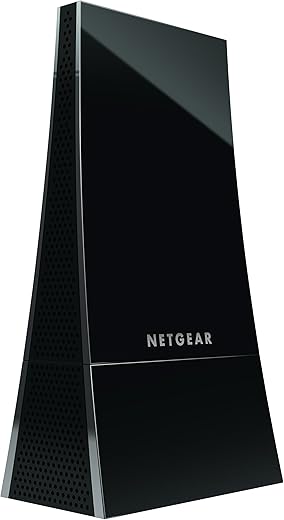
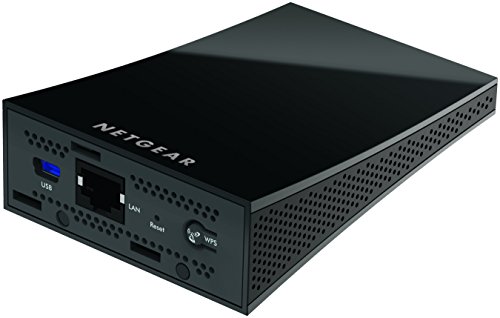
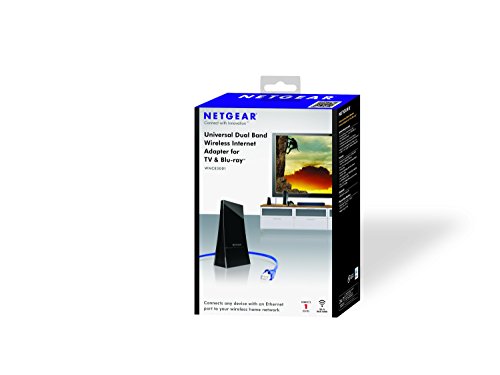
I have a home WiFi network configured with different SSIDs for the 2.4- and 5-GHz bands, so I can confirm that this universal WiFi adapter is correctly connected to the 5-GHz band on my dual-band WiFi router. The box actually contains two pieces, which was not immediately obvious from the picture in this listing: a small plastic stand that the device clips into (approximately lower 1-inch of photo), the actual adapter with power and Ethernet ports. A small foam piece with double-sided tape is also provided to secure the device to a surface, along with the power adapter cable assembly and a very thin Ethernet cable (presumably Cat5 or Cat5e) that I opted not to use.
I connected an aftermarket Cat6 cable to the unit and connected it to an 8-port Gigabit network switch after configuring it to connect to my 5-GHz WiFi network via a direct connection to my laptop. It successfully provided speedy access to all of my AV components (AV receiver, Xbox 360, PS3, Wii) connected to the switch. I like that I only have one WiFi entry/exit point to all of my AV devices, which has eliminated network latency and interference observed before when multiple adjacent devices were using the WiFi network concurrently. It also helps that I’ve moved all of my AV devices to the 5-GHz wireless band, which is less crowded than the 2.4-GHz band in my particular townhome complex.
I opted to not use WiFi Protected Setup (WPS), as it apparently opens up some security concerns on WiFi networks. For the record, my router is configured to encrypt data streams via WPA2+AES. I configured the device to allow my master router to distribute IP Addresses via DHCP. I did not have any trouble getting IP Addresses to any of my devices.
I used the small foam piece with double-sided tape to fix the unit to some open stand space located behind my large HDTV. As a result, people are none the wiser when inspecting my home theater that I’m using a universal WiFi adapter to extend my network. I’m happy with the unit and it functions as advertised. I like that I’ve been able to avoid running wires to my network ready AV equipment.
Bass Bill –
I have a Canon ImageCLASS MF6590 printer, which has Ethernet but no WiFi. It prints very well–near professional quality; so I hate to discard it. In the past I have had moderate success connecting it to an Ethernet port on my router using a Cisco Linksys PLTK300 Powerline Network Kit. However, communications was sometimes intermittent–often not working for days–only later to print everything in one big stack of paper.
This WiFi to Ethernet Adapter (WNCE3001) provides a far better connection to the printer–and at lower cost.
However, the PLTK300 Powerline Kit has a big advantage over this device: it connects up to FOUR co-located Ethernet devices at once to the internet. I used one to connect to a Blu-Ray player, an HD-DVD player AND a printer. I reclaimed that functionality by inserting a 5-port Ethernet switch between this WNCE3001 and the printer–and then connected the players to the switch. They ALL worked!
Incidentally, the DVD players can use DHCP but the printer needs a fixed IP (my computers got confused trying to print to a changing IP). This WiFi to Ethernet Adapter handles both fixed IP and DHCP well–and simultaneously.
Daniel Caron –
Works great! well once you figure out how to get it connected to your network, in my case with telus wireless router I needed to use the web method instead of WPS. This device is connected to a Netgear router and is able to provide wired internet to 3 device (TV, Computer, Satellite PVR) and everything runs smoothly, even if Netgear say this N600 is done for only one device 🙂 Really happy !
kevin horta cervera –
Funciona como se describe, pero el unico detalle es que no funciona si se requiere conectar or enlazar a un repetidor. solo puede ser al router directo
tripolitan –
Connected my Polycom VOIP telephone to my 5 GHz Wi-Fi network using this little device. Instructions are concise and the process is simple. I did not use WPS feature. Will update this review, if needed.
UPDATE: Both units purchased failed to connect to 5GHz band after a few months in operation.
ManiG –
Good Price, but disconnects often. Had to unplug power and reconnect to make it work.
Mike D –
This is a review for the N600/WNCE3001 product.
First, there seems to be a lot of misunderstanding here as to what this product does. Basically, if you have a device you want to connect to your network that only has a wired Ethernet port, and you can’t run a CAT5/6 cable to the device, you can plug this Netgear adapter into that device. The Netgear then communicates to your router via WiFi. That is, in effect, this Netgear device adds WiFi capability to non-WiFi client devices (TVs, and so on).
In my situation, I have a network camera that is not WiFi. There is no way to run the cable to the camera, and therefore I plugged the Ethernet cable from the camera into this Netgear device.
And it works. It’s solid. I’m relatively close to the router, so I’m getting a consistent 300MBPS/300MBPS signal on a 5GHz band, at 91% signal strength. I’ve run it straight for over three weeks without any drop outs.
This device is surprisingly small, although the form factor is a bit weird. A plus is that it powers off a standard USB cable. A USB power adapter is included, but if the device you’re plugging it into has a USB port (e.g., a TV), then you can use that as well — a nice touch, although one I don’t use.
Note further that as a general proposition, wireless is never as good as wired. So, for instance, I’ve seen a review where someone hooked this up to a VoIP phone. Definitely not ideal — any little blurble into the wireless signal (interference, etc.) will cause a momentary pause/etc. in the conversation. This is generally not a problem with video streaming, since the video is buffered for a couple of seconds. But, realize this device is not your best solution — the best solution is to run a network cable to the location in question. If you can’t do that, though, this is a good alternative.
Amazon Customer –
Received the product way before the estimated date of Delivery, was easy to install and work with. Brand new product.
Amazon Customer –
Works great! Simple to set up. Be aware cables are quite short.