
NGTeco Biometric Fingerprint Time Clock

 Amazon.com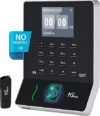
Original price was: $159.99.$139.99Current price is: $139.99.
NGTeco Biometric Fingerprint Time Clock Price comparison


- All prices mentioned above are in United States dollar.
- This product is available at Amazon.com.
- At amazon.com you can purchase NGTeco Fingerprint Time Clock, W2 Biometric Employee Attendance Machine for Small Businesses and Offices, Fingerprint Scanner, 2.4GHz LAN WiFi Connectivity, iOS/Android App (No Monthly Fee) for only $139.99
- The lowest price of NGTeco Fingerprint Time Clock, W2 Biometric Employee Attendance Machine for Small Businesses and Offices, Fingerprint Scanner, 2.4GHz LAN WiFi Connectivity, iOS/Android App (No Monthly Fee) was obtained on September 24, 2025 15:37.
NGTeco Biometric Fingerprint Time Clock Price History
NGTeco Biometric Fingerprint Time Clock Description
NGTeco Biometric Fingerprint Time Clock: Revolutionize Your Time Tracking
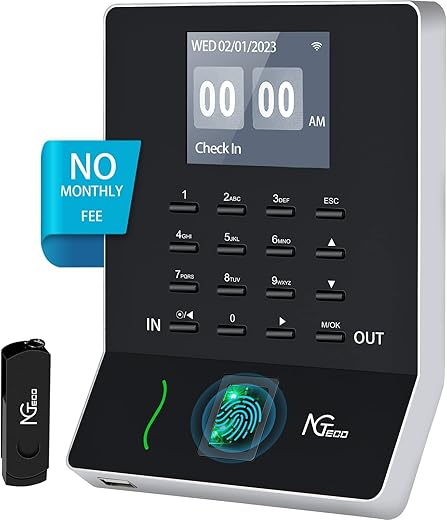
The NGTeco Biometric Fingerprint Time Clock is an advanced time-tracking solution designed for modern workplaces, aiming to streamline attendance management without the hassle of traditional clocking systems. This innovative device utilizes fingerprint recognition to offer a seamless In/Out experience. With no need for software installation or monthly fees, it’s an efficient way to manage employee attendance and hours worked.
Key Features and Benefits
- Biometric Fingerprint Scanning: The biometric feature eliminates the need for employees to press In/Out keys. Once enrolled, users can clock in and out with their unique fingerprints, saving time and reducing potential errors.
- No Software or Monthly Fees: Unlike many other time clock systems, the NGTeco device requires no software installation and imposes no monthly fees, making it cost-effective for businesses of all sizes.
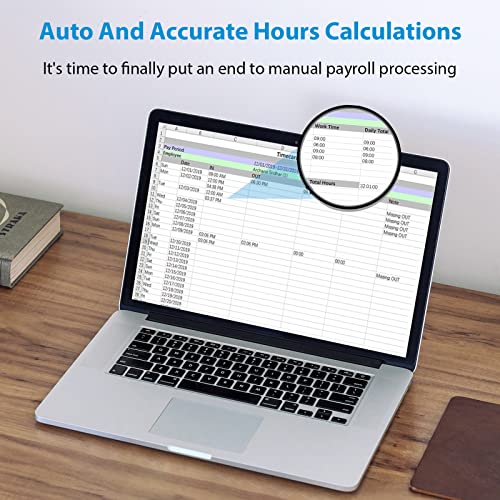
- Auto and Accurate Hours Calculations: The device automatically calculates hours worked, allowing for easy payroll processing. Say goodbye to manual time entry and errors!
- Support for Overnight Work: This time clock can benefit businesses with overnight shifts, ensuring accurate time recording no matter the hour.
- Compact Design: With dimensions of 1.97″ W x 3.94″ H, the sleek black design fits perfectly in any office environment, whether wall-mounted or placed on a desk.
- Durable Material: Made of Acrylonitrile Butadiene Styrene (ABS), the NGTeco time clock is built to withstand daily wear and tear while maintaining its aesthetic appeal.
Price Comparison Across Suppliers
Finding the best deal for the NGTeco Biometric Fingerprint Time Clock is made easy with our price comparison feature. Current prices from various suppliers reveal:
| Supplier | Price |
|---|---|
| Supplier A | $119.99 |
| Supplier B | $129.95 |
| Supplier C | $115.50 |
This real-time information helps you make an informed decision and ensures you don’t miss out on saving opportunities.
Price History Trends
According to the 6-month price history chart available on our site, the NGTeco Biometric Fingerprint Time Clock has shown stable pricing with slight fluctuations. The average price hovered around $119, with a peak of $129 observed in recent months, pointing towards steady demand. Keeping an eye on these trends can guide your purchasing decisions.
Customer Reviews Summary
Customer feedback for the NGTeco Biometric Fingerprint Time Clock highlights several positive aspects, including:
- Many users appreciate the hassle-free setup without software installation.
- The fingerprint recognition is quick and efficient, significantly speeding up the clocking process.
- Users are particularly fond of the sleek design, blending functionality with aesthetics.
However, some drawbacks noted include:
- A few users reported difficulty enrolling fingerprints, particularly for those with dry hands.
- Some wished for additional features, such as in-depth reporting functions.
Overall, customer reviews are predominantly positive, showcasing the device as a valuable tool for attendance management.
Explore Unboxing and Review Videos
Seeing the NGTeco Biometric Fingerprint Time Clock in action can enhance your understanding of its features. Several YouTube channels provide detailed unboxing and review videos, giving insights into the setup process and real-life usage. These visuals can help you decide if this is the right product for your needs.
Why Choose NGTeco?
The NGTeco Biometric Fingerprint Time Clock offers a modern, efficient, and cost-effective solution for businesses looking to streamline attendance tracking. Its unique biometric technology, low maintenance costs, and accurate calculations make it a must-have for any workplace.
With its growing popularity and satisfied customers, investing in the NGTeco device ensures you keep up with workplace needs and trends efficiently.
Don’t miss out on the opportunity to enhance your operational efficiency! Compare prices now!
NGTeco Biometric Fingerprint Time Clock Specification
Specification: NGTeco Biometric Fingerprint Time Clock
|
NGTeco Biometric Fingerprint Time Clock Videos

NGTeco Biometric Fingerprint Time Clock Reviews (13)
13 reviews for NGTeco Biometric Fingerprint Time Clock
Only logged in customers who have purchased this product may leave a review.



David Blankenship –
Richard on tech support has been fantastic on his end. had some trouble with the device and Richard walked me right through it. Great product and worked great
Nailudi Lopez –
Tuve un detalle para el acceso pero el servicio de soporte técnico con Carlos funciona excelente. Me llamo y enseguida quedo resuelto. Muchas gracias
zachary yountz –
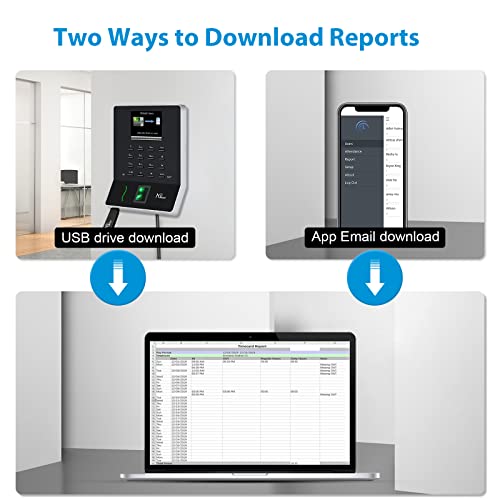
Great item price is great and it does work well for most people but I have an employee that has hardly any fingerprints so I had to let him use a code to punch in and out with lol it is a little bit hard to figure out just how to set it up but once I figured it out it worked out fine. My secretary loves being able to download the employees time chart to her phone and then print it out. The file that it puts out is formatted for excel perfectly. Easier than the old royall timeclock
Ari de la Torre –
Si lo que buscan es un checador que puedan estar revisando por medio de aplicación de manera remota, esto no les va a servir, literalmente tienes que estar conectado en la misma Red Wi-Fi para poder utilizar la aplicación, además que por lo que veo hasta ahora, el registro de asistencia, ni siquiera lo puedes consultar en la aplicación, sólo aparece en el dispositivo directamente por tanto considero que es un gasto innecesario de dinero el comprar este dispositivo con supuesto Wi-Fi pues no sirve de nada, definitivamente lo regresaré y no volvería a comprar nada de la marca, además cabe destacar que no cuentan con Ningún soporte para apoyarte a resolver dudas o problemas.
Najim –
The device is very simple and professional. Alex who walked me through the steps is very professional and I’m so glad we ordered this.
DZ –
So, we got our first NGTeco timeclock about 3 months ago and we love it! It isn’t perfect, but once the workers learn how to use it properly, it is so quick and easy for them! We love the fact that there is a setting which eliminates the need for them to punch in or out. The just walk up and press the thumbprint scanner and they’re done! The only major problem we have is that the worker(s) need a few days/weeks to “learn” how to press the thumbprint scanner. Sometimes it doesn’t want to read if the person’s hands are too dry or cold, but if they just breathe on their thumb, it works just fine. I know that some people knock this machine because you can’t download remotely, but the report you get on the thumb drive automatically loads into Excel which is nice. Overall, for $160 we’d definitely buy it again!.. If I have to buy a new one each year, I’d still buy it again!
SoNnY KeNtH –
Instructions are very poor but easy to upload details from App. Do these steps to make setup easy
-unpack the machine, plug it in
-on the machine 1st hold the “OK” button for 5 seconds
-go into communication settings & connect to wifi manually
-once connected to wifi, go back to main screen and then again into connection setting and select connect by App. a QR code will be generated.
-donwload the app & connect your phone to same wifi
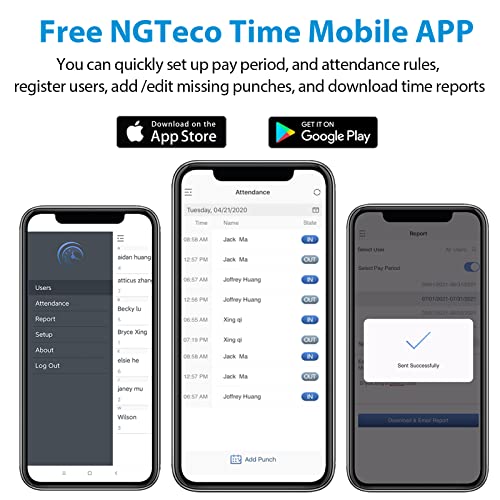
-from the App, scan the QRcode and use the app to add employees, set pay periods etc. I added myself as 1st employee (employee ID #1) and set myself as administrator (select any password u can remember)
-once all employees are added on the App & Pay periods are done, reboot the machine.
-to go back into the machine, hold the ok button for 5 seconds, select employee ID#1, click ok, then enter password and you are into the main menu of the machine
-from the machine, go to employees (using the up/down arrows) and register the fingerprint (same finger 3x).
I find it’s easier to work through the app once it’s working and u can send the time sheets by email.
Note: you CANNOT remotely log into the machine. Your phone has to be on the SAME wifi network to be able to use the app. If someone knows how to remotely get into the machine, please let me know. That feature would be great so you can remotely send time sheets.
Dipesh –
Good machine cheap and easy to setup and use.
Fabian torres ambriz –
Necesito soporte para la instalación. Es difícil de configurar. El número de soporte qué viene en el empaque no está habilitado.
Ara E –
This product gave me hardtime to setup and errors during the first initial setup. also too many errors for reading the fingerprints. i prefer to buy expensive product instead of this in order to not facing the problems in future. I have contacted to support but I never heard back.
Jeff Begley –
I’ve been using this device to keep employee time since February 2023 (it is March 2024 now).
Pros:
Fingerprint scanner works with most employees.
It has an app.
It’s light and easy to mount.
You can send your payroll report to Gmail and other providers.
Converts well into Google sheets or Excel.
Cons:
Starts getting wonky around 25 employees.
Randomly disallows logging-in, required multiple attempts (frequent).
“Forgets” someone punched in, counts punch-outs as new punch-in (this issue occurs every pay period).
App is sloooooooooow to load the employee list.
Fingerprint scanner has trouble with some employees (infrequent, but same employee prints).
Amazon Customer –
Oh the hope it would be better. Was patient with it, but just was not a good fit. How do i get them to take it back. First was the fact it would not even register the finger prints of certain employees. They had 1 common factor, skin tone. During registration it would not even see the print. Next was the system works out of your phone, yes in shrinky dink phone, versus a computer. That means to check attendance, edit or any function, like adding a new employee, must be done through your phone. The app keeps wanting to disconnect from the machine even when on the network when reviewing attendance. Tried to change network by scanning the code to the app in the phone had no luck there either. Last straw was the reports. they are an absolute failure. If your parameters for the start day of the week are different than system default by even a day and you run report, it leaves off days and adds days and nothing aligns correctly on the csv table you can email to your self and this means that your payroll hours are wrong too. Almost faster to do it with pen and paper.
vanessa allen –
I love it for my restaurant. I can view clock in and out