
Plugable Thunderbolt 4 Dock With 100W Charging




Plugable Thunderbolt 4 Dock With 100W Charging Price comparison

- All prices mentioned above are in United States dollar.
- This product is available at Amazon.com.
- At amazon.com you can purchase Plugable Dual Display Thunderbolt 4 Dock with 100W Charging | Windows, and MacBook Pro docking station offers 11 port expansion including dual 4K (8K ready) and Thunderbolt ports(TBT4-UDX1) for only $249.95
- The lowest price of Plugable Dual Display Thunderbolt 4 Dock with 100W Charging | Windows, and MacBook Pro docking station offers 11 port expansion including dual 4K (8K ready) and Thunderbolt ports(TBT4-UDX1) was obtained on September 24, 2025 06:54.
Plugable Thunderbolt 4 Dock With 100W Charging Price History
Plugable Thunderbolt 4 Dock With 100W Charging Description
Plugable Thunderbolt 4 Dock With 100W Charging: A Gateway to Ultimate Connectivity
The Plugable Thunderbolt 4 Dock With 100W Charging is your all-in-one solution for expanding connectivity and streamlining your workspace. Designed for professionals and tech enthusiasts alike, this powerful dock offers cutting-edge technology with seamless compatibility. Whether you need to connect multiple displays or charge your device quickly, this dock delivers exceptional performance and reliability.
Main Features and Benefits
- 100W Power Delivery: This dock provides robust charging capabilities, ensuring your laptop and devices are powered up quickly while you work.
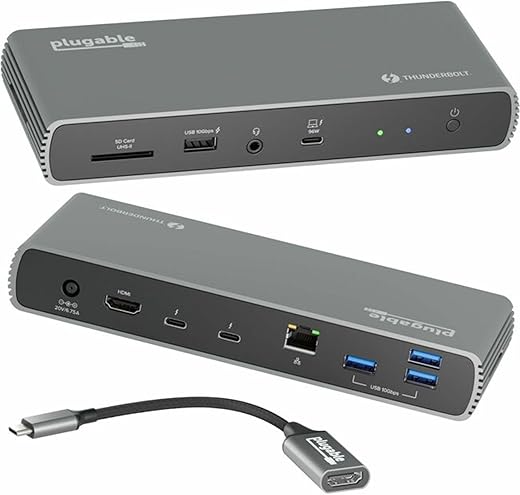
- Multiple Port Options: Equipped with Thunderbolt 4, USB-A, HDMI, and Ethernet ports, it enables extensive connectivity for all your peripherals.
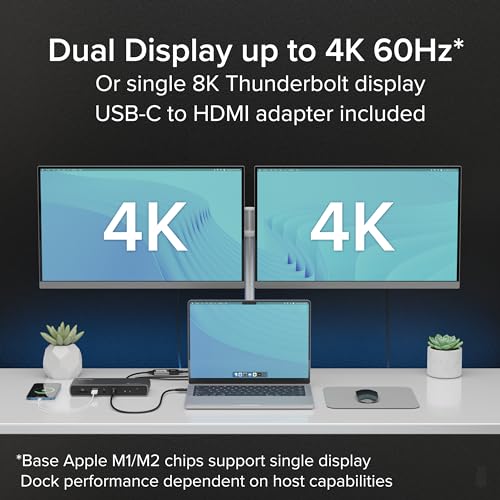
- Dual 4K Display Support: Experience stunning visuals with support for dual 4K displays at 60Hz, perfect for multitasking and enhanced productivity.
- Compact and Stylish Design: The Plugable Thunderbolt 4 Dock is designed to fit seamlessly into any workspace, featuring a sleek, modern aesthetic.
- Universal Compatibility: Compatible with any Thunderbolt 3 or USB-C device, providing a versatile solution for various laptops and systems.
Price Comparison Across Suppliers
When considering the Plugable Thunderbolt 4 Dock With 100W Charging, it’s essential to evaluate pricing strategies across different suppliers. Prices typically range from $199 to $249, depending on the retailer. At various online stores, you can find discounts or bundled offers that make it an even more appealing purchase. Check our price comparison tool to identify the best deal!
Price History Trends
Our detailed 6-month price history chart reveals a steady trend with slight fluctuations during seasonal sales. The dock’s price peaked in early summer but has seen significant promotions during back-to-school sales. Keeping an eye on these trends will help you purchase at the right time to maximize your savings.
Customer Reviews: What Users Are Saying
Customers rave about the Plugable Thunderbolt 4 Dock, highlighting its ease of use and effective charging capabilities. One user stated, “This dock powers my entire setup without any issues!” Positive feedback consistently mentions the dock’s ability to handle multiple connections without sacrificing performance. Users particularly appreciate the dual 4K display support, significantly enhancing their workflow.
However, a few drawbacks have been noted. Some users experienced initial setup confusion regarding port configurations. Additionally, a small fraction reported compatibility issues with certain peripherals. Despite these concerns, the overwhelming majority of customers endorse this product, appreciating its durability and reliability.
Discover Further Insights with Unboxing and Review Videos
To see the Plugable Thunderbolt 4 Dock in action, check out various unboxing and review videos available on YouTube. These visuals provide practical demonstrations of its features, giving potential buyers a clearer picture of what to expect. Customers often mention that watching these videos helped them make an informed purchasing decision.
In conclusion, the Plugable Thunderbolt 4 Dock With 100W Charging stands out as an exceptional investment for anyone looking to enhance their workstation. Boasting impressive features, solid user reviews, and favorable price comparisons, it caters to a variety of connectivity needs. Don’t miss the chance to elevate your productivity! Compare prices now!
Plugable Thunderbolt 4 Dock With 100W Charging Specification
Specification: Plugable Thunderbolt 4 Dock With 100W Charging
|
Plugable Thunderbolt 4 Dock With 100W Charging Reviews (13)
13 reviews for Plugable Thunderbolt 4 Dock With 100W Charging
Only logged in customers who have purchased this product may leave a review.
Related Products






Jerry Scroggin –
It will not come back on seeing the pluggable nvme case nor come back from sleep with the monitor coming back up. It’s definately a return item.
Poetic Grandpa –
This never worked at all on my HP ENVY 15-ep1000. Returned.
mdw –
Solidly built, perfect number of ports, worked right out of the box! Had it setup in 15 mins. On/off switch is excellent, as is the green “on” indicator and the blue “connected” indicator. And the indicator lights are not too bright. These are thoughtful design touches that set this dock apart.
One drawback: The powered thunderbolt port that goes to the laptop is on the front of the unit. This is a serious design issue, as it really messes up the neatness factor and makes a visual mess in the front of the unit. That port should be in the rear IMHO. So I (hesitantly) did remove a star.
Debbie –
I was using my Lenovo screens to provide the docking functions for my Surface and other devices. I was getting some dropping issues and couldn’t locate the problem. I finally concluded that it could be the screen docks were insufficient to run everything, and I bought this stand-alone dock. I haven’t had any hardware or software issues now after using this dock for two months.
GeorgeM –
For starter I had trouble getting everything working. I contacted Plugable support and they helped me with troubles that was not with the Plugable Thunderbolt 4 Dock TBT4-UDX1. I had a problem with my Thunderbolt card. Again the problem was not the Plugable Thunderbolt 4 Dock TBT4-UDX1. Once that was solved the Plugable Thunderbolt 4 Dock TBT4-UDX1fell right into place. I was able to set a network connection to NAS. Every USB device has worked correctly. At a speed that I could never achieve with USB 3.2. Plugable support was great and I’ve only had a few days to play with it, I ready like the Plugable Thunderbolt 4 Dock TBT4-UDX1.
Find-Smart-Value –
after a number of confusing issues with power compatibility and drives ejecting, it turns out none of them were really the dock’s fault, however from what I can see Kensington basically sells the exact same dock for cheaper with an extra TB port instead of HDMI, which is kinda disappointing…
Judas Letemps –
Plugableの10-in-1ドッキングステーション「TBT4-UDX1」です。Thunderbolt4コントローラー「Intel JHL8440」と、USB 3.2 Gen2ハブコントローラー「VIA VL822」を搭載しています。
アルミ合金製の重厚なシャーシで、サイズは200×75×30mm、448g。
Kensington SD5780T
のOEMのようです。
40GbpsのTB4ポートが1つ多いモデル(
Kensington SD5700T
)のほうが拡張性は高いですが、1つ少ない代わりにHDMI 2.0ポートと2.5GbEを持つ本機の方が現行環境から移行しやすいと思います。USB-C to HDMI2.0アダプタも付属しています。
ASRock Thunderbolt4 AICからSSDに繋いだ限りは、TB4はホスト直結と比べて、USB3.2はネイティブポートと比べて、ベンチマークは若干抑えられていますが認識や動作は安定している印象です。
TB4の映像伝送はDP Altモード・DPトンネリング共に4K@60Hz×2台が確認できました。おそらく解像度に関わらずHDMIと併せて2台までのようですが、1台なら4K@120Hzは確認できたので5K@60Hzや8K@30Hz(DSC対応なら60Hz)も行けそうな気はします。
イーサネットコントローラー「Realtek RTL8156BG」はUSB3.0接続の2.5GBASE-Tで、ゲーミング向け帯域制御ユーティリティ「Dragon」にも対応しています。S5からのWake On LanはPlugable提供ドライバ+ASRock TB4 AICでは動作しませんでした(スリープ解除は可能)。
カードリーダー「Genesys Logic GL3231S」はSD4.0 UHS-II HD312(300MB/s)およびSD3.0 UHS-I DDR200(160MB/s)に対応し、実測でも相応の速度が出ています。ただしmicroSDは別途変換アダプタが必要です(変換アダプタは一般的にDDRのランダムリード等が低下します)。
オーディオDAC「Realtek ALC4042」は32bit/384kHz対応ですが、Windowsからは24bit/48kHzの「Plugable Audio」のヘッドホンとマイクとして認識されます。音質は良好ですが、USBオーディオ共通の制約としてPUMA(Protected User Mode Audio)は非対応です。
電源は135W(20V/6.75A)の付属ACアダプタ(135×65×20mm)の使用が必須で、PD充電器やバスパワーによる駆動は非対応。ホストへのPD出力は最大で96W(20V/4.8A)までですが、付属ケーブルは無駄に240W EPRです。
デバイスへの給電性能はTB4のダウンストリームがそれぞれ5V/3A、フロントのUSB-Aが5V/1.5Aなので、特にスマホの充電向けというわけではありません。モバイルモニターの消費電力にも気を留める必要はあると思います。
デスクトップPCにおいても、背面のTB4ポートを机上に引き出せるメリットは大きいですが、アップストリームポートが手前側を向いているので、ケーブルマネジメントは考える必要があります(他社には背面ないし側面出しの製品もあります)。
MiSu –
Very happy with this dock. I have 2x4k monitors, DAC, ethernet and webcam all connected to my MBpro with the included thunderbolt cable. Everything wakes up and connects with a single touch of the fingerprint button on my mac. The unit is metal and cools well, the power supply is very solid (135W DC). Highly recommended!
GD –
I have been around the block once or twice troubleshooting technology. Mine and others. “Dread” is perhaps the most appropriate word to describe the times where I have to throw up my hands and consult the equipment manufacturer. We all know what that’s like, “Did you turn it off”, “Did you update the drivers”, “Is your OS up to date”, etc. You and I both know it’s gonna hurt to be on that call.
Let me tell you, these folks right here? Pluggable is hands down the best product support I have ever engaged with to go through technical troubleshooting. Full stop. They can speak to the actual technical specifications their products are built on, in addition to having real working knowledge of the ecosystems this tech integrates with. Honestly, I was quite surprised. I’m used to product support being a hassle to put it mildly. The rep I got via email support went above and beyond, even helped me go look at some non-Pluggable hardware that could have been impacting the behavior I was seeing. Did I mention this is via email support? Full paragraphs with proper grammar, that made logical sense, and actually addressed each point in the initial ticket.
Response time was that same day and the ticket was resolved in 48 hours. Issue ended up not even being their hardware which by the way is working great. Does exactly what I need it to, in exactly the way I expect.
I’ll be checking the Pluggable site first in the future, should I need any computer peripheral hardware. Way to do things right, Pluggable. 👍
Judas Letemps –
The media could not be loaded.
My experience with the Plugable Thunderbolt 4 Dock is nothing short of excellent – it’s like the beating heart of my laptop setup, providing an incredible surge of power and connectivity. Its versatility is remarkable, with top technical performance and game-changing capabilities, and here is more info about my experience:
✅ First and foremost, this dock is a certified powerhouse. It’s like having a personal charging station and high-speed data hub in one. The three Thunderbolt 4* ports not only charge up to 100W, but they also handle data at a whopping 40Gbps. It’s like transforming my laptop into a high-octane engine. **Thunderbolt 4 is the highest-speed data transfer and peripheral connection interface. This means quick file transfers and high-resolution video output. No lags, no compromise in video quality! Exactly what I need!
✅And the screen setup? Pure delight. I can easily connect two 4K monitors and immerse myself in a seamless, expansive display for multitasking like a pro. The clarity and smoothness of what I see on these screens are truly impressive.
✅But what’s truly astounding is the 11-port expansion. I never worry about running out of ports again. I can connect everything I need – from my external drives to my phone, even my camera’s SD card (for micro SD I use a simple adaptor, no problem here) – this dock handles it all. The speed at which it charges my MacBook Pro is like a turbo boost; it went from 0 to 50% in just half an hour!
✅Compatibility? A breeze. It fits right into my tech ecosystem, whether I’m using Windows or macOS. And the support? Stellar. The 2-year warranty and the lifetime support promise make it a worry-free investment.
Honestly, for anyone serious about boosting their laptop’s performance, expanding their screen real estate, and never running out of ports, this Thunderbolt 4 Dock is a game-changer! It is a great value.
NOTE: Here are some key features of a Thunderbolt 4 port that Plugable incorporates in this product:
🌞Speed and Bandwidth: Thunderbolt 4 supports a maximum data transfer rate of 40 Gbps, which is extremely fast, allowing for quick file transfers and high-resolution video output.
🌞Power Delivery: Thunderbolt 4 can deliver up to 100 watts of power, enabling the charging of devices and reducing cable clutter since you can use the same cable for power and data.
🌞Daisy Chaining: You can connect up to six devices in a daisy-chain configuration, which means you can connect multiple Thunderbolt devices to a single port without losing performance.
🌞Support for Multiple 4K Displays or an 8K Display: A Thunderbolt 4 port can support either two 4K displays or one 8K display.
🌞Backward Compatibility: Thunderbolt 4 is backward compatible with previous versions of Thunderbolt, meaning you can use Thunderbolt 4 devices with older Thunderbolt ports, although at reduced speeds.
🌞Accessory Compatibility: It can work with various Thunderbolt 4-compatible accessories, such as docking stations, external drives, monitors, and more.
In summary, a Thunderbolt 4 port offers incredibly fast data transfer, high power delivery, and support connecting multiple peripherals, making it a versatile and powerful port for modern computing needs. That is why I consider the price just right for this versatility and high capabilities
Sean D. –
I’m a software developer, so a lot of what I deal with on the screen is static text, however when I’m enjoying my down time playing video games, I need fast refresh on my external monitor from my laptop. Using this Thunderbolt 4 device passes through a direct connection to my discrete video card in my laptop for high quality, high frame rate gaming. It isn’t quite powerful enough to also charge my laptop, but I never expected this device to power my laptop, as it has a requirement for more power than this outputs.
Find-Smart-Value –
MacBookAir2018にて動作確認をしました、Thunderbolt3のためフルスペックでの動作確認はしていませんが、問題なく全ての機能は使用できました。
BootCampでのWindows10でもプラグアンドプレイで動作確認ができました。
認識名は「TPS DMC Family」
LANに関してはWindows標準ドライバでそのまま動きました、中身は「Realtek Gaming USB 2.5Gbe Family Controller」
SDカードスロットについては安価グレードのUHSⅡのカードで、ものすごく速いカードではありませんが軽くベンチをとり、SDカード側の公称値通りの速度ががでていました。
(検証カード Nextorage NX-F2SE128G 読出し280MB/s 書込み100MB/s)
尚差込方向はラベルが上側でささる方向なので分かりやすいです、差込にはバネやクリック感のある構造は一切なく、シンプルに抜き差しだけのタイプです。
ACアダプタはそこそこ大き目で重量はコード込み「417g」、コード部分はミッキータイプで、アダプタ側はセンタープラスの「6.3㎜」プラグ、PSEマークもしっかりありました。
本体重量は「446g」だったので、「本体」「ACアダプタ」で約900gの重量になるため、あまり持ち運ぶ人はいないと思いますがちょっと嵩張ります。
本体の色味はMacBookAir2018の「スペースグレー」と比べて黒め、表面の金属はラメ感が強く粒子が大き目のギラギラした感じです。
金属部分は縁などにバリもなく表面仕上げはいたって普通でした。
M1やM2チップの様な環境でのテストはできていないため。ハイエンドな8Kデュアル出力などの検証はできませんでしたが、一般的な範囲までの用途であれば問題なく使えます。
a wise man buys lead –
Works very well with my Samsung laptop that is equipped with Thunderbolt.