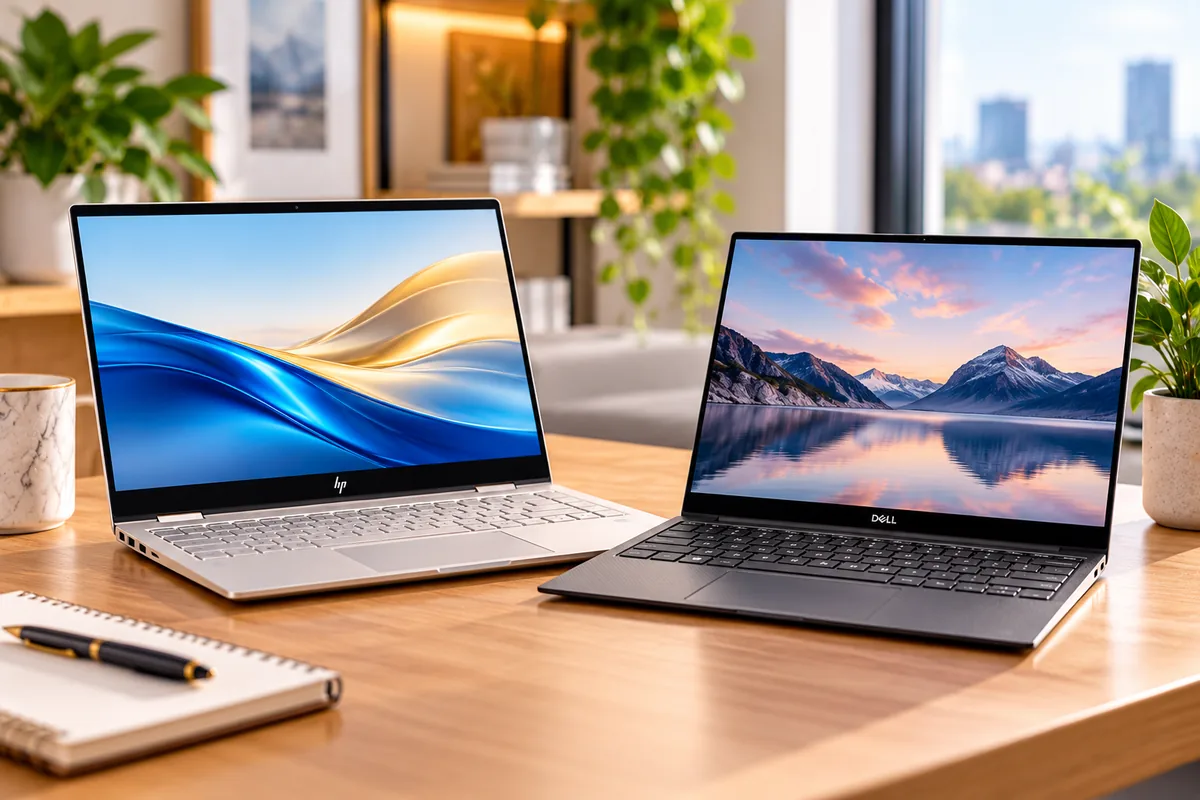
HP Envy vs Dell XPS 13
Comparing HP Envy vs Dell XPS 13 is more complicated in 2026 because HP has retired the Envy name from its current premium consumer lineup. The modern successor is the HP OmniBook X family.
For a fair current comparison, we are therefore matching the HP OmniBook X Flip 14 against the Dell XPS 13 DX13260. The HP keeps the convertible idea that made the Envy x360 popular. Dell takes the opposite approach with a very compact premium clamshell.
The choice becomes clear once you identify your priorities. Dell is much lighter and easier to carry every day. HP gives you a larger 14-inch touchscreen, 360-degree hinge, optional OLED display, pen support, and far more built-in connectivity.
Quick Answer: HP Envy vs Dell XPS 13
Choose HP OmniBook X Flip 14 if: you want a 2-in-1 touchscreen, pen support, a larger display, optional 3K OLED, HDMI, USB-A, and more flexibility with accessories.
Choose Dell XPS 13 if: you want the lighter laptop, a compact premium chassis, a strong 2.5K 120Hz touchscreen as standard, and straightforward everyday portability.
What Happened to HP Envy?
HP Envy is no longer the current name for HP’s premium thin-and-light consumer laptops. HP has moved that role into the OmniBook X family.
The change matters because many older search results still compare Envy x360 laptops with previous Dell XPS generations. Those comparisons can still help owners of older machines, but they no longer represent the current product families.
The OmniBook X Flip 14 is the closest modern replacement for an Envy x360 13- or 14-inch model. It keeps the 360-degree convertible hinge, touchscreen, optional pen input, premium positioning, and portable form factor.
If you are considering HP more broadly, our guide to the best HP laptops for students explains how the current OmniBook families fit together.
HP OmniBook X Flip 14 vs Dell XPS 13: Specs Compared
| Feature | HP OmniBook X Flip 14 | Dell XPS 13 DX13260 |
|---|---|---|
| Form factor | 360° 2-in-1 convertible | Traditional clamshell |
| Display size | 14 inches | 13.4 inches |
| Display | Touch; up to 2880 × 1800 OLED, 120Hz | 2560 × 1600 touch, 30–120Hz, 500 nits |
| Processors | Intel Core Ultra or AMD Ryzen AI, depending on model | Intel Core 5 or Core Ultra configurations |
| Memory | Up to 32GB | Up to 32GB |
| Storage | Up to 2TB | Up to 1TB |
| Weight | About 3.09 lb on current 14-inch configuration | Starts at 2.2 lb |
| Battery capacity | 59Wh or 70Wh depending on display/configuration | 52Wh |
| Webcam | 5MP IR on current configurations | Integrated webcam with IR on supported configuration |
| Wi-Fi | Wi-Fi 7 available | Wi-Fi 7 |
| Ports | USB-C/Thunderbolt, USB-A, HDMI, audio; exact mix varies by processor SKU | Two USB-C ports; no card reader |
| Pen support | Available | No convertible pen-focused mode |
| Best reason to buy | Flexibility and connectivity | Portability and compact design |
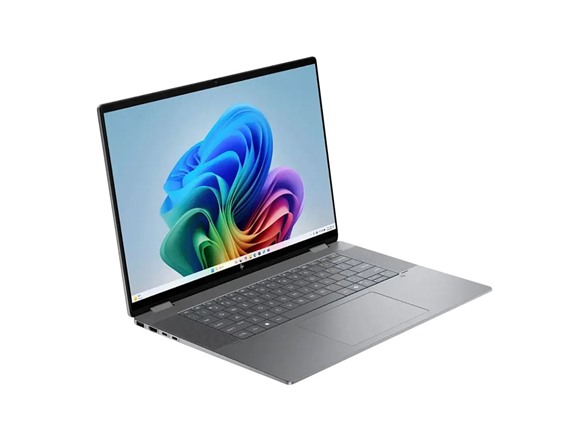
HP OmniBook X Flip 14: The Current HP Envy Successor
Best for: Students who annotate notes, presentation-heavy work, touchscreen users, people with several peripherals, and anyone who genuinely uses a convertible laptop.
The OmniBook X Flip 14 keeps the defining feature of the old Envy x360: a screen that folds through 360 degrees. You can use it as a regular laptop, tent-style display, presentation device, or tablet-like touchscreen.
The 14-inch display is also larger than the Dell’s 13.4-inch panel. HP offers several touchscreen choices, including a 1920 × 1200 IPS panel, 2K OLED, and an optional 2880 × 1800 OLED panel running at up to 120Hz.
The premium 3K panel is the configuration to consider if display quality is a major reason for choosing HP. However, it costs more and may affect battery behavior compared with lower-resolution options.
HP Has More Useful Ports
Connectivity is one of HP’s clearest practical advantages.
A current Intel customizable model includes two USB-A ports, two Thunderbolt 4 USB-C ports, HDMI 2.1, and a headphone/microphone jack. Other processor variants can use a slightly different USB mix, so check the exact SKU.
That selection reduces the need for a hub. It is useful for projectors, external monitors, flash drives, mice, storage devices, and older USB accessories.
HP Is Better for Touch and Pen Work
The 360-degree hinge gives the touchscreen a reason to exist beyond occasional tapping. You can fold the keyboard away when reading, drawing, annotating PDFs, or giving a presentation.
HP also offers compatible pen input on supported configurations. That can be useful for handwritten class notes, diagrams, signatures, and light sketching.
However, a convertible hinge is only valuable if you use it. If your laptop stays in normal clamshell mode every day, Dell’s lighter design may make more sense.
HP Performance Depends Heavily on Configuration
OmniBook X Flip 14 is sold with several Intel and AMD processors. Memory, storage, battery capacity, and display can also change.
That makes broad performance claims risky. A 16GB entry model and a 32GB high-end Ryzen AI configuration are not the same laptop experience.
Independent 2026 testing of a high-end AMD configuration praised the premium chassis, keyboard, webcam, and practical battery life. However, the review also found performance and value less compelling than the price suggested.
HP OmniBook X Flip 14 Pros
✅ 360-degree convertible design
✅ Larger 14-inch touchscreen
✅ Optional 3K OLED at 120Hz
✅ Much broader physical connectivity
✅ Pen support on compatible configurations
HP OmniBook X Flip 14 Cons
❌ About 0.9 lb heavier than XPS 13
❌ Configuration choices make pricing complicated
❌ Premium OLED upgrades raise the cost
❌ Convertible hardware adds little if you never use tablet mode
Dell XPS 13 DX13260: The Portable Alternative
Best for: Commuters, travelers, students carrying a laptop all day, writers, office users, and anyone who values low weight over extensive ports.
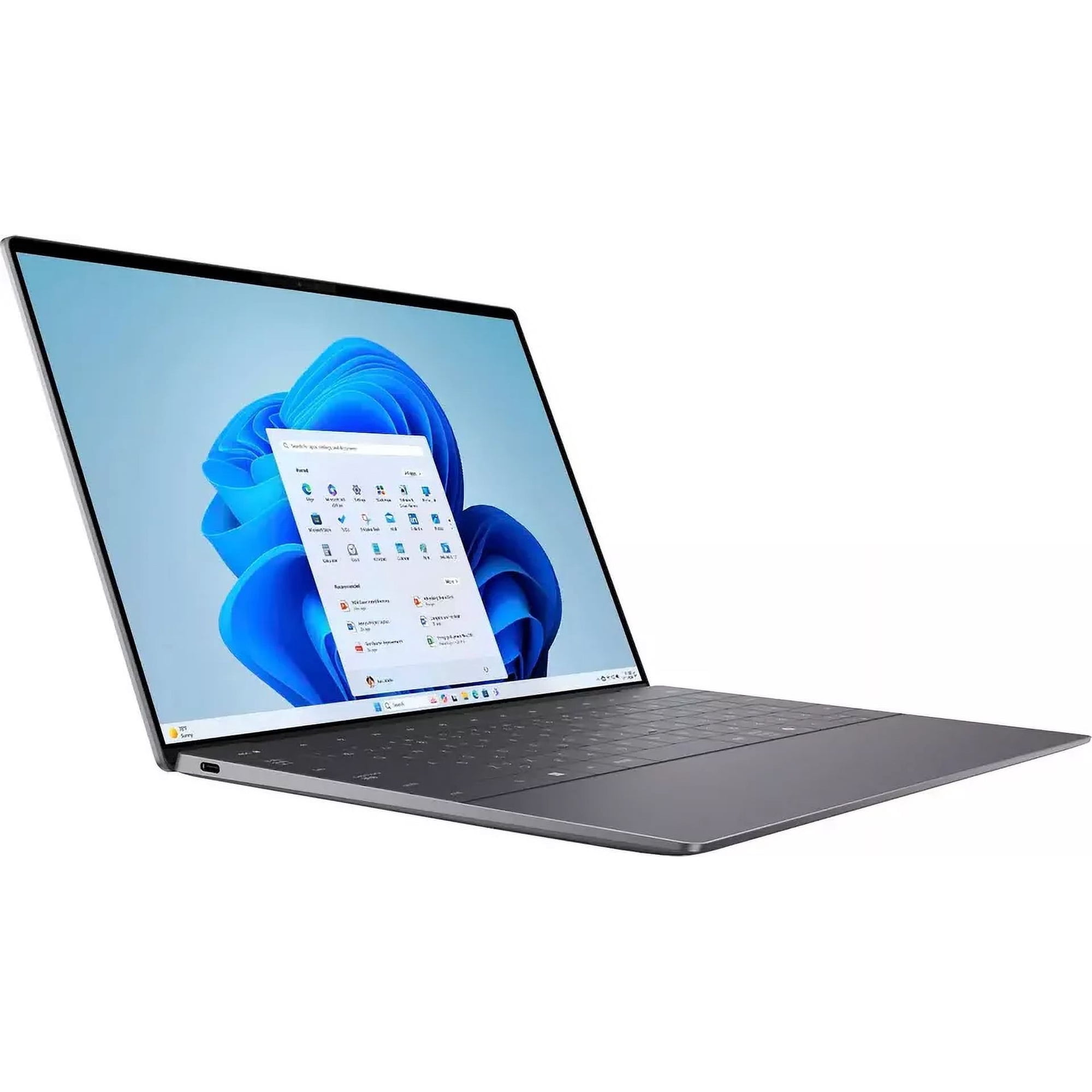
The 2026 XPS 13 takes a more focused approach. It is a conventional clamshell built around minimum size and weight.
Dell lists the starting weight at only 2.2 pounds. The chassis is about 0.5 inch thick, making it significantly easier to carry than the 3.09-pound HP.
That difference may not seem dramatic on a specification sheet. In a backpack every day, almost a pound is noticeable.
The Standard Dell Display Is Already Strong
Dell does not require an expensive OLED upgrade to get a high-resolution, high-refresh screen.
The current 13.4-inch panel has a 2560 × 1600 resolution, touch support, 30–120Hz variable refresh, 500-nit typical brightness, and wide DCI-P3 color coverage.
That makes the standard panel attractive for text, web work, media, and ordinary productivity. HP can exceed it with the optional 3K OLED, but that requires selecting the higher-end screen.
Portability Comes With a Port Compromise
The minimalist chassis leaves very little room for traditional connectors.
Dell lists two USB-C ports on current XPS 13 configurations and no card reader. Charging and external displays also use those ports.
That means a hub may become part of your daily setup if you use HDMI monitors, USB-A drives, wired accessories, or several peripherals at once.
This is the opposite of the HP approach. OmniBook X Flip is heavier, but it can connect directly to many more accessories.
Dell Targets Mainstream Productivity
The base XPS 13 uses Intel’s Core 5 platform, while more expensive versions move to Core Ultra hardware. Memory options reach 32GB.
For ordinary office work, research, video calls, spreadsheets, streaming, and browser-heavy study, the current XPS 13 is a natural fit.
It is not designed as a gaming laptop or mobile workstation. Independent testing also describes the current model as an excellent mainstream ultraportable rather than a performance powerhouse.
Dell XPS 13 Pros
✅ Extremely light at about 2.2 lb
✅ Compact 0.5-inch chassis
✅ 2.5K 30–120Hz touchscreen as standard
✅ Premium aluminum construction
✅ Strong battery results in independent testing
Dell XPS 13 Cons
❌ Only two USB-C ports
❌ No USB-A, HDMI, or card reader
❌ 8GB entry configurations offer less multitasking headroom
❌ Not designed for demanding GPU-heavy workloads
For more Dell options at different prices, compare our best Dell laptops for work and study.
Design and Build Quality
Both laptops target premium buyers, but their designs solve different problems.
HP: Flexibility First
HP needs a stronger hinge because the screen rotates through 360 degrees. The 14-inch format also creates more surface area for touch and pen work.
The result feels more like a multipurpose device than a pure ultraportable.
Dell: Portability First
Dell uses a compact CNC-aluminum clamshell and removes most physical ports. That helps keep weight at about 2.2 pounds.
If your laptop spends most of its life in a backpack, Dell’s design has a clear practical advantage.
Portability: Dell Has the Clear Advantage
The XPS 13 starts around 2.2 pounds. The current 14-inch OmniBook X Flip configuration we verified is about 3.09 pounds.
That is roughly a 0.9-pound difference before you add a charger or accessories.
Dell is also smaller because of its 13.4-inch display. It fits more easily on airplane trays, compact desks, and crowded lecture-hall surfaces.
However, the XPS may require a USB-C hub. Once adapters enter your bag, part of the weight advantage becomes less meaningful.
Display: Dell Standard Value vs HP Upgrade Potential
Both companies take different approaches to display quality.
Dell Gives You a Strong Panel Immediately
The XPS 13 uses a 13.4-inch 2560 × 1600 touchscreen. It supports a variable 30–120Hz refresh rate and is rated at 500 nits.
For most students and office users, there is little need to upgrade the display.
HP Gives You More Choice
HP offers several 14-inch touch panels. The premium choice is a 2880 × 1800 OLED touchscreen with a 120Hz refresh rate.
OLED adds much deeper blacks and stronger contrast. However, cheaper HP configurations can use lower-resolution IPS or OLED displays.
Therefore, do not compare “OmniBook X Flip” against “XPS 13” without checking the exact HP panel.
Laptop vs 2-in-1: Do You Actually Need a Convertible?
This is one of the easiest ways to decide between them.
The HP can fold into several positions. Tablet mode works for reading and annotation. Tent mode can help when watching video in limited space. Presentation mode puts the keyboard behind the display.
Dell does none of those things. It is simply a laptop.
That simplicity is not necessarily a weakness. If you have never wanted to draw or write on a laptop screen, paying for a 360-degree hinge may not improve your experience.
Performance: Compare the Exact Configuration
There is no useful universal performance winner because both product families include several processors.
The XPS 13 ranges from mainstream Core 5 hardware to higher Core Ultra configurations. HP sells both Intel Core Ultra and AMD Ryzen AI versions of the OmniBook X Flip.
Memory can also change the result. An 8GB XPS should not be compared directly with a 32GB HP when evaluating heavy multitasking.
For a fair buying comparison, start at 16GB RAM and 512GB SSD on both sides. That is a much more useful baseline for a premium Windows laptop in 2026.
For more demanding creative applications, neither product should automatically be treated as a workstation. If your work involves heavy video editing, large professional projects, or GPU-intensive applications, see our MacBook Pro guide for creatives or compare larger Windows creator laptops.
Ports: HP Is Much More Practical
HP wins this category for anyone who regularly connects accessories.
Current Intel OmniBook X Flip 14 configurations can include USB-A, Thunderbolt 4 USB-C, HDMI 2.1, and a 3.5mm audio connection.
The Dell XPS 13 provides only two USB-C ports and has no card reader.
If you connect an external display and charge the XPS at the same time, available I/O becomes limited quickly. A hub is almost inevitable for users with legacy accessories.
HP users can connect many common peripherals directly.
Webcam and Video Calls
HP currently offers a 5MP IR camera on the OmniBook X Flip 14 configurations we reviewed. It also includes software features aimed at video calls and collaboration.
Dell also supports modern video calling and facial sign-in on relevant configurations.
Do not choose solely by megapixel count. Image processing, room lighting, microphone quality, and internet connection can matter just as much during real meetings.
Battery Life
Manufacturer battery numbers are difficult to compare directly because test methods differ. Independent tests are more useful when the same publication uses a consistent process.
Tom’s Hardware measured almost 15 hours from the 2026 XPS 13 in its battery testing.
A recent OmniBook X Flip 14 configuration lasted 14 hours and 53 minutes in the same publication’s test methodology. However, HP sells several processors, battery sizes, and displays, so your result can differ substantially.
In practical terms, both families can provide all-day-class battery life in suitable configurations. Display choice, brightness, workload, and processor matter more than the model name alone.
HP vs Dell for Students
Both laptops can work well for college, but they fit different student routines.
Choose Dell for Carrying Around Campus
At 2.2 pounds, XPS 13 is much easier to carry between classes. Its 13.4-inch display also works well on small desks.
For essays, research, presentations, browser work, and Microsoft 365, a 16GB/512GB configuration is a practical target.
Choose HP for Notes and Presentations
OmniBook X Flip makes more sense if you use handwritten notes, diagrams, or touchscreen annotation.
The extra ports are also useful in classrooms where you may connect directly to HDMI projectors or USB accessories.
If price matters more than premium design, compare our affordable laptops for students before paying extra for either machine.
HP vs Dell for Work
Dell is a strong fit for people who travel frequently. The compact design is easy to carry between offices, client meetings, airports, and shared workspaces.
HP makes more sense at a desk with several accessories. HDMI and USB-A can eliminate adapters for monitors, presentation systems, keyboards, storage, and other peripherals.
The convertible screen can also help during face-to-face presentations. Fold the keyboard away and the device becomes easier to share across a table.
HP vs Dell for Creative Work
HP is the more flexible choice for light creative work because of its optional 3K OLED panel and pen support.
The larger 14-inch screen also gives you slightly more working space.
However, neither laptop includes the kind of discrete graphics normally associated with demanding 3D rendering or professional GPU-heavy production.
For Photoshop, Figma, illustration, light photo work, and modest editing, the right configuration can work well. More demanding creators should look at higher-performance systems.
Which Laptop Offers Better Value?
Do not compare headline starting prices alone.
Dell’s low entry price can refer to an 8GB model. During our current research, Dell also listed a 16GB/512GB Core 5 configuration at a higher price.
HP pricing changes even more because processor, memory, SSD, IPS versus OLED, and battery options all affect the total.
A fair comparison should start with these minimum targets:
- 16GB RAM
- 512GB SSD
- A display you would actually choose
- The processor architecture your software requires
Once those specifications match, compare the live retailer prices.
If neither offers compelling value, our MacBook Air alternatives guide covers several other premium thin-and-light Windows options.
Is an Older HP Envy Still Worth Buying?
Yes, but only when the exact configuration is priced aggressively.
The Envy name does not suddenly make older laptops obsolete. A recent Envy x360 with a good processor, 16GB RAM, 512GB SSD, and healthy battery can still be useful.
However, avoid paying premium current-generation money simply because the laptop carries the Envy brand.
Look for at Least 16GB RAM
Eight gigabytes can still handle lighter tasks, but 16GB gives a new premium laptop much better multitasking headroom.
Aim for 512GB Storage
A 256GB SSD fills quickly once Windows, applications, downloads, photos, and project files accumulate.
Check the Exact Processor
Envy was sold across many generations. Two machines with nearly identical product names can have very different CPUs.
Check Battery Condition
This is especially important when buying clearance, open-box, refurbished, or used inventory.
Compare Against Current Machines
An older Envy only represents strong value when it costs meaningfully less than a comparable OmniBook X, XPS 13, or other modern laptop.
Frequently Asked Questions
Is HP Envy discontinued?
Yes. HP has moved its current premium consumer thin-and-light lineup away from the Envy name. OmniBook X now serves as the closest replacement family.
What replaced HP Envy laptops?
HP positions OmniBook X as the successor to Envy. For shoppers who liked Envy x360, the OmniBook X Flip 14 is the closest current equivalent.
Is HP OmniBook X better than HP Envy?
Current OmniBook X systems add newer processors, AI acceleration, current display options, Wi-Fi 7, and updated hardware. However, an older Envy can still be good value if its exact specifications and price are competitive.
Is Dell XPS 13 better than HP Envy?
The current XPS 13 is better suited to buyers prioritizing low weight and portability. The modern HP Envy equivalent, OmniBook X Flip 14, offers more ports and 2-in-1 flexibility.
Which is better for students?
Dell XPS 13 is easier to carry around campus. HP OmniBook X Flip 14 is more useful when touchscreen notes, pen input, presentations, or built-in HDMI and USB-A ports matter.
Which laptop has more ports?
HP does. Current OmniBook X Flip configurations can provide USB-C, USB-A, HDMI, and audio connections. The current XPS 13 relies on two USB-C ports and may require a hub.
Which laptop is lighter?
Dell XPS 13 is much lighter. It starts around 2.2 pounds, compared with roughly 3.09 pounds for the current 14-inch OmniBook X Flip configuration referenced here.
Is a 2-in-1 laptop worth buying?
It is worth paying for when you use touch, handwritten notes, drawing, tent mode, or presentations. If the laptop always stays in normal clamshell mode, a lighter conventional design may offer better value.
Is 8GB RAM enough for a new laptop?
Eight gigabytes can handle lighter browsing and office use, but 16GB is a better baseline for a premium laptop intended for heavier multitasking or several years of ownership.
Should I buy an older HP Envy on sale?
Potentially. Check the exact CPU, RAM, storage, screen, battery condition, warranty, and price. A large discount can make a recent Envy worthwhile, but the model name alone is not enough.
Final Verdict: HP Envy or Dell XPS 13?
The current comparison is really HP OmniBook X Flip 14 versus Dell XPS 13.
Choose the Dell XPS 13 when portability is the priority. At about 2.2 pounds, it is significantly easier to carry, and its standard 2.5K 120Hz touchscreen is already strong.
Choose the HP OmniBook X Flip 14 when flexibility matters more. Its 360-degree hinge, larger 14-inch screen, optional 3K OLED panel, pen support, HDMI, and USB-A connectivity make it a more versatile device.
Neither is automatically the better performer because configuration differences are substantial. Compare equivalent 16GB/512GB models before judging price or speed.
Quick decision: Choose Dell XPS 13 for minimum weight and straightforward premium portability. Choose HP OmniBook X Flip 14 if you will actually use its convertible modes, pen support, larger display, or extra ports.
Sources
- HP — HP OmniBook X: The New Envy of Laptops
- HP — OmniBook X Flip 14 specifications and configuration options
- Dell — XPS 13 DX13260 product specifications
- Dell — The New XPS 13: A Commitment Delivered
- Tom’s Hardware — 2026 HP OmniBook X Flip 14 and Dell XPS 13 independent reviews
How we research: Discompare reviews current manufacturer specifications, product-generation changes, retailer configurations, and relevant independent testing. Because both laptop families are sold in several configurations, processor performance, battery life, memory, storage, ports, and pricing can differ from one SKU to another. Prices and availability can also change. Discompare may earn a commission from eligible retailer or price-comparison links.
Product Groups: HP OmniBook X Flip 14, Dell XPS 13 DX13260