
 Amazon.com
Plugable Thunderbolt 4 Dock With 100W Charging Price comparison

- All prices mentioned above are in United States dollar.
- At amazon.com you can purchase Plugable Thunderbolt 4 Dock with 100W Charging, Thunderbolt Certified, Laptop Docking Station Dual Monitor Single 8K or Dual 4K HDMI for Windows and Mac, 4X USB, Gigabit Ethernet (TBT4-UD5) for only
- The lowest price of Plugable Thunderbolt 4 Dock with 100W Charging, Thunderbolt Certified, Laptop Docking Station Dual Monitor Single 8K or Dual 4K HDMI for Windows and Mac, 4X USB, Gigabit Ethernet (TBT4-UD5) was obtained on September 24, 2025 06:54.
Plugable Thunderbolt 4 Dock With 100W Charging Price History
Plugable Thunderbolt 4 Dock With 100W Charging Description
Plugable Thunderbolt 4 Dock With 100W Charging The Ultimate Power Hub
The Plugable Thunderbolt 4 Dock With 100W Charging is designed for professionals and tech enthusiasts who demand high-performance connectivity. Whether you’re looking to expand your workstation or streamline your device management, this dock has everything you need. With its advanced technology and robust features, it allows you to effortlessly connect multiple devices while delivering power to your laptop. Discover why this dock stands out in the competitive market of docking stations.
Key Features and Benefits
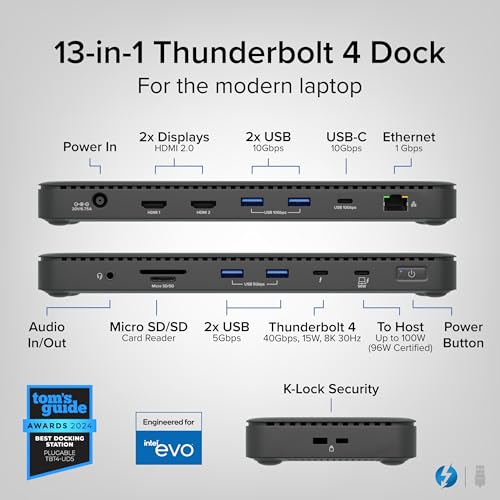
- 100W Power Delivery: This dock ensures your laptop charges quickly, providing sufficient power for demanding projects.
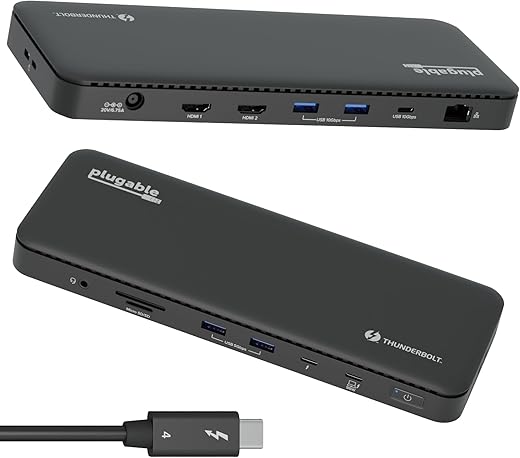
- Multiple Ports: Equipped with numerous USB-C and USB-A ports, HDMI, Ethernet, and a headphone jack, it connects a wide array of devices.
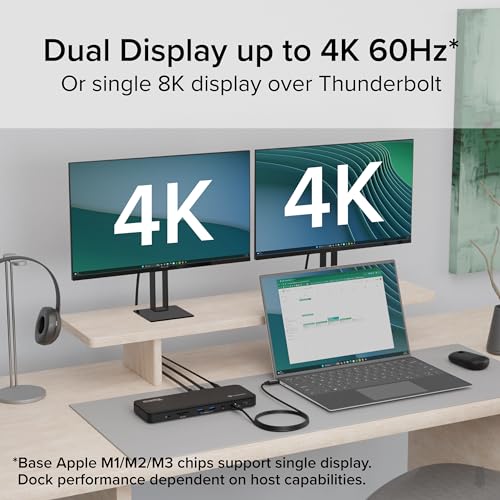
- Dual 4K Display Support: Enjoy stunning visuals on two 4K displays simultaneously for improved productivity and multitasking.
- Compact Design: The sleek and compact design makes it easy to fit into any workspace without clutter.
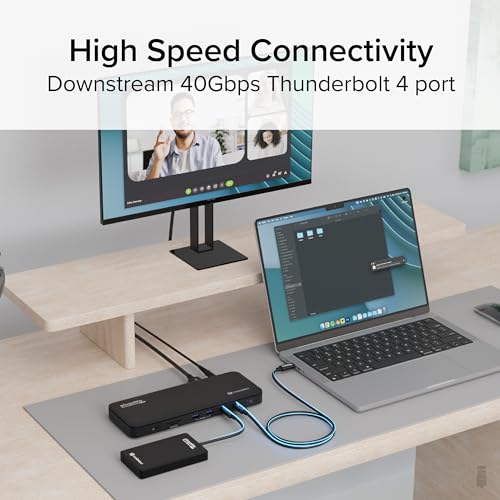
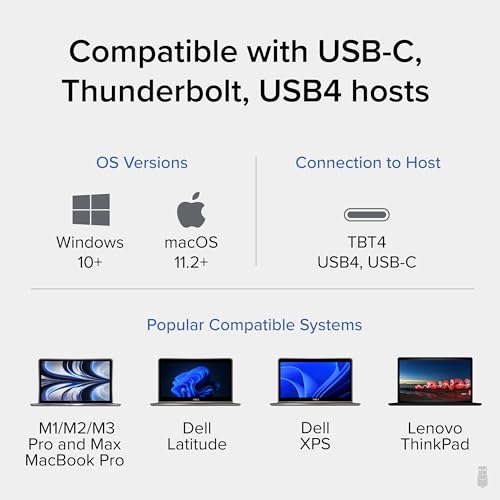
- Compatible with Various Systems: Works seamlessly with Thunderbolt 4, Thunderbolt 3, and USB-C devices, ensuring versatility in your connections.
How the Price Compares Across Different Suppliers
Prices for the Pluggable Thunderbolt 4 Dock With 100W Charging vary widely across different suppliers. On our price comparison platform, you can easily check and compare the current market prices. Some retailers are offering discounts, making this a great time to buy. Whether you are looking for budget-friendly options or premium suppliers, our site helps you find the best deal suited to your needs.
6-Month Price History Trends
Reviewing the 6-month price history chart reveals notable trends. Prices have fluctuated slightly, with discounts appearing more frequently during holiday sales. Tracking these price variations is essential for determining the best time to purchase. Our platform’s graph showcases this data clearly, allowing you to make informed decisions.
Customer Reviews What Buyers Are Saying
Overall, customers have positively reviewed the Plugable Thunderbolt 4 Dock, praising its performance and versatility. Many highlight:
- Fast Charging: Users love the 100W power delivery, which keeps their devices charged without interruptions.
- Ease of Use: The plug-and-play function is appreciated, making setup a breeze for any user.
However, a few customers have noted drawbacks, including:
- Slower Data Transfer Rates: Some users expected higher data transfer speeds from USB connections but found them to be average.
- Size: A handful of reviews pointed out that while the dock is compact, it might be larger than anticipated for some setups.
Related Unboxing and Review Videos
To fully understand the capabilities of the Plugable Thunderbolt 4 Dock, consider checking out related YouTube review and unboxing videos. These visual demonstrations provide insights from real users, showcasing how the dock performs in everyday use. Seeing the dock in action can help you visualize how it would fit into your own workspace.
Why Choose the Plugable Thunderbolt 4 Dock?
For those needing an efficient and reliable docking solution, the Plugable Thunderbolt 4 Dock With 100W Charging stands out as an exceptional choice. Its combination of multiple ports, robust power delivery, and support for dual 4K displays ensures that you can maximize your productivity without compromising on performance.
With so many satisfied customers and a solid build quality, investing in this dock is a decision you won’t regret. Compare prices now to find the best deal on the Plugable Thunderbolt 4 Dock With 100W Charging and take your workstation to the next level!
Plugable Thunderbolt 4 Dock With 100W Charging Reviews (13)
13 reviews for Plugable Thunderbolt 4 Dock With 100W Charging
Only logged in customers who have purchased this product may leave a review.






Milan C. –
Had it about a week and 0 issues so far.
I have a Mac Book Pro with an M1 Pro.
Using laptop + 2x4k@60hz displays. No issues, no flashing.
Everything perfect so far.
If anything changes I will update here.
c22dmk –
I am using my laptop PC as a desktop PC using this Plugable Thunderbolt 4 Dock. I have been using this for a few weeks now and I think I have found a near perfect Thunderbolt 4 dock for my needs. I have connected my 21 inch monitor through HDMI to DVI cable, my speakers using 3.5mm cable, my webcam, printer, wired keyboard, and wired mouse are connected through USB cables and finally I have my LAN connection. This setup is similar to when I had a my old HP Pavilion d4999t desktop tower connected to all these devices. Now, all I do is disconnect one Thunderbolt cable from my laptop and I can take it when I am traveling. While it is connected to this dock, it stays fully charged. Come back home, connect that cable back to laptop and now I have my desktop setup! I had considered using Sonnet Echo 20 SuperDock. But then I realized that I will be paying more for some functionality that I may never use. Also it is more bulky than this Plugable Thunderbolt Dock. The reason why I say it is a near perfect is because I wish it had one more USB port. If you are going to use wireless keyboard and wireless mouse than you will have adequate USB ports.
Martin –
The first unit I received had been previously opened had minor damage, most probably because I received a previously opened box from Amazon. I reported the issue to Plugable which responded within the hour saying that they would ship me a new unit to replace it. I received the unit on the next day.
Installed the dock and it worked right away with two 4K monitors, a wired GigE connection, a streaming camera and many other USB connection, both USB 3.0 and USB2.0 with no issue at all. I use two different laptop with that dock, a MSI and a Lenovo device and they both work great. OS is Windows 11 and both Laptop have Intel CPU (Ultra core 7 and i7) with the integrated ARC GPU. I guess it probably helps to make sure the latest driver are installed (the one from Intel directly, not the one comming with a manufacturer/Windows install) and to make sure the laptop supports Thunderbolt 4.
I previously had tried these setup with lower cost USB-C 2.0 dock devices but always had problem, especially trying to get two 4K display working. At best, I was only getting one display to work in 4K and the USB bandwidth was greatly affected (forget fluid video streaming from the webcam!). No an issue with this unit.
As far as durability is concerned, it is hard to tell after only a couple of days of usage. I can say that it look sturdy and very well built. I don’t think there should be an issue on that side but only time will tell!
Others reported the unit as becoming hot. On my side I can say that yes it heats up but nothing out of the ordinary, especially with a unit running at that speed and providing 96W.
Brian McKee –
Ordered two – Amazon sent me a new one, and a used one.
The used one was not working correctly.
Customer support at plugable was great, and sent me a second new one.
Then the courier company managed to loose it…
Customer support was again great, and we’re all good now.
Will order this brand again for sure.
Connie –
I purchased this product less than a year ago. Unfortunately it stopped worked all together and reeks of electrical fire so I cannot recommend. Before that, most of the time it had worked fine. However, I have had some issues when connecting to it my MacBook M1 not recognizing it. The only solution to that problem seemed to be a complete reboot.
whitefishblue –
Executive summary: I am a happy customer and I think this is a good product.
Update to review: After I left the below review, Plugable’s support team reached out to me. We were in the process of doing some troubleshooting and my next task was to install and run a diagnostic tool. There is a sensitive data concern (work laptop) so I am hesitant to download the tool. The hub seemed to reset earlier this week (not sure if it was something the hub did or if Windows might have done an update that impacted it). Since then it has been working perfectly. Plugable’s support team was good to work with. I have never been certain whether this was a problem with the hub or the laptop. But since it is working now and I am confident in their support team, I am changing this to five stars.
Original review: I am using this hub to run two monitors (while also using laptop display, so total of three screens) and a USB camera. Initially I was impressed – setup was easy and it somehow guessed the position of my monitors (one portrait and one landscape) so well that the mouse moved flawlessly from screen to screen. Since then…not so much. Every day it’s a gamble. It inconsistently assigns the ID, so most days I have to go into Display Settings, swap the positioning, redo the portrait/landscape settings, and adjust the layout. Today my USB camera won’t work. I have downloaded current drivers for the monitors and removed all old monitor settings, but cannot get the hub to consistently assign the monitor IDs. Sometimes I can cycle the power on it a couple times until it guesses the monitor assignments correctly. Sometimes after a sleep/wake on the laptop, the hub will only recognize one monitor. Rebooting the laptop solves that one. While I realize this could be a problem on the laptop end, it is a brand new Lenovo ThinkPad and I’ve had no other trouble with it. Two stars, since once the daily irritation is passed, it does work well for the rest of the day.
Kevin M Deken –
Works great. Even better with my DELL laptop than my DELL docking station. Also work with my older laptop with thunderbolt 3 port.
Zachary –
Thought I had a problem with my docking station (turned out to be a problem with my laptop), but I’d still reached out the pluggable for some support. They literally responded in like 20 minutes via email. Ridiculous.
Well my laptop was still working, the docking station was awesome saved a lot of time plugging another cables and stuff. 10/10 would recommend.
FredD –
This product works well. I have 2 monitors plugged in and many USB devices, from mouse/keyboard to SSD. I had initial problems due to Thunderbolt security turned on in my computer BIOS. Tech support quickly helped me identify the problem, and sent me links to correct the BIOS configuration.
Very happy!!!
Jason Kim –
So far this dock is one of few out there at this price range that actually supports multiple non-mirrored monitors on macbooks through a single thunderbolt port. Both monitors run at 4k 60hz.
I’ve read reviews about the dock not identifying monitors properly or the performance being inconsistent, but I will update this review after more usage if anything similar does happen. So far so good!
Jay C Boal –
This works perfectly in my setup, although I discovered after I bought this that my laptop doesn’t support Thunderbolt so I can’t run both of my external monitors through this dock. Not the dock’s fault of course.
The dock doesn’t seem to get notably hot in use though I’m not stressing it particularly with just one monitor that’s not even 4K.
My biggest gripe is that the uplink port – to connect the dock to the laptop – is on the *front*. This is stupid design. The front ports should only be for things that need to be plugged/unplugged frequently, so as to minimize cable clutter. In Plugable’s defense this is very common among smaller, more portable docking stations, but there’s enough room on the back for the uplink, so I’m taking away a star for this.
Speaking of portability, the dock itself is reasonably compact but the power brick is bulky and heavy. I wouldn’t really consider this a good option for a mobile setup.
Zhenghao Zhang –
My dock had a disconnect issue. After I emailed the customer service, they sent me a good one very quickly.
Eric Dionne –
J’ai testé plusieurs hub Thunderbolt 4 avant de trouver mon bonheur avec celui-ci. Il est branché sur mon MacBook Pro M2 et je peux l’utiliser avec deux écrans externes. Il y a toutes les entrées nécessaires pour brancher tous les périphériques (disque dur externe, stream deck, etc). Le dispositif chauffe un peu (c’est normal), alors il est préférable de l’installer dans un endroit bien ventilé.