
acer USB Type-C Gen 1 Dock With HDMI & Ethernet
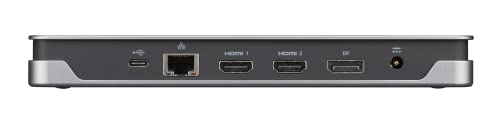
Original price was: $269.99.$214.99Current price is: $214.99.
acer USB Type-C Gen 1 Dock With HDMI & Ethernet Price comparison

- All prices mentioned above are in United States dollar.
- This product is available at Amazon.com.
- At amazon.com you can purchase Acer USB Type-C Gen 1 Dock | 2 x HDMI 2.0 Ports | 1 x Display Port | 3 x USB 3.1 Gen1 Ports | Ethernet | Power Delivery – 85W | SD Card Reader Up to 2TB | Requires One USB 3.1 Type-C on Computer for only $154.85
- The lowest price of Acer USB Type-C Gen 1 Dock | 2 x HDMI 2.0 Ports | 1 x Display Port | 3 x USB 3.1 Gen1 Ports | Ethernet | Power Delivery – 85W | SD Card Reader Up to 2TB | Requires One USB 3.1 Type-C on Computer was obtained on September 24, 2025 06:50.
acer USB Type-C Gen 1 Dock With HDMI & Ethernet Price History
acer USB Type-C Gen 1 Dock With HDMI & Ethernet Description
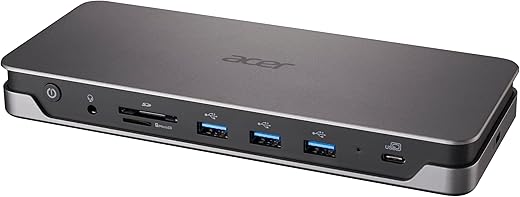
Acer USB Type-C Gen 1 Dock With HDMI & Ethernet
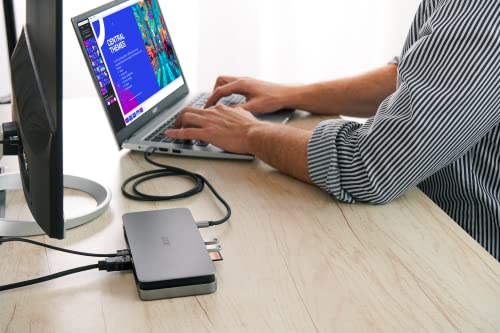
The Acer USB Type-C Gen 1 Dock is the ultimate solution for your connectivity needs. Whether you are a tech enthusiast or a professional needing efficient workspace organization, this versatile docking station combines functionality with sleek design. With HDMI and Ethernet ports, this dock allows you to expand your laptop’s capabilities seamlessly. Stay connected and enhance productivity—all at a competitive price!
Key Features of the Acer USB Type-C Gen 1 Dock
- Compact Design: Measuring 7.9 x 3.26 x 0.94 inches and weighing just 1 pound, this dock is portable and fits easily in your travel bag.
- HDMI Output: Enjoy high-definition video output with the HDMI port, supporting 1080p resolutions for presentations or streaming media.
- Ethernet Port: Gain reliable wired internet connectivity with the built-in Ethernet, ensuring a stable connection for work or gaming.
- Plug-and-Play: The simple USB Type-C connection means you can get started quickly—no additional drivers or software needed.
- Compatibility: Works with a wide range of laptops featuring USB Type-C ports, making it a versatile addition to any setup.
Why Choose the Acer USB Type-C Gen 1 Dock?
The Acer USB Type-C Gen 1 Dock is engineered for users who demand more from their technology. Here are some benefits that set it apart from competitors:
1. **Enhanced Connectivity**: No more fussing over multiple adapters or ports—this docking station centralizes your connections, saving you time and effort.
2. **Superior Performance**: The high-definition HDMI output supports seamless streaming and displays, ideal for presentations or gaming sessions.
3. **Affordable Pricing**: The Acer dock offers great value without compromising quality, making it an excellent choice for both personal and professional use.
Price Comparisons Across Suppliers
When it comes to price, the Acer USB Type-C Gen 1 Dock is competitive. Prices vary among different suppliers, so here’s a brief overview:
– **Amazon:** Often features the best deals and fast shipping options.
– **Best Buy:** Offers in-store pickup options, ideal for immediate needs.
– **Walmart:** Frequently matches competitors’ prices, providing great discounts.
Using our price comparison tool, you can quickly find the best deal from the leading suppliers.
6-Month Price History Insights
The price trends for the Acer USB Type-C Gen 1 Dock indicate a steady demand in the market. Over the past six months, the price has remained relatively consistent, with minor fluctuations during promotional events. This stability suggests that the dock is a reliable investment, showing no signs of decline in value.
Using our price comparison tool, you can easily visualize and track pricing trends. This is especially helpful in ensuring you’re making an informed buying decision.
Customer Reviews: What Users Are Saying
Customer feedback on the Acer USB Type-C Gen 1 Dock has been largely positive:
– **Pros:** Many users appreciate its portability and easy setup process. The HDMI output consistently delivers crisp visuals, perfect for photographers and designers. The reliable Ethernet connectivity is another highly praised feature, especially for those working from home.
– **Cons:** Some reviews mention limitations regarding the number of additional peripherals it can support simultaneously. A few users suggest that the dock could benefit from more USB ports for additional devices.
Overall, the feedback underscores the Acer USB Type-C Gen 1 Dock as a functional addition to any workspace, combining portability and efficiency.
Explore Unboxing and Review Videos
For a closer look at the Acer USB Type-C Gen 1 Dock, we recommend checking out unboxing and review videos on YouTube. These videos provide firsthand insights into the setup process, usage, and real-world application. They often highlight the benefits of the dock in practical scenarios, helping you see its full potential.
Conclusion: Upgrade Your Workspace
In summary, the Acer USB Type-C Gen 1 Dock With HDMI & Ethernet is an exceptional device for anyone looking to enhance their workspace efficiently. Its affordable price, combined with robust features and positive customer feedback, make it a compelling choice.
Don’t miss out on this opportunity to upgrade your connectivity while staying within budget. Compare prices now!
acer USB Type-C Gen 1 Dock With HDMI & Ethernet Specification
Specification: acer USB Type-C Gen 1 Dock With HDMI & Ethernet
|
acer USB Type-C Gen 1 Dock With HDMI & Ethernet Reviews (10)
10 reviews for acer USB Type-C Gen 1 Dock With HDMI & Ethernet
Only logged in customers who have purchased this product may leave a review.






Black Dog –
Thanks to Acer for creating this thing. The laptops today dont come with a lot of USB ports. This lets you run dual monitors, a camera, and whatever else you need. It saved me from having to return and buy another laptop.
Well worth the cost!
CatherineGrace –
Works great with my Acer laptop and dual monitors
AJ –
The product description leads you to believe it will be power the laptop, which is an essential function of a dock. A real inconvenience to have to plug in 2 cables. It should be clear on the description.
Crystal –
**Update**
After 6 months both HDMI ports stopped working all together. This docking station is unless do not waste your money.
It worked great for 3.5 months then one of the HDMI connections stopped working so now I only have one. This was frustrating after using an HP docking station for years at work with no problems. Unfortunately the ACER cannot live up to a long durability.
P. Lucas –
I have a laptop with a USB-C port but it’s not Alt-Display mode / charging capable so I needed a USB 3.0 dock. This one works great! I had to update my laptop with the DisplayLink drivers but after that no worries. It works with Ultrawide 29″ monitor no problem, passes through the audio like a dream and provides tons of extra ports. Transfer speeds are good. Ethernet speeds are good. I don’t notice lag on the second monitor and it doesn’t get in the way of other software. I do wish the power plug was normal size instead of a wall brick but no big deal. It’s not the prettiest piece of tech. It doesn’t get warm. Once all the cables are attached it just sits there taking up space. It would benefit from some way to mount it below the desk.
Humberto G. –
facilita la conexión a laptop
Giant Yoda –
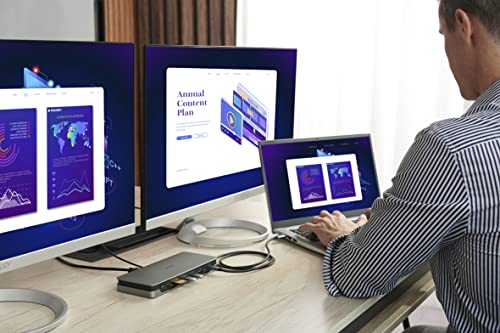
Extends display to 2 additional monitors and adds additional USB outlets…exactly what I needed. Used with Dell laptop, no drivers needed.
Quiraque, Zacarias –
This Acer dock station is amazing. It does not have too many options, however it works perfectly with my macbook air. Before this dock station, I bought 4 from different companies, however non of them could connect with 2 extra monitors on macbook. But this solved my problem, now i can use my mac book with 2 extra monitor and also i have 3 screams. All you need is a DisplayLink Manager tool installed on your Macbook. Love it love it love…
JT –
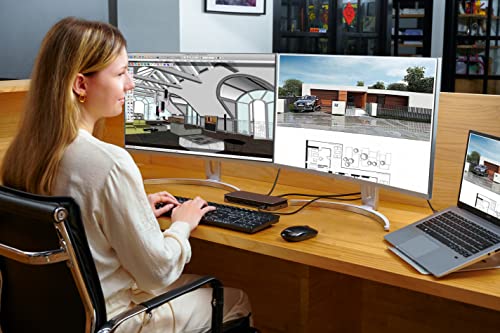
This dock is great, I’ve had many other styles and brands and this is up there. This makes a greater dock for someone setting up a home office. I had a super easy setup which didn’t require any extra drivers (Windows 10 PC). Acer is a trustworthy brand with good customer service. I wish they made a 3 monitor version.
oscar –
Si tienes mac mejor busca otra opción, al menos a mi no me funcionó