
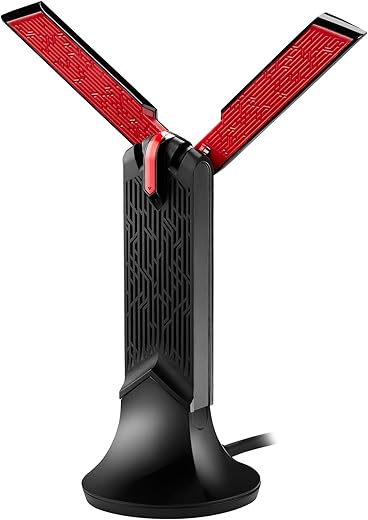
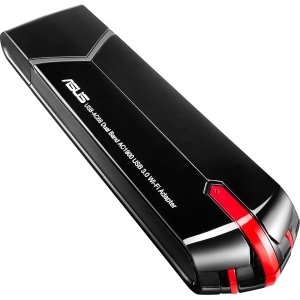
ASUS AC1900 Dual-band USB WiFi Adapter Price comparison


- All prices mentioned above are in United States dollar.
- This product is available at Amazon.com.
- At amazon.com you can purchase ASUS USB-AC68 AC1900 Dual-Band USB 3.0 WiFi Adapter, Cradle Included for only $124.97
- The lowest price of ASUS USB-AC68 AC1900 Dual-Band USB 3.0 WiFi Adapter, Cradle Included was obtained on September 11, 2026 09:02.
ASUS AC1900 Dual-band USB WiFi Adapter Price History
ASUS AC1900 Dual-band USB WiFi Adapter Description
ASUS AC1900 Dual-band USB WiFi Adapter: Elevate Your Internet Experience
Enhance your wireless connectivity with the ASUS AC1900 Dual-band USB WiFi Adapter. This advanced adapter provides users with a highly efficient way to achieve superior internet speeds for gaming, streaming, and browsing. Whether you are at home or on the go, the ASUS AC1900 ensures you stay connected with robust performance and reliable signal strength.
Main Features and Benefits of the ASUS AC1900
- Dual-band Connectivity: Enjoy simultaneous connections on both 2.4GHz and 5GHz bands, allowing for flexible usage tailored to your needs. The 2.4GHz band supports longer range, while the 5GHz band enables faster speeds for bandwidth-intensive activities.
- AC1900 Speed: Achieve blazing-fast speeds up to 1900Mbps. This is ideal for HD streaming and online gaming, reducing lag for a seamless experience.
- USB 3.0 Compatibility: The USB 3.0 interface offers fast data transfer speeds, ensuring quick connections and minimal latency compared to USB 2.0 adapters.
- Easy Setup with WPS: Connect easily to your router with the Wi-Fi Protected Setup (WPS) feature, which simplifies the connection process, making it user-friendly for individuals of all tech levels.
- Advanced Antenna Design: Equipped with high-gain antennas, this adapter strengthens signal reception and transmission, ensuring better coverage and fewer dead zones.
Price Comparison Across Suppliers
When considering the ASUS AC1900 Dual-band USB WiFi Adapter price, it’s essential to compare different suppliers. Prices typically range from $49.99 to $69.99, depending on seasonal discounts and availability. Our price comparison tool allows you to view the best options available across various retailers, ensuring you secure the best deal possible.
6-Month Price History Trends
Our 6-month price history chart of the ASUS AC1900 reveals interesting trends. Over the last few months, the average price has fluctuated, with the lowest recorded price at $45.99 during a holiday sale. Notably, prices tend to rise during back-to-school periods and holiday seasons, confirming the importance of timing your purchase for maximum savings.
Customer Reviews Overview
Customer feedback on the ASUS AC1900 Dual-band USB WiFi Adapter review highlights its strengths and weaknesses. Many users praise the fast speeds and impressive range, particularly when streaming and gaming. The ease of setup is another positive point frequently mentioned. However, some users have noted occasional connectivity drops, particularly on the 5GHz band in certain environments. Overall, the consensus is that this adapter delivers excellent performance for its price.
Related Unboxing and Review Videos
To better understand the functionalities and real-world performance of the ASUS AC1900, consider watching related YouTube unboxing and review videos. These videos provide firsthand insights from users and tech reviewers, showcasing setup processes and live demonstrations of its capabilities. Watching a comprehensive review can help you make a more informed purchase decision.
With its advanced features and user-friendly design, the ASUS AC1900 Dual-band USB WiFi Adapter significantly enhances your wireless network experience. Share the joys of seamless streaming, responsive gaming, and efficient browsing with this powerful adapter.
Compare prices now!
ASUS AC1900 Dual-band USB WiFi Adapter Reviews (8)
8 reviews for ASUS AC1900 Dual-band USB WiFi Adapter
Only logged in customers who have purchased this product may leave a review.




Armando –
Supero mis espectativas. Excelente conectividad.
Zapp Brannigan –
Aunque es un poco cara, da muy buenos resultados. Ojo con la instalación, no es tan fácil como dice en la caja. Lo volvería a comprar
Angad B. –
Excellent product
Alex Bonilla –
I recently moved and had issues with my previous USB adapter being able to catch good connection in the new house layout so i was looking for a new adapter to work with my gaming and streaming (League, warframe, Among Us, etc. simple games)
at first, i did as directed and downloaded the drivers straight from the WEBSITE since i dont have a CD reader in my pc. Was working great for a month or two; 60 ping in league, reliable connection, videos loaded faster. However recently, i had issues of broken connection and heavy ping spikes. i originally thought it was due to COVID and having everyone home and using the internet; but not only was i the only one using a computer, i was the only person awake in the house, meaning no one was even awake to use any devices extensively.
After doing a quick swap out and connection test with my old adapter, i realized the new adapter was not working up to par. i looked around on these reveiws and noticed that the people who had no issues or little issues were those who connected the adapter out of the box without installing the drivers. so i did a few more connection tests between the two adapters for comparisons.
the ASUS adapter was hitting between 8-60 Mbps for downloads prior to removing the drivers and 0.5mbps for uploads. After a clean driver removal and fresh computer restart; Downloads hit 90-120mbps download and 11-12mbps for uploads. so far its running smooth and i have been testing the connection with consistent results. hopefully it sticks because i do like this adapter quite a bit.
Tom –
Initially I connected the ASUS USB-AC68 AC1900 Dual-Band USB 3.0 WiFi Adapter to a USB 3.0 port on my desktop using a somewhat long but very good high quality USB extender cable. The USB-AC68 worked great, except when it didn’t….I kept getting periodic disconnect issues as others have reported.
So, debugging … I decided to remove the USB 3.0 Extension cable completely and plugged the WiFi unit directly into a free USB 3.0 port on my desktop. Result: I have not gotten a single disconnect issue since and it has been many, many months now. Evidently there must be a noise or signal quality issue that develops going through the USB cable from the device.
If you are having disconnect trouble I recommend you find a free USB port close to the motherboard (or make one) and let the AC-68 live there for your wireless connection. As an FYI I use a Gigabyte motherboard. But, my WiFi AC-68 unit is plugged into an ANKER USB 3.0 extension board which provides me access to a few more USB 3.0 ports. Hope this helps. This is a good unit when it works.
I should mention that this USB WiFi dongle connects to my “ASUS Whole Home Dual-Band AiMesh Router (AC1900) for Mesh Wifi System (Up to 1900 Mbps) – AiProtection Network Security by Trend Micro, Adaptive QoS & Parental Control (RT-AC68U)” as the household WiFi router. This is unit is located 1 floor below where I connect with this USB WiFi dongle.
Zapp Brannigan –
Very solid, no real complaints. No dropped connections and full wifi signal.
I have gigabit ethernet and ac 1900wifi with rogers ignite.
Speed test 168 download speed, 30mb/s upload speed. My AC-1200 gave me almost same results (but was unstable with lots of wifi drops).
Best Device Manager > Network Adaptors > Asus USB-68 settings > advanced tab
Adaptivity Para 0
AMfactor …mode 2
BeamCap HT ..TX/RX (bottom Option)
EnableAdapt.. AUTO
HLDiff… 7
L2H… Auto or F5
Ldpc.. & HT LD…. (bottom option)
QoS Support Support QoS
StbcCap & HT STBC (bottom option)
USB RF select BY DEV/Host
USB SF Mode Disable
VHT 2.4G Enable
Wireless Mode IEEE 802.11a/n/ac
* this seems to work ok with power management enabled!
Zsaklina –
I’m really surprised with how great this Wifi adapter is. I had one from another brand before this. It would cut out quite frequently, had issues getting recognized by my PC, amid other issues. I have not had ANY of these issues with this Wifi adapter whatsoever. It’s honestly incredible. It doesn’t cut out, the connection is super fast and it’s really easy to install. You won’t regret getting this!
C141/C17 Load –
3/19/2020 – Product review update: I’ve had this product for 18 months now, still working fine, no issues at all.
1/10/2019 – Product review update: I’ve had this product for several months now and am still very happy with it. Absolutely no issues, still getting very decent download/upload speeds and have made my wife happy with her computer again. Averaging 22-27MB’s on the downloads and 19-25MB’s on the uploads (which is 2 to 3 times better than my previous product) with a 100MB ISP service. Pings are averaging around 15-19ms. Note: this testing is with a speed test service not associated with my ISP provider. I may be wrong but my ISP provider’s “speed test” always seems to bring back very high results which I don’t think are “real world”. My computer is about 50 feet from my router with several walls in between (standard wallboard/wood frame house). Hope this helps.
Initial Review: Bought this item to replace a much older product that, at the time, seemed acceptable. However, when my Internet Service Provider “upped” the down service speed from 25MB to 50MB at no additional charge I found that I couldn’t take advantage of it.
I already have an ASUS router (recently purchased) so I decided to stay with the ASUS product line, especially after reading the favorable reviews for this product. After receiving the product, I installed the CD drivers and immediately updated them from the ASUS website (not sure if I just simply duplicated what I already had done but did it anyway). Plugged the ASUS unit in, navigated to my Wi-Fi page and found my router. Input the password and I was up and running.
The speed is definitely faster than I had before, not sure if I’m getting all of the “bang” available but it certainly does what I need it to do. I’m sure that someone who knows how to do this better than myself could “fine tune” the installation.
One minor issue with it was that it seemed to take a couple of tries for it to “remember” the link after I powered down the PC. I had to “reconnect” but it did eventually “remember” the link and now works fine. Not sure if this is an “idiot in front of the screen” error or something with Windows 10.
Hope this helps any other “novice” looking to install this device.