
Baseus 13-in-1 USB C Docking Station Dual Monitor

 Amazon.com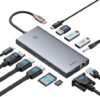
$69.99
Baseus 13-in-1 USB C Docking Station Dual Monitor Price comparison


- All prices mentioned above are in United States dollar.
- This product is available at Amazon.com.
- At amazon.com you can purchase Laptop Docking Station, Baseus 13-in-1 USB C Docking Station Dual Monitor with 2 HDMI 4K@60Hz, DP 4K@120Hz, VGA, 10Gbps Data Transfer, PD 100W and Ethernet for Dell/HP/Lenovo/Surface Laptop for only $69.99
- The lowest price of Laptop Docking Station, Baseus 13-in-1 USB C Docking Station Dual Monitor with 2 HDMI 4K@60Hz, DP 4K@120Hz, VGA, 10Gbps Data Transfer, PD 100W and Ethernet for Dell/HP/Lenovo/Surface Laptop was obtained on September 24, 2025 12:53.
Baseus 13-in-1 USB C Docking Station Dual Monitor Price History
Baseus 13-in-1 USB C Docking Station Dual Monitor Description
Baseus 13-in-1 USB C Docking Station Dual Monitor: Your Ultimate Connectivity Solution
The Baseus 13-in-1 USB C Docking Station Dual Monitor offers unparalleled versatility and performance for users looking to expand their workspace. With its 13 ports, this docking station allows advanced connectivity options for laptops and devices, making it an essential tool for professionals and tech enthusiasts alike. If you’re searching for the Baseus 13-in-1 USB C Docking Station price or detailed reviews, you’ve come to the right place!
Key Features of the Baseus 13-in-1 USB C Docking Station
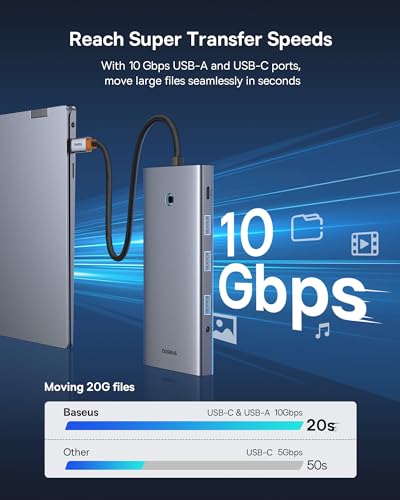
- High-Speed Data Transfer: Experience lightning-fast data transfer rates of up to 10 Gigabits per second. This feature enables swift file transfers and optimal performance for high-definition video streaming.
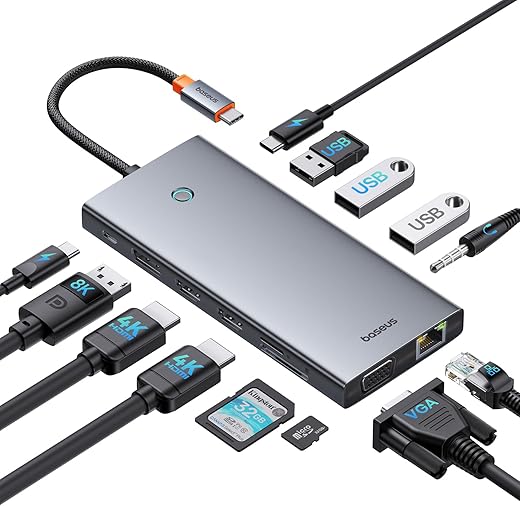
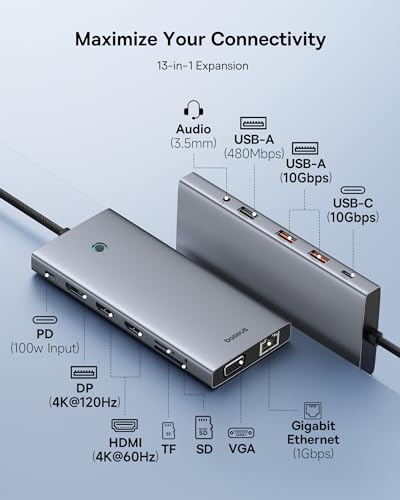
- Multiple Connectivity Options: Equipped with 13 ports, including HDMI, USB-A, USB-C, and Ethernet, this docking station can support various devices, making it perfect for dual monitor setups and more.
- Compact Design: With dimensions of 5.71 x 2.52 x 0.55 inches and a light weight of 4.5 ounces, the Baseus dock is compact and portable, easily fitting into your bag for on-the-go use.
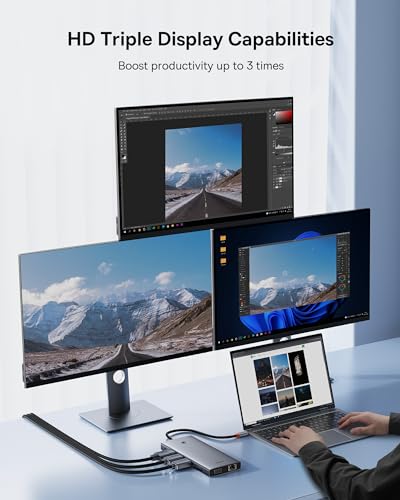
- Dual Monitor Capability: Connect up to two displays simultaneously, enhancing your productivity by allowing you to multitask efficiently.
- Durable Build Quality: Manufactured by Baseus, known for their quality, this docking station is built to last, ensuring reliable long-term use.
Price Comparison Across Suppliers
When considering the Baseus 13-in-1 USB C Docking Station price, you’ll find competitive offers from various suppliers. Regularly check for the best deals to maximize your savings while securing this essential piece of technology.
Trend Insights from 6-Month Price History
Over the last six months, the price of the Baseus 13-in-1 dock has shown stable trends with some fluctuations during promotional events. The value remains consistent, indicating that it’s a smart investment for anyone entering the tech space.
Customer Reviews: What Users Are Saying
Customer feedback on the Baseus 13-in-1 USB C Docking Station highlights its performance and functionality. Users appreciate the ease of setup and the high-speed connectivity options available. Many users have specifically noted the following:
- Positive Aspects: Users rave about the high data transfer speeds and the ability to connect multiple devices seamlessly. The dual monitor support is also praised, with many users reporting enhanced productivity.
- Noted Drawbacks: Some reviews mention that specific devices may require additional drivers or updates for optimal performance, which could be a consideration for some users.
Explore Unboxing and Review Videos
For a deeper understanding of the Baseus 13-in-1 USB C Docking Station, check out several unboxing and review videos available online. These videos provide insights into the product’s capabilities, setup process, and real-world applications, helping you make an informed decision.
Why Choose Baseus 13-in-1 USB C Docking Station?
The Baseus 13-in-1 USB C Docking Station stands out for its comprehensive set of features designed to improve connectivity and productivity. Whether you’re a professional working from home or an avid gamer requiring multiple display options, this docking station has you covered. With its robust design and performance capabilities, it’s built to meet the demands of modern technology usage.
Don’t miss out on the opportunity to enhance your workspace. Harness the power of the Baseus 13-in-1 USB C Docking Station and take your productivity to new levels. Compare prices now!
Baseus 13-in-1 USB C Docking Station Dual Monitor Specification
Specification: Baseus 13-in-1 USB C Docking Station Dual Monitor
|
Baseus 13-in-1 USB C Docking Station Dual Monitor Reviews (6)
6 reviews for Baseus 13-in-1 USB C Docking Station Dual Monitor
Only logged in customers who have purchased this product may leave a review.






Eric –
When the little box comes with cartoon stickers inside for no reason, you know you are in for a bad time. HDMI did not work. Multiple cables, computers, and monitors tried. Crashed one computer caused the other to just go into a loop. Also, some people say you need third party software to work; tried that too, now I think I have a virus.
John Burns –
After using this 13-in-1 hub for about a week, I can provide some perspective for those looking to purchase something similar.
The USB-C hub came in a simple yet effective packaging. As for aesthetics and appearance, it can easily blend in with your other products like iPads and Macbooks as the fit & finish is pretty similar. Even though it has a decent number of ports, it remains highly portable and lightweight for anyone to consider moving around in their bag on a daily basis. And the LED indicator on top is pretty handy and can tell from a glance if any connected devices are thunderbolt compatible.
Now let’s get to the things that matter most to everyone:
After coming from a 7-in-1 USB-C hub that only had 1 USB-C port for only PD power delivery, I appreciate the extra set of ports in this hub so that I can use all of them simultaneously. This Thunderbolt compatible hub can easily pass-through 85W for PD power delivery to charge your device while letting you connect multiple devices (think hard drives or USB sticks) for transferring at USB3.1 10 Gbps via USB-C and USB-A ports. Having dual 4K ready HDMI ports with one 4K ready Display port is such a plus. Viewing any number of high-res documents or PDFs or 4K/6K video files is such a breeze.
Data transfers also clocked in as advertised. Via the USB 3.1 10Gbps ports, I was able to copy 17GB folder in under 3 minutes and I ran that twice on each port. Now I use various hard drives for video editing and having plugged in 3 drives (one Sandisk USB-C SSD, and two WD 5TB drives) I did not notice any lag or dropout. The only port that suffers from data throughput is the SD card slot and is not even UHS-2 compatible, so it will take ages to copy media from your camera’s SD card. Not a big fan of that, so I tend to use an external Lexar UHS-2 compatible adapter to transfer media.
My other area of concern was heat dissipation. Naturally, when you plug-in so many devices, chances are the hub would get hot to touch but this USB-C hub handled that pretty well. When 4K displays are connected via both DP and HDMI ports, it stays fairly cool. When I plug-in the PD port for power delivery as well as multiple drives in addition, that’s when the hub got “barely” warm to touch, not hot. Now when I used the hub in this mode with all the peripherals connected for longer durations (say, 2-3 hours non-stop) it was getting a little hot but I never felt it would hurt my hand or anything. Overall, pretty well heat dissipation management by this little guy.
One silly gripe I have is that the attached USB-C cable that connects the hub could have been slightly longer, like another 12-18 inches. I am one of those people who use their laptop on a riser/stand. When the hub is connected to the laptop on a stand, it sort of dangles and doesn’t rest flat on the desk due to this shorter cable. In my opinion, the ideal cable length could have been 2.4 to 3 feet in length. Although the USB-C cable appears short for my workflow, it seems to be well made and may as well handle day to day wear-n-tear without any major issues. In fact, the cable has been reinforced on the ends (normally where the cable breaks apart).
Overall, I feel the USB-C hub has all the right ingredients to be a very useful product for daily use. It’s got the right amount of HDMI, DP, USB-A and USB-C ports. It’s small & lightweight and the heat dissipation is well controlled considering the PD port can handle 85W pass-through. The only shortcomings were, for me at least, slower than usual SD card slot, the smaller length of the attached USB-C cable. Nonetheless, even with these little inconveniences, I am glad I have it and will continue to use it daily. It makes my overall workflow so much easier to manage in differing environments. For me, it’s such a handy hub to have in this small and portable form factor.
Bimmerfest80 –
This is the Swiss Army of USB-C hubs. It has everything you could possibly want. It has 2 HDMI ports, 3 USB ports, 1 DP port, USB-C port, micro SD, SD, 3 USB ports: 2 are 3.0, headphone jack, USB-C that can be used to charge your laptop, VGA, and ethernet port. I’m quite impressed on how they crammed so much into this hub. I tried the various ports with great success. I used the USB ports. 1 had my Logitech MX mouse USB controller, USB storage, and I tried it with my external SSD drive, which I copied over 50GB to my laptop. All worked well. I tried the HDMI and DP, which worked fine. I could not test 120hz since my monitor did not support it. I used the USB-C for my iPhone. I used the ethernet port, when I had issues with an OS update. I plugged it directly in and it resolved my Internet issues. I was back on WiFi in no time. That’s something I couldn’t do without an ethernet adapter or this USB-C hub. The headphone jack works fine. I tried charging my Macbook Pro through this hub and again no issues. It’s always refreshing, when something just works and it keeps the Macbook Pro aesthetics perfectly with the aluminum design. I will say it does get warm under heavy load. But I did not notice any issues, while using it. Any Apple users that feels like your device does not have enough ports then look no further than this Baseus unit. It’s the perfect complement to your Macbook Pro, Air or any other laptop you’re using. And I liked it so much I bought the Baseus 9-1 to use with my iPad Air.
Bimmerfest80 –
I use the docking station for transferring files on my iPad Pro and it works great with extremely fast transfer speeds that actually match up to my fast portable SSD transfer speeds. It has all the ports I would need (individually labeled with their rated transfer speed) along with a well-made braided cable and metal casing.
It’s also a great addition to my portable mini PC since they tend to lack USB ports to maintain the smaller size and cost.
Ankur Puri –
tested everything except the rgb connector as i dont currently have a device that uses it. everything functions as intended. used a dell 7500 laptop and ipad pro m1. this is actually ideal for the ipad since it has that one connection and now you have connectivity included the sd card slot and headphone jack. i have another brand metal hub thats similar and it has pretty much the same operating temp, that normal as it says in the description and on the sticker on the product when you take it out the package. so far so good. will update if any technical or longevity issues
Ankur Puri –
After 3 months of use here is my take:
Power throughput:
I have not checked this feature when the docking station was purchased.
The power throughput port says 100W but it does not provide power through it if you use a charger with less than 100W (used a 65W one).
When I plug the usb-c power brick with 65W directly to the computer, the battery shows charging.
If I use a higher rating charger (130W), then power passes through – my labtop shows charging but with the battery warning of not full power charging.
The wired ethernet port has intermittent operation so I am on wireless.
The GREAT feature is that I can have two external monitors connected to my labtop (HDMI and display port).
Have not tried with more monitors yet.
Are the two ports (power throughput and wired ethernet bad)?
Is the power throughput expected to perform in this manner?
I wish I could get a replacement to check if these two ports are functioning properly or not?
Number of stars: 2 (getting two since the two monitor ports work!)