
Corel Value-Packed Video Editing & Recording Software

 Amazon.com
Original price was: $59.95.$39.99Current price is: $39.99.
Corel Value-Packed Video Editing & Recording Software Price comparison

![Pinnacle Studio 26 | Value-Packed Video Editing & Screen Recording Software [PC Download]](https://m.media-amazon.com/images/I/71FYddiuPSL._SS520_.jpg)
- All prices mentioned above are in United States dollar.
- This product is available at Amazon.com.
- At amazon.com you can purchase Pinnacle Studio 26 | Value-Packed Video Editing & Screen Recording Software [PC Download] for only $39.99
- The lowest price of Pinnacle Studio 26 | Value-Packed Video Editing & Screen Recording Software [PC Download] was obtained on September 24, 2025 13:53.
Corel Value-Packed Video Editing & Recording Software Price History
Corel Value-Packed Video Editing & Recording Software Description
Corel Value-Packed Video Editing & Recording Software: Unleash Your Creativity
Looking to elevate your video editing game? The Corel Value-Packed Video Editing & Recording Software offers everything you need to create stunning videos. Released on August 10, 2022, this powerful software combines an intuitive interface with robust features, making it perfect for both beginners and seasoned professionals. Discover, compare prices, and read reviews today!
Main Features and Benefits
- Easy-to-Use Interface: The user-friendly design ensures a smooth learning curve, allowing you to edit videos efficiently without a steep learning curve.
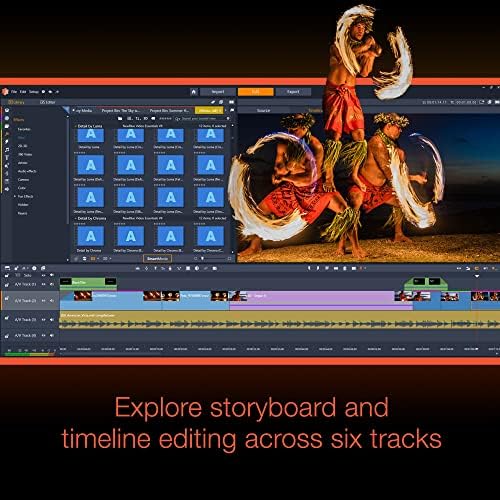
- Comprehensive Editing Tools: Access a broad range of tools including cutting, trimming, transitions, and effects, giving you the flexibility to create unique video content.
- High-Quality Output: Export your videos in stunning quality. Whether you’re making content for social media or personal projects, your edits will shine.
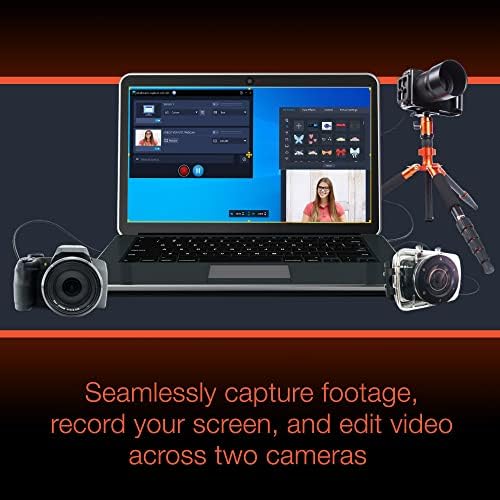
- Recording Capabilities: Record your screen, webcam, or audio seamlessly, making it easy to create tutorials, presentations, or gameplay walkthroughs.
- Regular Updates: Corel frequently rolls out updates and new features, ensuring your software keeps up with the latest in video technology.
Price Comparison Across Different Suppliers
When it comes to pricing, the Corel Value-Packed Video Editing & Recording Software is competitively priced across various suppliers. As of now, the prices vary, allowing you to find the best deal. Some retailers offer promotional discounts, so it’s worthwhile to compare prices across our platform to ensure you get the best value.
6-Month Price History Trends
The 6-month price history chart shows a consistent trend, with slight dips during promotional seasons. This trend suggests that waiting for holiday sales or promotions can lead to significant savings on your purchase. Monitor the price history regularly to maximize your investment in video editing software.
Customer Reviews Summary
Customer feedback for the Corel Value-Packed Video Editing & Recording Software is overwhelmingly positive. Users praise its intuitive interface and comprehensive editing tools, noting that it significantly simplifies the editing process. Many reviewers highlight the quality of the output videos as a standout feature, which has helped enhance their projects dramatically.
However, some users have reported minor performance issues when using advanced features on low-spec devices. It’s worth considering your system’s capabilities when deciding to purchase this software.
Explore Video Reviews and Unboxings
Interested in seeing the software in action? Check out related unboxing and review videos on YouTube. Many creators provide detailed walkthroughs and tutorials on using Corel’s video editing features. Watching these videos can help you gauge whether this software meets your video creation needs.
In summary, the Corel Value-Packed Video Editing & Recording Software is an excellent choice for anyone looking to create professional-grade video content efficiently. With its robust features and user-friendly design, it’s no wonder this software is trending among video creators. Don’t miss out on comparing prices to find the best deal for you!
Whether you want to learn how to edit videos for YouTube or simply create memorable family videos, this software has you covered. Don’t delay – compare prices now!
Corel Value-Packed Video Editing & Recording Software Specification
Specification: Corel Value-Packed Video Editing & Recording Software
|
Corel Value-Packed Video Editing & Recording Software Reviews (9)
9 reviews for Corel Value-Packed Video Editing & Recording Software
Only logged in customers who have purchased this product may leave a review.

sassy –
I have several of the Pinnacle programs. Never had any problems with any of there programs. I plan on purchasing this program as well. I do advise you to keep track of the key code. I purchased a new computer, have misplaced the key codes and cannot load the other programs to new computer. You need those key codes. Besides that I love the Pinnacle programs.
brian s –
A little bit of a learning curve, but it’s great for all the basics and very affordable for what you get
Adam Secrest –
Has lots of presets for exporting (tiktoks videos are 1080/1920 portrait). Super easy to master and quick keying are at short distance from mouse for laptops. Has lots of preloaded transitions and images or ways to implement AI into your videos. Great results when shooting with 4K Camera. Very much recommend!
Steen. –
Very poor documentation
Christian U. –
Navigating this isn’t quite a walk in the park, and just a heads up, their tunes do come with a price tag. Once you snag some, give yourself a cozy little moment to get acquainted with it before diving into your work. If you’re new to the video editing scene, you might find the cutting and splicing a bit of a puzzle, but don’t worry—you’ll get the hang of it. As I mentioned earlier, take your time to play around with the software before it takes center stage in your projects. In the meantime, I’ll be on the lookout for even more user-friendly software.
Mike –
The product information was confusing, stating the input and output can be Mp3 & Wav. Like my old Nero software, I viewed this to be it can rip CD’s to make MP3’s.
I viewed product how-to’s and cannot find if or how I can do this.
I wish I would have upgraded my Nero software instead… I plan to use for video editing, however disappointed I spent the money for Pinnacle.
Bayman –
I’ve been editing video for 20 plus years and admittedly using a very user friendly program called videowave – now by roxio. I wanted to upgrade to something more professional and I researched and read reviews from many online resources. I was looking for something, initially with more features, user friendly interface and that I could quickly crank out content with and eventually get into the more advanced features. Pinnacle seemed like it would be a good choice. Nope. It is so clumsy that I couldn’t figure anything out and the help and tutorials were not…helpful. Being software, I can’t return it so lesson learned. I am proficient at Adobe Premier and this Pinnacle video editing suite makes premier look easy.
Disappointed ! –
Been using pinnacle 12 for years. Had to upgrade to pinnacle 26, because of new computers and OS.
Could not figure out how to use the new pinnacle. Help system is not very good. I am trying to return the software.
Jayson R Brimmer –
Great Product!!! Just as described!!!