
 Walmart.com
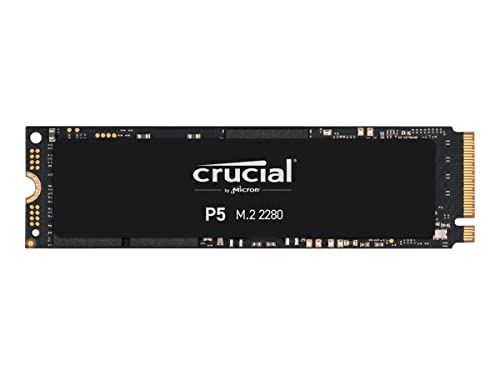
Crucial P5 1TB 3D NAND NVMe SSD – CT1000P5SSD8 Price comparison



- All prices mentioned above are in United States dollar.
- This product is available at Amazon.com.
- At amazon.com you can purchase Crucial P5 1TB 3D NAND NVMe Internal Gaming SSD, up to 3400MB/s - CT1000P5SSD8 for only $228.68
- The lowest price of Crucial P5 1TB 3D NAND NVMe Internal Gaming SSD, up to 3400MB/s - CT1000P5SSD8 was obtained on September 24, 2025 08:29.
Crucial P5 1TB 3D NAND NVMe SSD – CT1000P5SSD8 Price History
Crucial P5 1TB 3D NAND NVMe SSD – CT1000P5SSD8 Description
Crucial P5 1TB 3D NAND NVMe SSD – CT1000P5SSD8
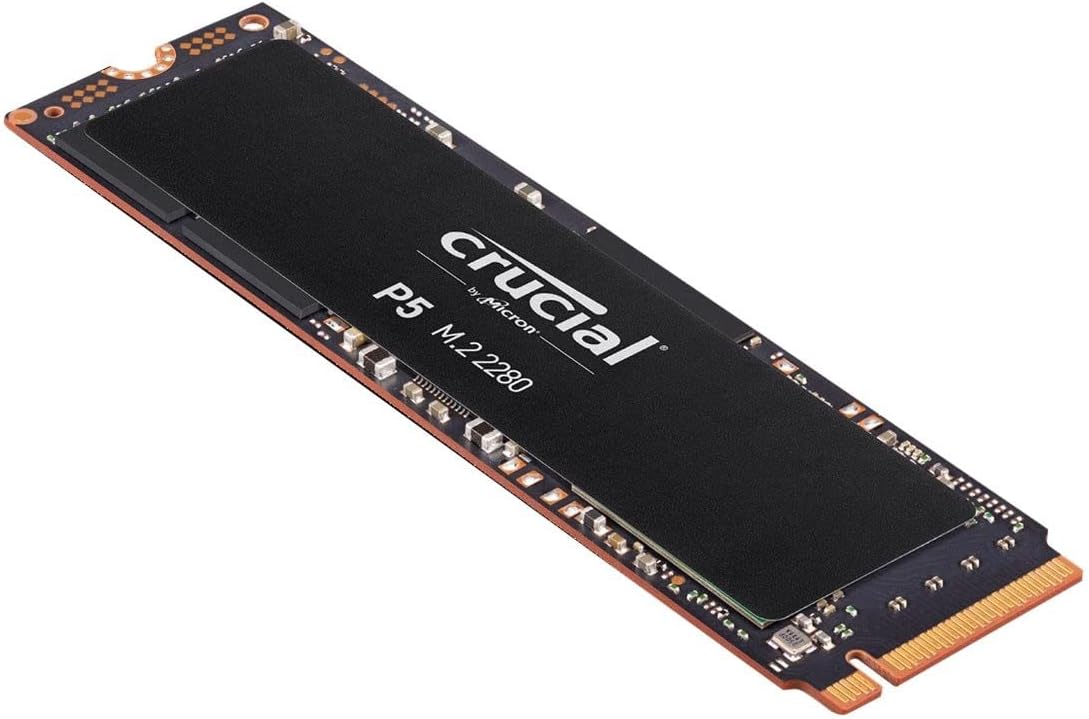
The Crucial P5 1TB 3D NAND NVMe SSD (CT1000P5SSD8) is engineered for gamers, professionals, and businesses seeking enhanced performance and reliability. With lightning-fast speeds and a compact design, this SSD elevates your computing experience, making it an essential component for anyone looking to upgrade their storage.
Exceptional Performance with Blazing Fast Speeds
- Read Speed: 3400 MB/s Experience rapid loading times and seamless multitasking.
- Write Speed: 3000 MB/s Quickly save large files and enjoy reliable performance under demanding workloads.
- Data Transfer Rate: 3400 MB/s Transfer data in seconds, reducing downtime and improving productivity.
Robust Storage Solution for All Your Needs
- Generous Capacity: With 1TB of storage, the Crucial P5 provides ample space for your operating system, applications, and multimedia files.
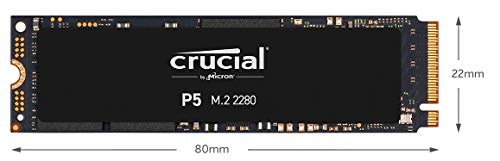
- Form Factor: M.2 Its compact design fits into thin laptops and desktops, ensuring versatile compatibility.
- Flash Memory Size: 1TB Ideal for gamers and professionals who handle large files or run multiple applications simultaneously.
Durability and Heat Management
The Crucial P5 SSD features advanced 3D NAND technology, providing improved durability and heat management compared to traditional SSDs. This ensures long-term reliability, helping to protect your data while maintaining peak performance across various operating systems, including PC, Linux, and Mac.
Competitive Pricing and Availability
When considering the Crucial P5 1TB SSD price, you’ll find it competitively priced across various suppliers. It provides excellent value for its exceptional performance and capabilities. The integrated pricing comparison tool allows you to view and analyze prices, ensuring you find the best deal possible.
Price Trend Insights
Based on the 6-month price history chart, the Crucial P5 has experienced a stable price with occasional promotional dips. This consistency speaks to its value in the market, ensuring that you won’t miss out during flash sales or discounts.
Customer Reviews Summarized
Customers have lauded the Crucial P5 1TB for its impressive speed and reliability. Many users, particularly gamers, appreciate the speedy load times and improved system responsiveness. Here are some highlights from customer feedback:
- Positive Aspects: Users report significant improvements in boot times and application launches, making it ideal for gaming and heavy software usage.
- Notable Drawbacks: A few buyers have noted that the installation process may require some technical knowledge, but overall, most found it straightforward.
Explore Unboxing and Review Videos
For those interested in seeing the product in action, there are several YouTube review and unboxing videos available. These clips provide a visual guide to the installation process and performance benchmarks, giving potential buyers a clear insight into what they can expect.
Why Choose the Crucial P5 SSD?
The Crucial P5 1TB NVMe SSD stands out as a premium choice for anyone needing fast, reliable storage. Its combination of high read/write speeds and a robust form factor makes it perfect for a range of uses, from casual browsing to intensive gaming and professional tasks. The 1TB capacity further ensures that you have enough space to store all your critical files and applications without worry.
Final Thoughts
In summary, if you’re looking to boost your system’s performance with a top-tier SSD, the Crucial P5 1TB NVMe SSD should be at the top of your list. With competitive pricing, favorable customer feedback, and robust technical specifications, upgrading your storage has never been easier or more beneficial. Compare prices now!
Crucial P5 1TB 3D NAND NVMe SSD – CT1000P5SSD8 Specification
Specification: Crucial P5 1TB 3D NAND NVMe SSD – CT1000P5SSD8
|
Crucial P5 1TB 3D NAND NVMe SSD – CT1000P5SSD8 Reviews (8)
8 reviews for Crucial P5 1TB 3D NAND NVMe SSD – CT1000P5SSD8
Only logged in customers who have purchased this product may leave a review.




Arnaud Valli –
J’ai récemment installé le Crucial CT1000P5SSD8 SSD Interne P5 1To dans mon système et je suis ravi des performances et de la fiabilité qu’il offre. Cet SSD M.2 2280SS basé sur la technologie NVMe PCIe et 3D NAND est un véritable changement de jeu pour toute personne souhaitant améliorer les performances de son ordinateur.
La première chose que j’ai remarquée est l’incroyable vitesse du Crucial P5. Grâce à l’interface NVMe et à la connexion PCIe, les vitesses de lecture et d’écriture sont impressionnantes, ce qui rend le démarrage, le chargement des applications et le transfert de fichiers incroyablement rapides.
L’endurance et la fiabilité sont également des points forts de ce SSD. La technologie 3D NAND contribue à prolonger la durée de vie du lecteur, même avec une utilisation intensive. Avec sa capacité de 1 To, le Crucial P5 offre beaucoup d’espace pour stocker des documents, des photos, des vidéos et des jeux.
En termes de facilité d’installation, le format M.2 2280SS du P5 le rend compatible avec la plupart des ordinateurs modernes, ce qui facilite grandement le processus.
En résumé, le Crucial CT1000P5SSD8 SSD Interne P5 1To est un excellent choix pour quiconque cherche à améliorer les performances et la capacité de stockage de son ordinateur. Il offre une combinaison impressionnante de vitesse, de fiabilité et de capacité, le tout dans un format compact et facile à installer. Je le recommande vivement.
Camila Marques –
Comprei para fazer upgrade no Dell G15 e instalei sem problemas, tem uma boa performance.
Miguel Ángel R. –
Lo encontré a buen precio y decidí comprarlo. Al fin voy a poder descargar todos los juegos que compro y que no me da tiempo de jugar.
A – Z –
One of the first things to know about the Crucial P5 NVMe drive is that Crucial is made by Micron (of Idaho), one of the leading memory chip makers in the world. They’ve been a consistent top performer for decades. Most of all, unlike other brands, you can know that all Crucial products consistently use Micron chips, so you can expect consistent, high performance results. (Brands switching the chips in their SSD’s is an industry problem at the time of this writing) The P5 drive – the top performer in their line – is designed for gaming, number crunching, video and other workstation tasks, so it was an easy choice for my system that would be doing all of that. And it didn’t disappoint. The build quality is excellent. It installed easily and has performed without a hitch since Day One. If you’re coming from anything less than a different high performance NVMe (and there are a couple of solid competitors), you WILL notice the zippy load times and data transfer times. Another nice feature – likely because Crucial is using their own chips – is that the price is very good for the size and performance of the drive. It isn’t dirt cheap, but it can be less than equally performing NVMe drives from big-name competitors. Personally, I bundled this with Ballistix RAM and have been very, very pleased with the flawless performance.
Jesus –
Va muy bien en el portatil
Aardvark –
What I learned so far:
Watch the price of this: it dropped $10 dollars the day after I ordered it (I cancelled & re-ordered it.)
The screw to attach it SHOULD have come with your system. It doesn’t come with the SSD because there are too many versions. Do use a magnetized screwdriver to attach it. Don’t go King Kong on it.
The Acronis “free” Clone program does work, but it is a SLOW, slow process… be very patient. The last “step” to disconnect the original source drive…. I’m NOT doing that! Instead, use your BIOS to set the new SSD as the FIRST boot drive and remove any HDD references (leave DVD & USB boots as alternates) Then use DRIVE Manager to set sames and drive letters.
The Crucial Executive Storage Tool; used it to increase speed and efficiency. Did not have any issues with it, although you can bollox things up if you ignore the warning… read the instructions!
This is not cutting edge tech so it’s not for super-gamers, but it’s a solid performer from a respected company.
In a few days, once I have some backups of the new boot drive I trust, I’ll reformat the original 1Tb HDD as a data drive.
Danger, Danger… Ignore my suggestion to not remove the Source Drive!! ALL Internal HDDs must be disconnected so the system will set the SSD as Drive 0 & as Primary on first boot! Before the next boot the HDDs can be reconnected.
Doing otherwise created a FrankenSystem, booting from the original 0 Drive then loading the OS from the SSD…. APPEARS TO WORK, but it is wrong..
Sh –
Ich habe die Crucial P5 2 TB SSD (CT2000P5SSD8) für mein QNAP TS-x64 NAS-System gekauft, und ich bin absolut zufrieden mit der Leistung und Zuverlässigkeit dieser SSD. Sie hat meine Erwartungen in jeder Hinsicht erfüllt.
Vorteile:
Schnelle Leistung: Die NVMe PCIe-Schnittstelle sorgt für beeindruckende Geschwindigkeiten, sowohl beim Lesen als auch beim Schreiben von Daten. Dies hat die Leistung meines NAS-Systems erheblich verbessert, insbesondere bei datenintensiven Anwendungen wie der Bearbeitung großer Dateien und dem Streaming von 4K-Inhalten.
Große Speicherkapazität: Mit 2 TB Speicherplatz bietet diese SSD reichlich Platz für meine umfangreiche Mediensammlung und wichtige Backups. Selbst bei intensiver Nutzung ist noch viel Platz für zukünftige Daten vorhanden.
Zuverlässigkeit: Crucial ist bekannt für seine langlebigen und zuverlässigen Speicherlösungen, und diese SSD ist keine Ausnahme. Seit der Installation läuft mein NAS-System stabil und ohne Probleme. Die 3D NAND-Technologie trägt zur hohen Zuverlässigkeit und Langlebigkeit bei.
Einfache Installation: Die Installation der SSD in meinem QNAP TS-x64 NAS war einfach und unkompliziert. Die SSD wurde sofort erkannt, und ich konnte sie schnell in mein System integrieren.
Leistungssteigerung: Durch die Verwendung dieser SSD als Cache oder Hauptspeicher in meinem NAS-System habe ich eine spürbare Verbesserung der Systemleistung und Reaktionszeit erlebt. Zugriffe auf Daten erfolgen schneller, und die allgemeine Benutzererfahrung ist deutlich flüssiger.
Fazit:
Die Crucial P5 2 TB SSD ist eine ausgezeichnete Wahl für jeden, der die Leistung seines NAS-Systems verbessern möchte. Sie bietet hohe Geschwindigkeiten, Zuverlässigkeit und viel Speicherplatz, was sie ideal für datenintensive Anwendungen macht. In meinem QNAP TS-x64 hat sie hervorragende Arbeit geleistet und meine Erwartungen voll erfüllt. Ich kann diese SSD jedem empfehlen, der eine leistungsstarke und zuverlässige Speicherlösung sucht.
W. Moore –
I have installed the Crucial PD M.2 SSD in 2 machines.
Before, I was booting from fast SSD’s, however the speed after replacing with these is amazing.
They are very easy to install, and going to Crucial website – you can get the free software to clone the original drive. They also have software to manage the M.2, which makes it faster and more efficient.
Some sites say you need to set the M.2 up as an external, to clone the original – I did not. I installed the M.2 drive in it’s slot, booted the machines regularly, and downloaded then ran the software. It setup the partitions to the size I selected (larger than the original drive in one case). It formatted the partition, cloned the software, and made it bootable. When it was done, I removed the original SSD to save as a backup. I rebooted with the P5 M.2, downloaded the management software, checked everything, and it works.
The boot time is not much better, because the original SSD’s I had were very fast, anyway, and it is a function of the peripherals such as connecting to the network.
But, the machines are now incredibly fast at all of the other operations with the P5 M.2 drives.
The only problem – – is that the screws to hold down the M.2 is not included. In my cases – the screws were different sizes for my 2 machines.
It took me way more time scrounging for the correct hold down screws than the rest of their installation.
If you want to know if I would recommend this – I will say, if your machine has a M.2 drive slot, and you’re not using it for a boot drive – YES!