
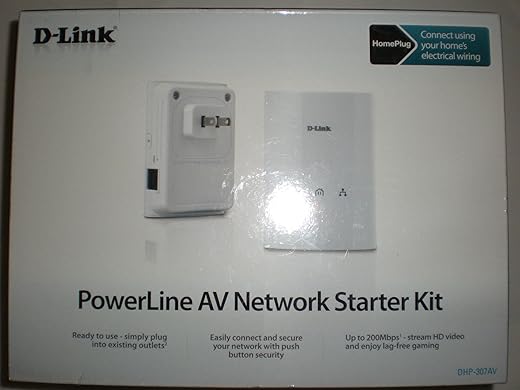
D-Link Powerline AV Network Adapter Kit DHP-307AV
$99.99
D-Link Powerline AV Network Adapter Kit DHP-307AV Price comparison

- All prices mentioned above are in United States dollar.
- This product is available at Amazon.com.
- At amazon.com you can purchase D-Link Powerline AV Network Adapter Kit (DHP-307AV) for only $74.99
- The lowest price of D-Link Powerline AV Network Adapter Kit (DHP-307AV) was obtained on October 16, 2026 05:58.
D-Link Powerline AV Network Adapter Kit DHP-307AV Price History
D-Link Powerline AV Network Adapter Kit DHP-307AV Description
D-Link Powerline AV Network Adapter Kit DHP-307AV
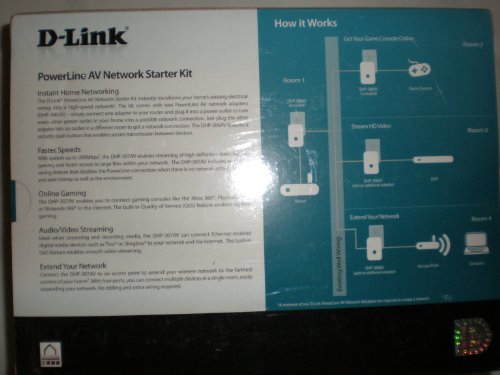
The D-Link Powerline AV Network Adapter Kit DHP-307AV is the ultimate solution for extending your network connection throughout your home or office. If you’re looking for a reliable way to achieve stable internet connectivity in hard-to-reach areas, this product will exceed your expectations. Check prices and explore reviews for the DHP-307AV to see why it’s trending in home networking solutions!
Key Features of the D-Link Powerline AV Network Adapter Kit
- High-Speed Connectivity: With data transfer speeds of up to 200 Mbps, the DHP-307AV ensures smooth streaming and fast downloads.
- Easy Setup: No complicated configuration is needed. Simply plug in the adapter, and you’re ready to go!
- Compact Design: Measuring just 1.68 x 2.75 x 3.92 inches, this adapter is small and unobtrusive, fitting easily into any environment.
- Secure Connection: Provides 128-bit AES encryption to keep your internet connection secure from unauthorized access.
- Versatile Compatibility: Ideal for various devices, including smart TVs, gaming consoles, and computers.
- Power Saving Mode: Automatically reduces energy consumption when not in use, making it an environmentally-friendly choice.
Price Comparison Across Retailers
The D-Link DHP-307AV is competitively priced across various suppliers. Currently, you’ll find it listed at different rates depending on the retailer, which allows you to compare prices effectively. Regularly check the price comparison feature on our website to find the best deal suited for your budget.
6-Month Price History Trends
Over the last six months, the price of the D-Link DHP-307AV has shown a trend of stability with slight fluctuations. Customers can take advantage of current pricing before any potential increases. Staying informed with our price history chart helps you make a wise purchasing decision.
Customer Reviews and Feedback
- Positive Aspects: Many users praise the DHP-307AV for its reliable performance and ease of setup. The device is noted for providing a strong and stable connection in areas that previously experienced poor Wi-Fi signals.
- Drawbacks: Some customers report occasional connectivity drops, particularly in homes with several connected devices. However, the majority find the performance satisfactory, especially given its affordability.
Explore Unboxing and Review Videos
For a deeper dive into the D-Link Powerline AV Network Adapter Kit, several unboxing and review videos are available on YouTube. These videos offer practical insights and real-world testing experiences that reveal how well this product functions in typical household and office environments. Check out these resources to further validate your purchase decision.
In conclusion, the D-Link Powerline AV Network Adapter Kit DHP-307AV stands out as an exceptional choice for anyone seeking to enhance their home or office network without the hassle of complex installations. With its robust features and positive customer feedback, it is a smart investment for reliable internet connection. Don’t miss out on the opportunity to improve your connectivity—compare prices now!
D-Link Powerline AV Network Adapter Kit DHP-307AV Specification
Specification: D-Link Powerline AV Network Adapter Kit DHP-307AV
|
D-Link Powerline AV Network Adapter Kit DHP-307AV Reviews (4)
4 reviews for D-Link Powerline AV Network Adapter Kit DHP-307AV
Only logged in customers who have purchased this product may leave a review.






Whitney Jenson –
We have plaster walls and therefore not WiFi friendly. My son kept getting disconnected while playing his Xbox and literally got “punished” for leaving live matches. (He was not allowed to play for a period of time) A friend mentioned these as an alternative to hard wiring and wow, very impressed. Easy set up, total plug and play. I did no reconfiguring or update of firmware. I just opened the box and walla! Doesn’t put out the speed it says it can, but it’s fast enough for keeping the Xbox online and game play much quicker! I would recommend them.
Thor BiNe –
I purchased the D-Link Powerline AV Network Adapter Kit DHP-307AV and installed one to my Fios router with 35mbps from my basement and the other to my living room where the PS3 is located. The first day, it worked like magic. I was getting more than half of the advertised ‘Speeds up to 200Mbps’. Every single day that pass, I was getting slower and slower. After a week, it reboots itself and would take a while to reconnect but this time the speed is 5 and below. I tried the reset button and it worked sometimes. I also tried to unplug and reconnect and it seems to work less than half the time. But I would not want to do that every time the connection is lost. Also, It disrupted 2 of my most important ‘work connected’ machines. I would recommend this product to someone who knows how to assign static IP to individual machines/gadgets connecting to the internet and to someone who has the patience to unplug and reconnect the adapter.D-Link Powerline AV Network Adapter Kit DHP-307AV
mike newlander –
Background: I recently built a detached shop (metal sided) which is about 70 feet from the main house. Wireless reception for both cell phones and wireless router was OK when the garage doors were open but once they closed, dropped off. I purchased the DHP-307 AV thinking i could bring internet to my detached shop but achieved marginal success. It seemed to work fine inside the house, but the shop got intermittent connectivity with a lot of drop outs. Bottom line, seems like a good product to use in a single building, size probably matters.
My experience with the On Sale however was not so good.
I purchased the DHP 307 AV and got the a good price and the product arrived on time. Thinking maybe i had a bad unit, i decided to exchange the product for another one, that’s when things got annoying. I contacted On Sale for return instructions received instructions in “Ching-glish” . It took 2 more emails to finally understand them! All follow on communications were about the same. Once On Sale had received my return, they claimed that i returned a DHP 306 in the DHP 307 box and they wanted the DHP 307 back. I don’t know if a DHP 306 even exist. After several cryptic mails from them, i decided to cancel the order. I will update this review if my account isn’t credited in a day or two. Bottom line, be aware of possible communication issues if you have to deal directly with On Sale.
Chris –
I know this product already has good reviews and I wanted to just share my story/2 cents on it as well. I’ve been using Wifi in my house for years now. I have been running my desktop PC’s off our Wifi since the start. My last PC was only running Wireless G but performed great. I was even playing games like CoD MF 1 & 2 along with other editions and never had real lag issues.
I built a newer PC and have tried Wireless N usb and PCI adapters. I was getting fair signal and my speeds were fine, but I built this PC to run Battlefield 3 which it did without issue. However in the online multiplayer, even on servers with 18ms ping times, I would often experience some lag multiple times each match. It was driving me up a wall because I knew my Wifi strength was good and even purchased a signal boosting antenna. All my efforts couldn’t help with the lag but everything else was fine on the PC.
Then I read in some forums how WiFi typically operates in a half-duplex mode where it essentially can’t send and receive packets at the same time. I thought maybe that had something to do with things and that my new game just requires more packets to be sent and received than previous online shooters. I purchased the D-Link powerline unit and couldn’t be happier. I don’t recall if it’s my PC NIC or cables that are limiting my connection to 100MBps, but I know the product says it does up to 200MBps.
Either way, even at half the max speed everything works great. No more lag in the game and this product was so easy to setup as most others should be too. I’ve ditched the WiFi hassle on my new desktop and would recommend this product or others if you ever come across serious issues. I should also mention that my speedtest.net bandwidth performance didn’t change between WiFi and this portline unit. That’s why I’m left to believe it wasn’t my connection causing lag issues.
I’m not the homeowner in my house and our modem is across the house and I wouldn’t have any easy way to run a LAN cable to my PC location. I was really just stuck with doing LAN over Power or trying to move my modem. Since the cable company installed a phone/internet modem and had some special wiring into our phone port, I didn’t want to risk trying to relocate the modem to a closer room which I could then run a LAN cable to. It may not be the most practical reason to buy one of these units, but it sure helped my cause and I figure I can always use this unit or expand off the 2 adapters I have in the future.