
 Amazon.com
LIONWEI 9-In-1 USB C Docking Station Price comparison

- All prices mentioned above are in United States dollar.
- At amazon.com you can purchase LIONWEI 9-in-1 USB C Docking Station Dual Monitor, Triple Display - 2 HDMI, DisplayPort, PD, 3 USB, SD/TF Card Reader for only
- The lowest price of LIONWEI 9-in-1 USB C Docking Station Dual Monitor, Triple Display - 2 HDMI, DisplayPort, PD, 3 USB, SD/TF Card Reader was obtained on September 24, 2025 06:53.
LIONWEI 9-In-1 USB C Docking Station Price History
LIONWEI 9-In-1 USB C Docking Station Description
LIONWEI 9-In-1 USB C Docking Station Overview
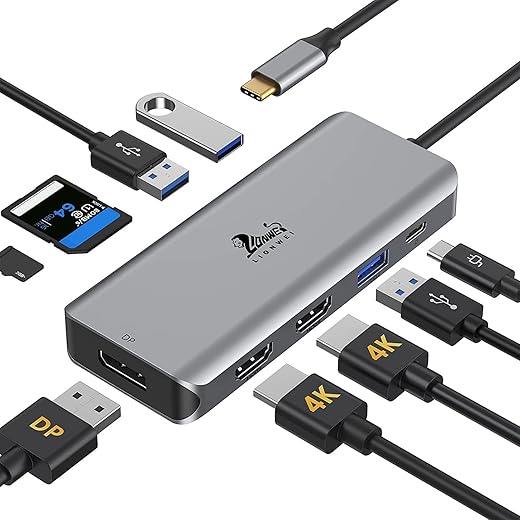
The LIONWEI 9-In-1 USB C Docking Station is the ultimate solution for expanding your device’s connectivity effortlessly. This multifunctional hub is designed for users who demand versatility and high performance, making it the ideal partner for laptops, tablets, and other compatible devices.
Key Features and Benefits
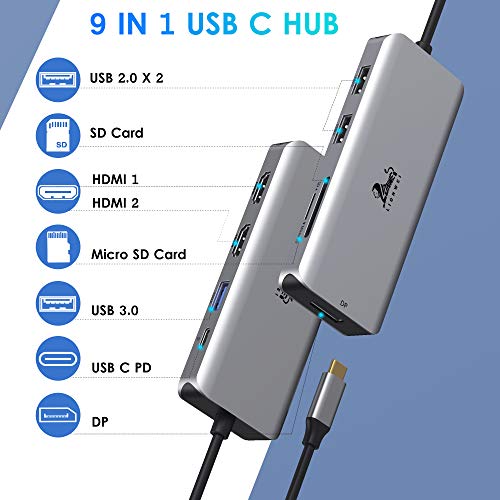
- Multiple Ports: With 9 different ports including HDMI, USB 3.0, and Ethernet, you can connect various devices simultaneously, enhancing your productivity.
- 4K HDMI Output: Experience stunning visuals with support for 4K at 30Hz, ensuring vibrant and high-definition display quality for presentations or entertainment.
- Fast Data Transfer: USB 3.0 ports enable data transfer speeds of up to 5Gbps, allowing you to move large files quickly and efficiently.
- Power Delivery: Charge your devices while using the docking station with 87W Power Delivery, providing fast charging without compromising on performance.
- Compact Design: Portable and lightweight, the LIONWEI docking station can easily fit into your laptop bag, making it perfect for on-the-go users.
- Reliable Ethernet Connection: Enjoy stable internet access with the built-in Ethernet port, ideal for remote work and online gaming.
- Plug and Play: No complicated software required; simply plug it into your device and start using it right away.
- Durable Build: Designed with high-quality materials to ensure longevity and resistance to wear and tear.
Price Comparison Across Suppliers
The LIONWEI 9-In-1 USB C Docking Station is competitively priced across various suppliers. Currently, you can find prices ranging from $89.99 to $109.99, depending on the retailer. This makes it a cost-effective option when you consider the extensive functionality you receive.
6-Month Price History Trends
According to our 6-month price history chart, the LIONWEI docking station has seen a steady price range, with occasional promotions reducing the price to as low as $85. This trend indicates that now might be an excellent time to invest in this essential accessory.
Customer Reviews and Insights
Customer feedback highlights the effectiveness of the LIONWEI 9-In-1 USB C Docking Station. Many users appreciate the build quality and the wide array of ports, making it easy to connect multiple devices. Positive reviews often note:
- Exceptional performance with 4K output.
- Fast and reliable data transfer capabilities.
- Compact and portable design for travel.
However, a few users have mentioned minor drawbacks, such as the heat generated during extended use. While this is typical for similar devices, it’s something to consider if you plan to use it for long periods.
Explore Reviews and Unboxing Videos
Many customers have documented their experiences with the LIONWEI 9-In-1 USB C Docking Station through unboxing and review videos on platforms like YouTube. These videos offer in-depth looks at the product’s performance and setup, giving potential buyers valuable insights before making a purchase decision.
Why Choose the LIONWEI Docking Station?
Investing in the LIONWEI 9-In-1 USB C Docking Station means you are choosing versatility, performance, and reliability. Its range of features makes it suitable for professionals, students, and everyday users who need a reliable solution to enhance their device capabilities.
Order Yours Today!
Don’t miss out on this opportunity to simplify your tech setup. Compare prices now and find the best deal for the LIONWEI 9-In-1 USB C Docking Station!
LIONWEI 9-In-1 USB C Docking Station Reviews (11)
11 reviews for LIONWEI 9-In-1 USB C Docking Station
Only logged in customers who have purchased this product may leave a review.





Nikko Torres –
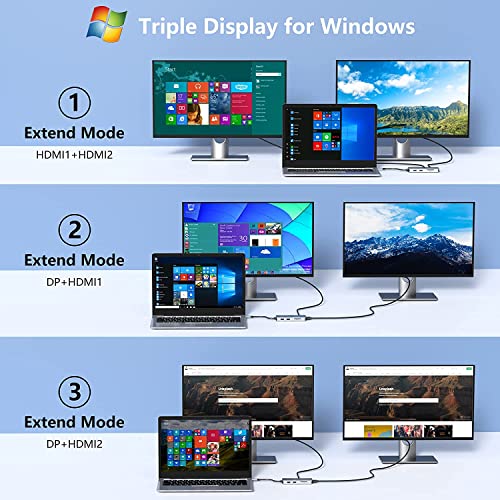
I’ve purchased 3 of these in the past 3 years since I have multiple “workstations” at different houses. Works well with my Dell XPS-13, but be sure to pay attention to the pictures and description to ensure it will fit your needs as it’s “Triple Screen” modes will differ depending on your hardware (PC, MacBook, GPU settings, etc.). The most recent purchase I made had an issue where HDMI Port 2 stopped working. I confirmed this by swapping it out with another dongle (same product, just purchased at a different time). Seeing as how it was less than a year since purchasing, I reached out to customer support to see if they could help me…I honestly had low expectations and wasn’t expecting a response since it’s an overseas company (probably across the world in China) but they actually responded early the next morning! Customer support was helpful and had me follow some simple troubleshooting instructions to confirm the dongle was in-fact defective and so they sent me a brand new replacement which is working great. Very happy with this product and the customer support. I do agree with the other reviewers that after a full 8 hour work day, the dongle does feel warm to the touch but even my oldest dongle from 3 years ago is still working fine so I don’t have an issue with it.
McCarthy’s Roofing –
This product works as advertised
Easily setup two external hdmi monitors and a few usb accessories
Sly Like a Fox Howls Like a Wolf –
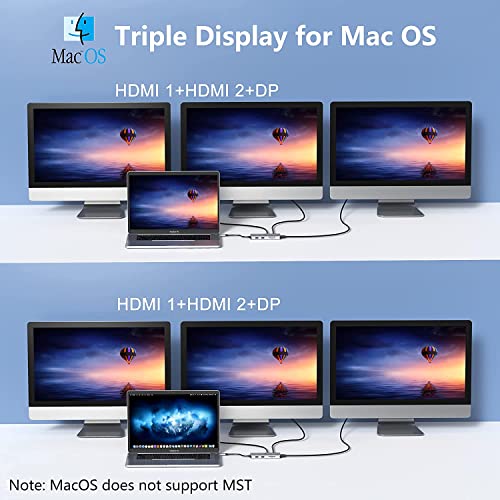
I have an HP Spectre x360 (listed in supported devices here on amazon and in their attached PDF) with a Thunderbolt 3 port which according to the above information should support 2 external monitors via their HDMI 2.0 ports at 4K@30hz.
My laptop runs both my existing monitors extended desktop at 4k@60hz when plugged directly into my laptop via 1 thunderbolt and the other HDMI with my laptop’s screen working fine when open also at 4k@60hz; so my graphics chipset can extend 3 x 4k@60hz just fine. I really need two screens running at 4k@30Hz. However, this hub fails to do so even though it’s quoted at being capable and compatible of doing so:
Copied from above product description “This usb c hub dual monitor adapter presents an Ultra-High-Definition video through 1HDMI for 4K 3840*2160@60Hz, 2HDMI for 4K 3840*2160@30Hz”
First time I plugged the unit (powered with USB-C @ 90watts) into my laptop with my monitors already plugged into the hub’s HDMI ports, one was flipped to 2k@60hz [max] and the other to 1080P@30hz [max], these setting were not updatable beyond these “maxes” in Windows Display Settings.
I then tried unplugging the hub and plugging it back in. This time one monitor could go up to 4K@30Hz but the other is stuck at 800×600@60hz! I tried repeatedly unplugging the hub and plugging it back in AND unplugging each HDMI cable and plugging them back in – with the same terrible results of the lower resolution. Display Settings allows the 4K screen’s resolution to be lowered but the 800×600 resolution AND refresh rate cannot be changed when plugged into the hub.
Each time the hub is plugged into the laptop takes quite a while for the screens to come on vs when plugged directly into the laptop. The hub introduces significant latency to the system also experienced with my wireless keyboard and mouse when plugged into the hub – but no latency issues on my super old Rosewill USBS hub.
KGarcias –
I really liked this item and used it for over a year without issue, but then it randomly quit working. Two of the ports no longer recognized the item they were being used for so I had to order another product. I was happy with it while it worked.
Richard Dale –
Great and reasonably priced. It works with all notebook computers
Charlie Klunder –
I got this Hub to extend my Surface Pro 7 to two external displays. When I got it, it worked great. My setup consisted of the hub plugged into my computer via a USB-C and the Hub breaks out into two HDMI ports for my external monitors, a keyboard, and a wired mouse. The Hub allows all to work simultaneously. After a while the Hub ceased facilitating both monitors. Only one HDMI port was working and only one monitor (the one plugged into the working port) would display anything. I contacted their customer support and after helping me to troubleshoot the problem on the software side (which unfortunately seemed not to be the problem) they sent me a new one and it works just fine.
Dragos Robu –
I had issues with the HDMI ports on the first one, but Lionwei support was outstanding, quick response and they sent me another one that works perfectly. I will be purchasing more of their products over time!
Traxman32 –
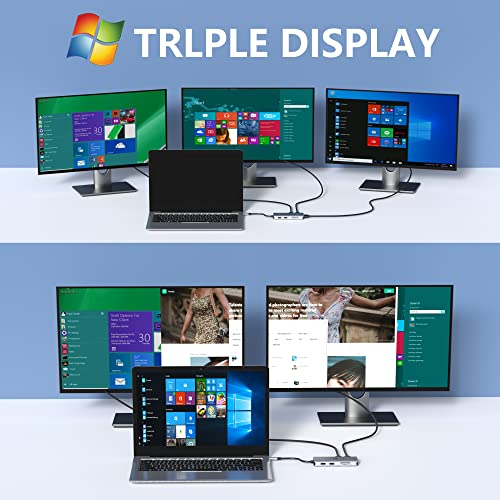
I’ve been using this for a long time now, it works great! I have it connected now to my work laptop (Lenovo) and I have 4 monitors running, all run just fine. For power, I’ve got an old Dell power brick (USB-C) connected to it, works fine, keeps my laptop charged, even though my laptop is a different brand. I’d definitely recommend this to my friends and coworkers.
Yoitzme –
Great fit, that’s all i needed. All 3 displays are working fine.
Eduardo –
This USB-C docking station is a very simple device and works great. I bough it to easily switch between my wife’s and my computer at home to share the same monitor, mouse and keyboard when working from home.
The only problem I had was that my wife’s computer cannot either charge the battery or connect monitors through USB-C, what did not helped me to meet my objective (but it is a computer problem not the docking station).
So MAKE SURE WHAT YOUR COMPUTER is able to connect via USB-C before buying the device.
Asmodahlia –
It works seamlessly as long as you follow the instructions for downloading the driver before attempting to use. I could see this being very useful to many. However, it didn’t work with my particular setup because one of my two monitors requires a refresh rate over 60 Hz, which appears to be throttled by this hub. If you plug your monitor in and it turns on but the screen looks glitchy or flashes black intermittently, this is likely the case for you as well. You may be able to fix it by adjusting the refresh rate manually, but the highest it can go appears to be 60 Hz, so if your monitor requires more than that this will likely not function for you.
That being said, it should still be a perfect fit for most users, particularly business users (my monitor just happens to be a high-end gaming monitor, which would not usually be the case for most).