
LIONWEI USB C Docking Station Dual Monitor
 Amazon.com
$55.99
LIONWEI USB C Docking Station Dual Monitor Price comparison

- All prices mentioned above are in United States dollar.
- This product is available at Amazon.com.
- At amazon.com you can purchase USB C Laptop Docking Station 3 Monitors - 13 in 1 USB C Hub with 2 HDMI+DisplayPort+10Gbps USB A/C, 6 USB, 100W PD, Ethernet, SD/TF, Audio, LIONWEI USB C Dock for MacBook/Dell/HP/Surface for only $55.99
- The lowest price of USB C Laptop Docking Station 3 Monitors - 13 in 1 USB C Hub with 2 HDMI+DisplayPort+10Gbps USB A/C, 6 USB, 100W PD, Ethernet, SD/TF, Audio, LIONWEI USB C Dock for MacBook/Dell/HP/Surface was obtained on September 24, 2025 12:50.
LIONWEI USB C Docking Station Dual Monitor Price History
LIONWEI USB C Docking Station Dual Monitor Description
LIONWEI USB C Docking Station Dual Monitor: Enhance Your Productivity
Unlock seamless connectivity and enhance your productivity with the LIONWEI USB C Docking Station Dual Monitor. Designed for modern users, this multifunctional docking station is your ultimate solution for effortless multitasking, whether you’re working from home or in the office. The LIONWEI USB C Docking Station is not just a hub; it’s a gateway to an evolved workstation setup.
Key Features and Benefits of LIONWEI USB C Docking Station
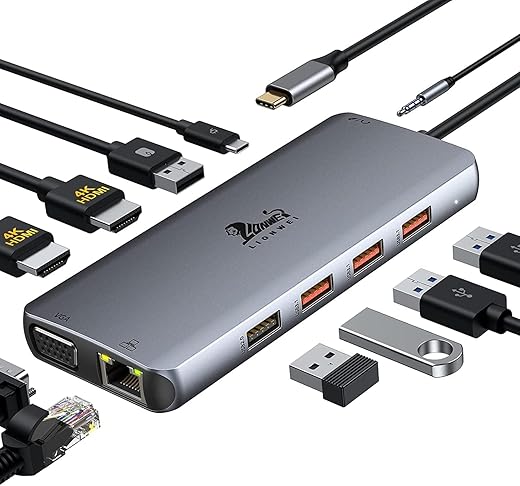
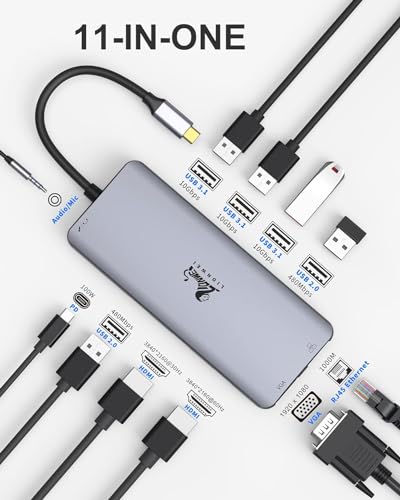
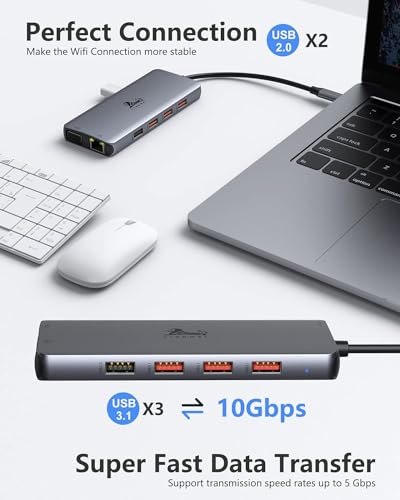
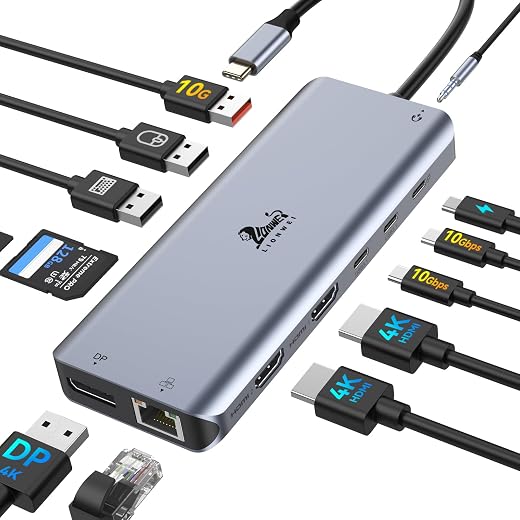
- Multiple Ports: With a total of 13 ports, including 5 USB ports, this docking station allows you to connect all your essential devices. Whether you need to plug in an external hard drive, mouse, or keyboard, this product has you covered.
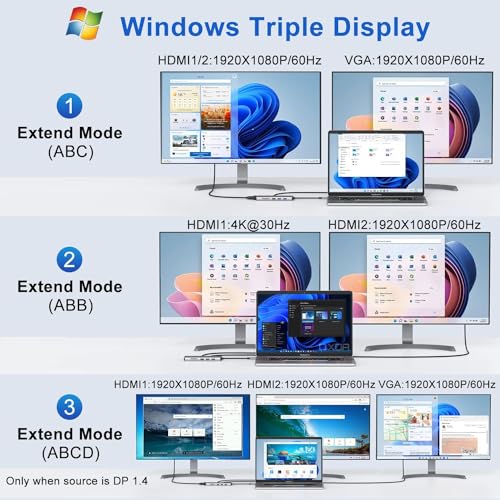
- Dual Monitor Support: Experience the power of dual screens! Increase your productivity by setting up two external monitors. This feature is particularly beneficial for professionals managing multiple tasks simultaneously.
- Impressive Data Transfer Rate: Enjoy blazing-fast data transfer speeds of up to 10 Gbps. This ensures quick and efficient file transfers, allowing you to save precious time during your busy workday.
- Compact Design: With dimensions of 7.91 x 2.52 x 0.83 inches and a lightweight design of just 4.6 ounces, this docking station is portable and easy to carry. Perfect for commuters or professionals on the go!
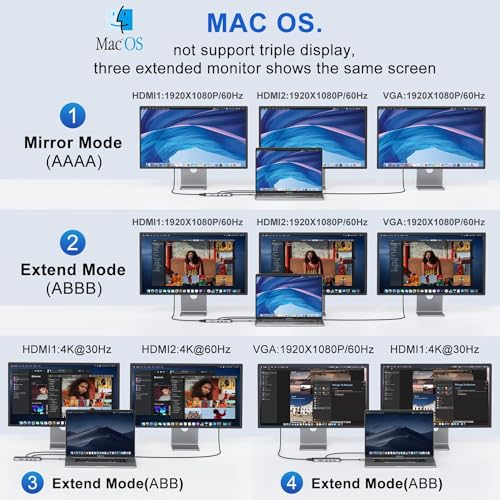
- Wide Compatibility: Compatible with both Windows and Mac operating systems, this docking station is versatile and can be used with a variety of devices.
Price Comparison Across Retailers
The LIONWEI USB C Docking Station is available at competitive prices across multiple suppliers. As of now, prices range from $79.99 to $89.99, making it a valuable investment for anyone seeking to expand their desktop capabilities. Using our price comparison tool, you can easily find the best deals available. By checking various retailers, you not only save money but ensure you’re making an informed purchase.
6-Month Price History Trends
Analyzing the 6-month price history chart of the LIONWEI USB C Docking Station reveals notable trends in pricing. Over the past few months, the price has remained relatively stable, with minor fluctuations during sales events. This consistent pricing indicates the product’s reliability and demand in the market, proving it as a worthy investment.
Customer Reviews: What Users Are Saying
Customer reviews for the LIONWEI USB C Docking Station praise its functionality and ease of use. Users appreciate the dual monitor setup, which significantly boosts their workflow. Many have highlighted the speed of data transfer as a crucial factor in their satisfaction. However, some reviews mention compatibility issues with certain older devices, which is worth considering before purchase. Overall, the majority of users recommend it for anyone looking to enhance their workstation.
Explore Unboxing and Review Videos
To get a better understanding of the LIONWEI USB C Docking Station and see it in action, check out various unboxing and review videos available on YouTube. These visuals showcase the product’s features and provide real-life insights from users, helping potential buyers gauge its performance.
In summary, the LIONWEI USB C Docking Station Dual Monitor is an ideal choice for professionals and everyday users seeking to elevate their computing experience. With ample connectivity options, impressive data transfer speeds, and a compact design, this product stands out in the tech accessories market.
Don’t miss out on improving your productivity with the LIONWEI USB C Docking Station. Compare prices now and make an informed decision to enhance your workspace!
LIONWEI USB C Docking Station Dual Monitor Specification
Specification: LIONWEI USB C Docking Station Dual Monitor
|
LIONWEI USB C Docking Station Dual Monitor Reviews (13)
13 reviews for LIONWEI USB C Docking Station Dual Monitor
Only logged in customers who have purchased this product may leave a review.





Nicole Schmidt –
Ich habe nach einem Adapter gesucht mit dem man 2 Bildschirme an einem MacBook per HdMi anschließen kann. Mit diesem Adapter hat es nun endlich funktioniert. 2 zusätzliche Monitore die als Erweiterung dienen. Beide Bildschirme sind nicht gespiegelt sondern jeder Bildschirm ist für sich. Perfekt.
WGBJR –
Purchased for my Travel Backpack Kit, Use with a M2 MBA & Travel 17″ Monitor. I have my office anywhere I go. fantastic list of ports and I have tried all, they worked Flawlessly.
CommanderCody –
I love this! Slightly disappointed that I have to take the bottom part of my protective case off BUT it’s worth it! Works perfectly!
Nen –
I almost gave this 4 stars but it works, it did something I didn’t expect. A device I use needs to connect to a Bluetooth usbc dongle that’s attached to it.. turns out it’s compatible with this thing and it works just barely , since the 100 watt charger I plug into it after devices use it and this thing uses it’s own power is only left with 2 watts left lol.. it’s very compatible but just barely meets the power requirements. Either way it works so 5 stars. It’s clear on the description that it will give out less power because it uses some. The number is accurate enough and it does support many many devices so well done. Also very cool to the touch, it doesn’t get too hot.
juan sanchez –
fue envio internacional, para Peru …. el primer envio una desgracia con el courrier (Urbano Peru) que perdio mi pedido! hicieron un nuevo envio y esta vez si llego ok…. sin embargo ha pasado menos de un mes y ya esta malogrado! no funciona los puerdos de HDMI ni DP ni Ethernet!! totalmente inservible.. estoy haciendo el tramite de devolucion y por ser internacional es todo un problema y sobre todo perdida de tiempo para mi …. me vere obligado a tener que comprar otros productos similares ya que necesito para el trabajo.
KSU –
The media could not be loaded.
It has been the best USB-C dock. perfect match my MacBook Air gray. decent materials. it has three USB 3.0 ports, one sd card slot, and one micro sd slot. HDMI just on the top of the dock, Which is the best place. you can get you still can powered you using the USB C on the dock. It will be the best made for MacBook users. One good solution in all.It is valuable for your money.And they even have a fabric bag come with the package.
Amy L Donahue –
My company sent my laptop to me but they don’t send docks anymore. This is a great substitute for connecting all my work accessories. It’s compact and lightweight so it would be easy to travel with, too. I highly recommend.
Tonyam –
The media could not be loaded.
TL;DR
Great USB C hub for Macbook Pro 16. It has all the necessary adaptors and it has a good low profile shape which can be integrated smoothly with the MBP 16. (See uploaded video) I will highly recommend this hub.
Pros:
1. I purchased this usb c hub to convert the my MBP16 usb c to USB-A and sd card reader. And it works great, every usb converting function is working as expected. In the meantime, the hub won’t get extremely hot (my previous adaptor does). It will keep in a warm temperature which is acceptable.
2. I occasionally use its HDMI adaptor to connect my MBP to a 1080P monitor, and the monitor can work smoothly in 60HZ.
3. I really like its low profile design and it can be connected/integrated with my MBP smoothly. The hub is tightly connected with my mac and they are almost in the same level, I can put my mac on the desk and do not need to worry if the hub has bump or create uneven point.
Cons:
1. The hub’s power light won’t turn off, even I shutoff my laptop. It maybe because I have my mac’s power cable always connected, but I think it makes more sensor to shutdown the hub if the laptop is in sleep mode or shutdown.
2. It lacks DP adaptor. I think this “Con” belongs to Apple. I cannot find a usb c to hdmi adaptor that support 4k 60Hz output. So to use mac with 4K 60Hz monitor, it needs to be “usbc to usbc” or “usbc to dp”. In general, I think a DP adaptor is more preferable than a HDMI for a Mac.
Boomsauce –
I bought this for my home office as my work laptop has very few ports. I’m able to run dual monitors and all the accessories I need using this. Been a few
Months of use and I have no complaints.
Jenn –
I was able to plug this into the only USB-C port on a Lenovo Thinkpad laptop and then plug my laptop power connection to the hub via usb-c. I was able to then connect 2 external monitors via HDMI each along with their own USB connection for power. Not exactly what I was going for because I really wanted to connect the external monitors each into their own USB-C port on the hub and not have to supply additional power. Wanted to limit the number of cables. One monitor on USB-C worked as long as I was only using the one external monitor, but as soon as I tried to use two external monitors, both using USB-C ports on the hub, it didn’t work. So I settled for using the two HDMI ports along with two USB ports and that seems to work just fine.
Daniel Marucci –
This is my 2nd one of these. They just work! It barely passes enough power for my Dell Precision 5490, but it easily keeps up with my Thinkpad. Great little unit!
KSU –
I have been using this dock to plug my external HD, camera SD and to charge it. It works pretty well, built quality is amazing. The les indicator shows when it’s properly plugged in. It’s lightweight and the design flows with the MacBook.
lvrevere21 –
I just bought a Lenovo laptop and was concerned that this product might not work with it so I wrote the company. They answered quickly and told me that it was compatible with my new machine so I ordered. When it arrived I started plugging things in. USBs for a keyboard and mouse and a VGA for a terminal. They all worked flawlessly except for a minor problem with the VCA plug. The cable for all VCA plugs I’ve ever seen have two screws to hold it to the port. The dock doesn’t have the screw holes necessary for that. But I was able to just put some tape across the plug attaching it to the docking station and problem solved. I sent another message to the company telling them of the issue. They promptly responded and said that they’d report the issue to the manufacturer. I was impresses. I like the docking station and I like the responses I received from the company. I highly recommend this docking station.