
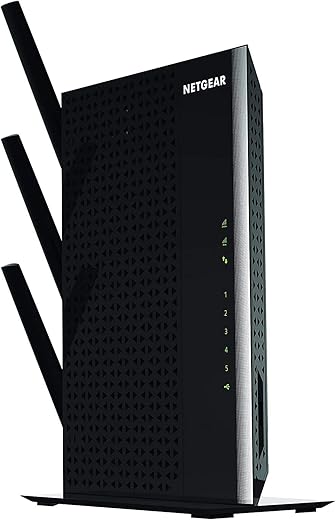
NETGEAR WiFi Mesh Range Extender EX7000

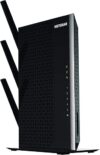
$80.00
NETGEAR WiFi Mesh Range Extender EX7000 Price comparison


- All prices mentioned above are in United States dollar.
- This product is available at Amazon.com.
- At amazon.com you can purchase NETGEAR WiFi Mesh Range Extender EX7000 - Coverage up to 2100 sq.ft. and 35 Devices with AC1900 Dual Band Wireless Signal Booster & Repeater (up to 1900Mbps Speed), Plus Mesh Smart Roaming for only $243.76
- The lowest price of NETGEAR WiFi Mesh Range Extender EX7000 - Coverage up to 2100 sq.ft. and 35 Devices with AC1900 Dual Band Wireless Signal Booster & Repeater (up to 1900Mbps Speed), Plus Mesh Smart Roaming was obtained on September 11, 2026 10:06.
NETGEAR WiFi Mesh Range Extender EX7000 Price History
NETGEAR WiFi Mesh Range Extender EX7000 Description
NETGEAR WiFi Mesh Range Extender EX7000 – Ultimate Wireless Coverage
Boost your home network with the NETGEAR WiFi Mesh Range Extender EX7000. Known for its expansive coverage and reliable performance, this extender is an excellent choice for anyone looking to eliminate dead zones in their home or office. In this description, we will delve into its key features, benefits, and how it stands out against competitors in price and performance.
Key Features and Benefits of NETGEAR EX7000
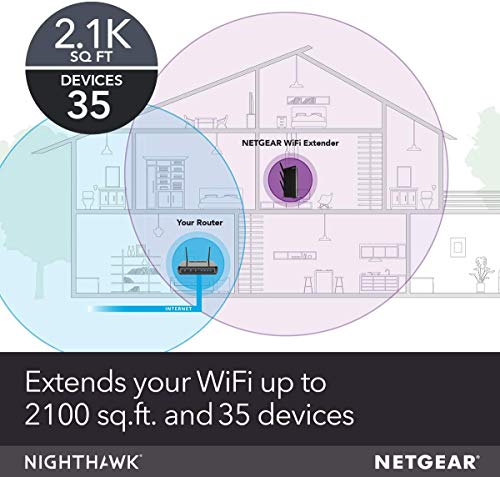
- Extended WiFi Range: The NETGEAR EX7000 can extend WiFi coverage up to 2,500 square feet, ensuring seamless internet access in large homes and offices.
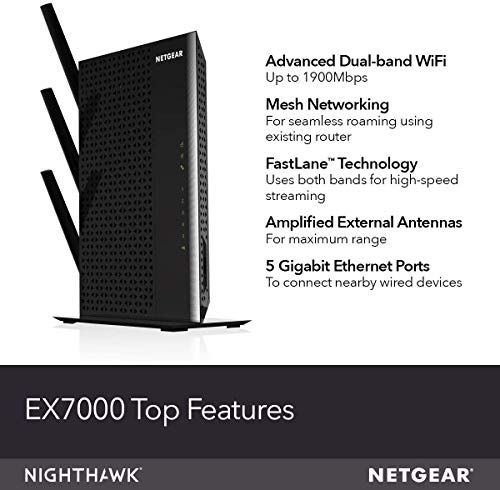
- High Speeds: With speeds of up to 1900Mbps, enjoy lag-free streaming, online gaming, and fast downloads.
- Dual Band Technology: The range extender operates on both 2.4Ghz and 5Ghz frequencies, providing dual-band WiFi for optimal performance.
- Smart Connect Technology: This feature intelligently selects the best band for each device, ensuring maximum speed and reliability.
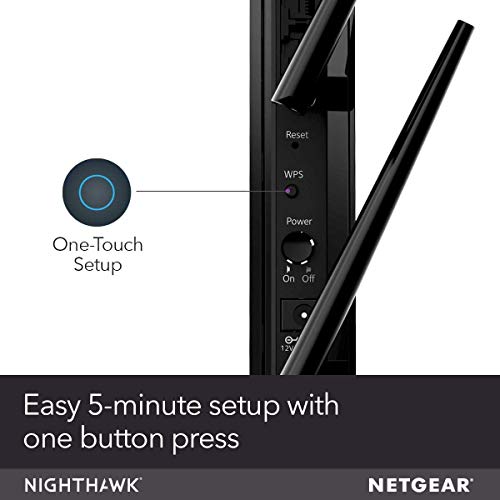
- Easy Setup: The simple 1-press WPS setup means you can start enjoying improved WiFi coverage in just minutes.
- 1 USB 3.0 Port: Connect your external hard drives or printers for shared access across your network.
- Five Gigabit Ethernet Ports: Perfect for wired connections to devices like gaming consoles and smart TVs, ensuring high-speed connections.
Price Comparison Across Suppliers
The NETGEAR WiFi Mesh Range Extender EX7000 is competitively priced across various retailers. On average, you can find this extender for about $129.99. However, prices may vary, so be sure to compare across different suppliers to find the best deal. Check out various platforms like Amazon and local electronics stores to see if any promotions might be available.
Price History Trends
Our 6-month price history chart indicates that the price of the NETGEAR EX7000 has fluctuated slightly, with the lowest prices reported around $119.99 during promotional sales. Such trends suggest that waiting for discounts may lead to significant savings, especially during holiday sales.
Customer Reviews and Insights
Customer feedback for the NETGEAR WiFi Mesh Range Extender EX7000 has been overwhelmingly positive. Users praise its reliability and ease of installation. Many reviews highlight how effectively it eliminates WiFi dead zones and enhances overall internet speed. Here are some key takeaways:
- Positive Aspects: Users often report a substantial increase in coverage area and faster speeds after installation. Many appreciate the dual-band feature, which allows for optimal performance on multiple devices.
- Noted Drawbacks: Some customers have experienced connectivity issues with older devices. A few reviews mentioned that the range could still be limited depending on the home layout and building materials used.
Explore Reviews and Unboxing Videos
For those looking for a deeper understanding of the NETGEAR EX7000, numerous unboxing and review videos are available on YouTube. These resources can guide you through the setup process and demonstrate the performance in real-time, providing valuable insights into its functionalities and features.
Why Choose NETGEAR EX7000?
The NETGEAR WiFi Mesh Range Extender EX7000 stands out in a crowded market for several reasons. Its combination of powerful performance, extensive range, and user-friendly features makes it a top choice for enhancing your home network. Whether you are streaming HD content, gaming online, or just browsing, the EX7000 ensures that you remain connected with reliability and speed.
With its dual-band technology and the ability to connect multiple devices at high speeds, this range extender effectively eliminates annoying WiFi dead zones. If you are looking for the best value in extending your WiFi coverage, the NETGEAR EX7000 is hard to beat. Don’t just take our word for it—check out the latest pricing and customer reviews!
Compare prices now!
NETGEAR WiFi Mesh Range Extender EX7000 Reviews (8)
8 reviews for NETGEAR WiFi Mesh Range Extender EX7000
Only logged in customers who have purchased this product may leave a review.




PABLO JIMENEZ –
Me da buena señal a toda la casa y es muy simple su uso, estoy muy contento con este repetidor
Jeffrey Inskip –
It works fantastic, before we struggled with wifi into the bedrooms from the modem, now we get identical speeds throughout the home with multiple devices, easy set up too
E K Sanchez –
Workk great.
I set it up with another. One as a Access Point and the other as a Range Extender.
I reach almost 300′ with absolute excellent coverage.
The seller was awesome to work with.
I would definitely buy products from them again.
Lou250 –
WOW – triples the speed at the far end of my apartment. I purchased the NightHawk AC 5300, X8 about two months ago and was blown away by its power to reach the far end of my apartment without an extender. Prior to this I had the very well respected Apple Extreme and an Apple extender to get that far.
But as the weeks went by I became frustrated because although the Router kept me connected, it was very slow. I had to settle for a 2.4 connection and even that was sometimes pretty slow on my tablet and on my phone. I finally gave in to my craving to get the extender to go with the very good router.
It has made an enormous difference and has surprising reach. At least half of my house now gets a stronger signal from the extender than from the router itself. Netgear’s instructions say that an amber light means an ok signal. I kept wandering all around trying to get a blue light for both 2.4 and 5, which would be an “excellent” signal.
I would suggest not spending a lot of time trying to get blue lights – when I finally gave in to one amber and one blue, I discovered that the amber signal was more than “ok” – it was 2+ times faster. And then tonight, I suddenly found that both 2.4 and 5 were blue. Not sure I will always get such a good signal, even on the 5 band, but it’s held all night. I would suggest getting the best amber you can (if you can’t get blue), and let it settle in. Also, check your speed, you might be very happy with amber.
If I could, I would have docked half a star for the poor placement of the power cord into the extender. It actually prevents me from placing the lowest antenna where I’d like. But overall performance was too good to dock a whole star for something this minor by comparison.
I also found it a pleasure to set up with another Netgear product. The extender and router found each other within a minute and contact was stabilized in another 20 or so seconds.
T. Mills –
I have used one of these Netgear Wi-Fi Extenders in my shop as a wireless bridge for years, so I was not hesitant to buy another for a client (I am a computer consultant with 17 years experience with wireless networks.)
I hooked it up, and the programming was relatively easy. I liked the fact that it functioned sort of like a mesh wireless device in that the extended networks could have the same SSID as the networks they were extending. However, after getting it all set up and then disconnecting and reconnecting the wireless devices closest to it, I discovered that the devices could not connect to the router’s DHCP server, so they all ended up with useless 169.254 autoconfiguration addresses. I tried all kinds of things to remedy this including resetting the device and setting it up again from scratch, same result.
I discovered I could make the wireless devices work by assigning a static IP, subnet mask and gateway, but I never like to do this. To me, if a device can’t get an address through DHCP, that is a sign that something is bad wrong – not a simple little obstacle to work around with a static IP. Also, if you assign a static IP address to a wireless adapter in a mobile device, then the next time you take it somewhere else and connect it to a different wireless network, the static address isn’t going to work.
So I took the device out and replaced it with something else. Now I’m stuck – is it defective? Should I return it? Or was I doing something wrong in programming it? Lately I have had a string of inexplicable setup failures like this with Netgear devices, to the point where I am thinking of abandoning the whole brand. Especially in light of the fact that I have called their tech support before and it is by far the worst, most useless “support” on the planet – script readers in India who have no clue how networks work.
I replaced this with a little Linksys booster that plugged into the wall – not near as robust and no 5 network ports on the back, but at least it worked.
Arinjitg –
I added this to my home network to extend the range. I have paired this with Netgear Nighthawk X6 router and together, I am getting coverage of over 2000 sq.feet. the extender is very stable and the signal strength is uniform. I have tested it in all corners of my house and there is no drop in signal. it is a bit pricey, so go for it if you need large areas to be covered only. This will do the job.
Mrs Maree Walton –
This has worked wonders on my NETFLIX as it no longer stalls.
Juan Adolfo Langarica –
Por fin tengo internet en mi cuarto! Después de años de intentos y de comprar extensores económicos, paquetes de internet y demás, decidí comprar este producto recomendado por un conocido.
Lo instale en pocos segundos y funciono desde el primer momento, ahora lo tengo situado en mi cuarto y tengo internet en toda mi casa y hasta afuera!
ME ENCANTO!!! 👍🏻👍🏻👍🏻