Apple Mac mini M6 Review 2026
The Apple Mac mini M6 is a major performance upgrade inside the same tiny desktop design. It is much faster than the M4 model, improves networking, handles creative work comfortably, and makes modern Mac gaming more credible.
However, there is a catch. Apple now starts the M6 Mac mini at $899 while keeping the base configuration at 16GB of unified memory and 256GB of storage. That makes the latest Mac mini excellent hardware, but a less obvious bargain than the previous generation.
Our verdict is simple: the M6 Mac mini is an easy recommendation for buyers moving from an Intel Mac, M1, or many M2 systems. Most M4 Mac mini owners should keep what they already have.
Quick Verdict: Apple Mac mini M6
Overall verdict: Excellent compact desktop with a major performance jump, but the higher starting price weakens its value advantage.
Best for: Students, developers, home-office users, photographers, programmers, and creators who already own a monitor and peripherals.
Best configuration: M6 with 24GB unified memory and 512GB storage gives creators and heavier users more long-term flexibility.
Biggest strength: A remarkable amount of CPU, graphics, media, and AI performance inside a 5-inch desktop.
Biggest weakness: The $899 base model still includes only 256GB of storage, and memory or storage cannot be upgraded later.
Apple Mac mini M6 Specifications
| Specification | Mac mini M6 |
|---|---|
| Chip | Apple M6 |
| CPU | 12-core |
| GPU | 12-core |
| Neural Engine | Dual 16-core Neural Engine |
| Base memory | 16GB unified memory |
| Memory options | 16GB, 24GB, 32GB |
| Base storage | 256GB SSD |
| Storage options | 256GB, 512GB, 1TB, 2TB |
| Rear ports | 3 Thunderbolt 4, HDMI, 2.5Gb Ethernet |
| Front ports | 2 USB-C 10Gb/s, 3.5mm headphone jack |
| Wireless | Wi-Fi 7, Bluetooth 6, Thread |
| Display support | Up to 3 external displays |
| Dimensions | 5 × 5 × 2 inches |
| Weight | 1.5 lb |
Design: Still One of the Best Small Desktops
Apple did not redesign the Mac mini for M6, and that is not a major problem.
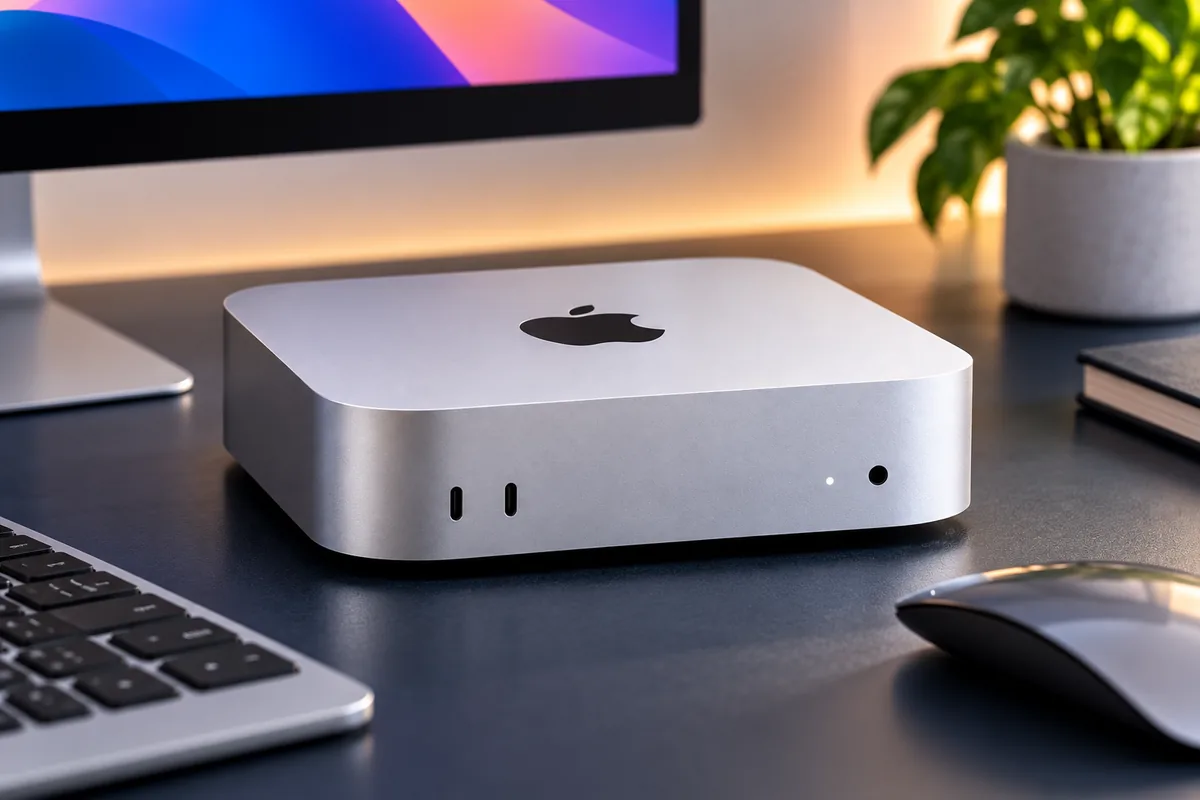
The current enclosure measures only 5 inches wide, 5 inches deep, and 2 inches tall. It weighs about 1.5 pounds, yet the power supply remains inside the chassis.
That makes the Mac mini unusually easy to place on a small desk, mount beneath a workstation, or move between rooms.
The Front Ports Are Convenient
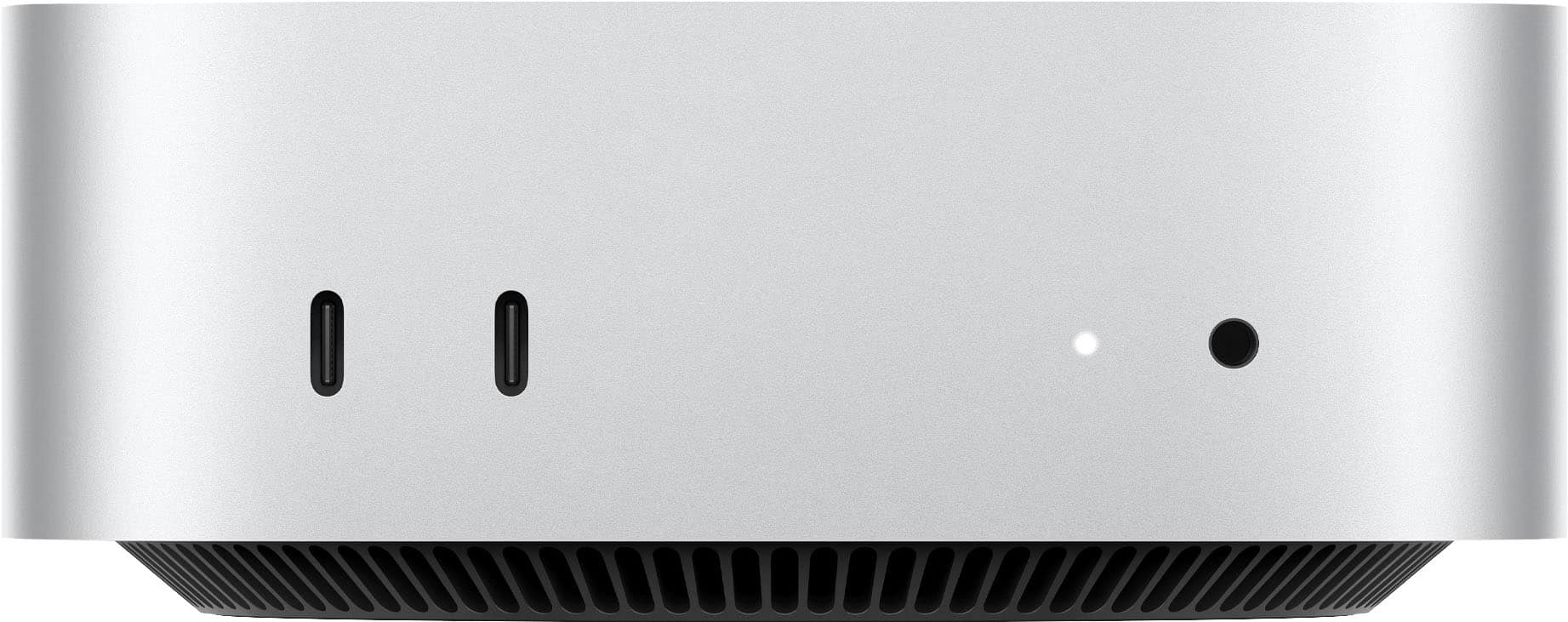
Two USB-C ports and the headphone jack sit on the front.
They are useful for portable SSDs, cables, card readers, and other temporary accessories. However, the front USB-C ports do not handle display output.
The Power Button Is Still Underneath
Apple kept the power button on the bottom of the enclosure.
It is a strange location, but it is less disruptive in daily use than it initially sounds. Most owners leave a desktop Mac sleeping rather than regularly shutting it down.
Still, moving the button to the rear or adding Touch ID directly to the computer would have improved the design.
Ports and Connectivity: Better Than Before
Connectivity is one of the quieter but more useful M6 upgrades.
The rear of the base M6 model has three Thunderbolt 4 ports, HDMI, Ethernet, and power.
Apple now includes 2.5Gb Ethernet as standard, while 10Gb Ethernet remains an optional configuration.
Wireless networking also moves to Wi-Fi 7 and Bluetooth 6. Thread networking is built in as well.
No USB-A or SD Card Slot
The biggest port limitation is unchanged.
If you still use USB-A drives, keyboards, audio equipment, cameras, or memory cards, you may need a hub or dock.
That accessory cost should be included when comparing the Mac mini with a desktop PC that has more built-in ports.
Display Support Is Excellent for a Small Desktop
The M6 Mac mini can drive up to three external displays.
Depending on the combination, it can support two displays up to 6K at 60Hz plus a third display up to 5K at 60Hz, or different high-refresh 4K configurations.
It can also drive an 8K display in supported two-monitor arrangements.
This makes the Mac mini practical for developers, traders, editors, and office users who want a multi-monitor workspace.
If you are building a desk around it, see our guide to the best monitor setups for your home office.
Mac mini M6 Performance
The M6 upgrade is much more substantial internally than the unchanged exterior suggests.
The new chip uses a 12-core CPU and 12-core GPU. Apple also adds Neural Accelerators and a dual 16-core Neural Engine for AI workloads.
Everyday Productivity
For browsing, office software, messaging, video calls, spreadsheets, and general multitasking, the M6 has far more performance than most users need.
That is good for longevity. It also means ordinary buyers should not assume they need the M5 Pro configuration simply because it has a higher-tier chip.
Independent CPU Results Show a Large Jump
Tom’s Guide measured a Geekbench 6 single-core score of 4,708 and a multi-core score of 21,405 on its M6 test machine.
The M4 comparison system scored 3,838 and 14,838 respectively.
That puts the largest gain in multi-core workloads, although single-core responsiveness improves as well.
Video Encoding Is Much Faster
In the same test suite, a 25GB 4K HandBrake transcode completed in 2 minutes and 45 seconds on M6.
The tested M4 needed 4 minutes and 42 seconds.
That does not turn the base Mac mini into a substitute for every professional workstation, but it shows how capable the small desktop has become for video workflows.
Storage Performance: 512GB Is Worth Considering
Storage deserves special attention because the base model includes only 256GB.
Tom’s Guide measured more than 6,300 MB/s in its file-copy test on a 512GB M6 configuration, compared with just over 3,000 MB/s on the tested M4.
However, that result should not be assumed for the 256GB base SSD. The review specifically notes that its 512GB configuration benefits from higher storage bandwidth.
Is 256GB Enough?
Yes, for some buyers.
It can work if most files live in cloud storage or on an external SSD and the Mac is mainly used for browsing, productivity, coding, and streaming.
It becomes restrictive much faster if you store:
- large photo libraries;
- 4K video;
- games;
- virtual machines;
- sample libraries;
- large development environments;
- local AI models.
External storage can solve capacity problems later. Internal memory cannot.
Is 16GB Unified Memory Enough?
For ordinary users, yes.
Sixteen gigabytes is enough for web browsing, office apps, programming, media playback, light photo editing, and normal multitasking.
There is no reason to tell every buyer to upgrade to 24GB.
Choose 24GB If:
- you regularly run several demanding apps together;
- you edit larger photo or video projects;
- you use local AI models;
- you run containers or virtual machines;
- you want more memory headroom over several years.
Choose 32GB If:
Your workloads already demonstrate that 24GB is limiting.
If you simply want the most expensive configuration “for future-proofing,” the price may move close enough to M5 Pro or Mac Studio territory that another Mac becomes more sensible.
Creative Work: Surprisingly Capable
The M6 Mac mini is well suited to photography, music production, coding, and moderate video work.
Its media engine includes hardware acceleration for H.264, HEVC, ProRes, ProRes RAW, and AV1 decoding.
That matters because media tasks do not rely only on raw CPU performance.
Photo Editing
Photographers should find the M6 more than powerful enough for Lightroom, Photoshop, Affinity Photo, and similar tools.
The main configuration decision is memory and storage rather than CPU speed.
Video Editing
Final Cut Pro, DaVinci Resolve, and other optimized applications benefit from Apple’s media hardware.
The base M6 is strong enough for many 4K projects.
However, editors working with complex timelines, heavy effects, multiple high-resolution streams, or large professional projects may benefit from M5 Pro.
If portability matters more than a desktop setup, compare the best MacBook Pro for creatives before deciding.
Coding and Development
The M6 Mac mini is a particularly strong desktop for developers.
Fast single-core performance helps responsive development workflows, while additional CPU cores improve compiles and other parallel tasks.
The small enclosure also makes the Mac mini attractive as a dedicated development machine, home server, or always-on workstation.
Memory matters more if you regularly run Docker containers, virtual machines, Android emulators, local databases, or large development environments.
In those cases, 24GB is easier to recommend than 16GB.
Mac mini M6 Gaming Performance
Gaming is one of the areas where the M6 feels noticeably different from previous base Mac minis.
In Tom’s Guide testing at 1080p, Cyberpunk 2077 reached about 57 fps. Shadow of the Tomb Raider reached about 71 fps, while Civilization VI exceeded 86 fps.
Total War: Warhammer III reached roughly 47 fps.
That Does Not Make It a Gaming PC Replacement
The performance is encouraging, but the software library still matters.
Windows supports far more PC games, and a desktop gaming PC can offer discrete graphics plus future GPU upgrades.
The M6 Mac mini makes sense for someone who primarily wants a Mac but also wants to play compatible games.
It is not the best reason to leave a gaming PC ecosystem.
AI and Apple Intelligence
Apple designed M6 with local AI performance as a major focus.
The GPU includes Neural Accelerators, while the chip also has a dual 16-core Neural Engine.
Apple claims substantial gains in local-model performance compared with previous generations. Those figures are based on Apple’s own test conditions, so they should not be treated as universal results for every AI application.
Who Benefits?
The additional AI hardware can help with Apple Intelligence, supported creative tools, local model inference, coding assistants, image workflows, and newer AI-enabled applications.
For light Apple Intelligence use, 16GB is enough.
Users running larger local models should consider 24GB or 32GB because unified memory is shared across CPU and GPU workloads.
Thermals and Noise
The Mac mini remains impressively quiet.
Apple’s small enclosure uses active cooling, but normal productivity work rarely makes the machine intrusive on a desk.
Independent reviews also found stable performance during sustained workloads rather than immediate severe thermal throttling.
That makes the Mac mini easier to live with in a quiet office, bedroom workspace, or recording environment.
What We Like and What We Don’t
Pros
✅ Major CPU and GPU performance improvement
✅ Extremely compact 5-inch chassis
✅ Quiet operation
✅ Wi-Fi 7 and standard 2.5Gb Ethernet
✅ Three-display support
✅ Strong hardware media engine
✅ Much more credible 1080p gaming performance
Cons
❌ $899 starting price
❌ Only 256GB storage on the base model
❌ Memory and internal storage are fixed at purchase
❌ No USB-A ports
❌ No SD card reader
❌ Power button remains underneath
❌ Monitor, keyboard, and mouse are not included
Mac mini M6 vs M4
The M6 is clearly faster, but that does not automatically make it a smart upgrade for every M4 owner.
| Feature | Mac mini M6 | Mac mini M4 |
|---|---|---|
| CPU | 12-core | 10-core |
| GPU | 12-core | 10-core |
| Base memory | 16GB | 16GB |
| Base SSD | 256GB | 256GB |
| Standard Ethernet | 2.5Gb | 1Gb |
| Wireless | Wi-Fi 7 / Bluetooth 6 | Earlier-generation wireless |
| Launch starting price | $899 | $599 |
| Chassis | 5 × 5 × 2 inches | 5 × 5 × 2 inches |
Upgrade From Intel or M1?
Yes.
The performance, efficiency, display support, connectivity, and modern Apple Silicon software experience make this a substantial upgrade.
Upgrade From M2?
It can make sense if you run demanding software, want the newer compact chassis, or need the additional graphics and AI performance.
Light users can still keep an M2 comfortably.
Upgrade From M4?
Usually not.
The M6 is measurably faster, but the exterior experience remains almost identical. An M4 Mac mini is still an extremely capable desktop.
Upgrade only if the additional CPU, GPU, networking, gaming, or AI performance directly solves a limitation you currently experience.
Mac mini M6 vs M5 Pro
The naming can be confusing.
M6 is the newer chip generation, but M5 Pro remains the higher-performance Mac mini tier for demanding professional workloads.
| Feature | M6 | M5 Pro |
|---|---|---|
| Base CPU | 12 cores | 15 cores |
| Base GPU | 12 cores | 16 cores |
| Base memory | 16GB | 24GB |
| Maximum memory | 32GB | 64GB |
| Memory bandwidth | Up to 170GB/s | 307GB/s |
| Base storage | 256GB | 512GB |
| Rear Thunderbolt | Thunderbolt 4 | Thunderbolt 5 |
| Starting price | $899 | $1,699 |
Choose M6 If:
- you do general productivity or office work;
- you develop software;
- you edit photos;
- you do moderate video editing;
- you want good performance without moving into a workstation budget;
- you want casual gaming and local AI capability.
Choose M5 Pro If:
- you regularly run sustained multi-core workloads;
- you need more than 32GB unified memory;
- you work with large video or 3D projects;
- you need Thunderbolt 5;
- you run larger local AI models;
- you know your workflow benefits from much greater memory bandwidth.
Which Mac mini M6 Configuration Should You Buy?
M6 With 16GB / 256GB
Best for: Everyday home use, students, office work, coding, browsing, and lighter creative workloads.
This configuration has plenty of processing performance.
The main limitation is storage rather than CPU speed. External SSDs make it much easier to live with 256GB if your workload is not storage-heavy.
M6 With 16GB / 512GB
Best for: Buyers satisfied with 16GB memory who want a more practical internal SSD.
This is a sensible upgrade for users who install large applications or prefer keeping more files locally.
M6 With 24GB / 512GB — Our Balanced Pick
Best for: Developers, creators, heavy multitaskers, and buyers planning to keep the computer for several years.
This is the configuration we prefer when budget allows.
The larger SSD is more useful for media and development work, while 24GB gives macOS more room for demanding applications, containers, creative tools, and local AI workloads.
It is not necessary for ordinary users.

M5 Pro With 24GB / 512GB
Best for: Professional workloads that can actually use the additional CPU, GPU, memory bandwidth, and Thunderbolt 5 connectivity.
Before heavily upgrading an M5 Pro Mac mini, compare the final price with Mac Studio.
Mac mini M6 vs Mac Studio
Mac mini and Mac Studio begin serving different users once workloads become truly demanding.
Mac Studio starts much higher, but it adds substantially more CPU and GPU headroom, greater memory capacity, more connectivity, and a chassis designed around sustained professional workloads.
Stay With Mac mini If:
- you do not need extreme GPU performance;
- 32GB or less memory is enough on M6;
- desk space matters;
- your workload is intermittent rather than continuously demanding;
- you want to keep the total system cost lower.
Consider Mac Studio If:
- you need substantially more unified memory;
- 3D rendering is central to your work;
- you work with demanding VFX or high-end video;
- you need more built-in ports;
- your upgraded Mac mini price is already approaching workstation territory.
Who Should Buy the Mac mini M6?
The M6 Mac mini is an excellent fit for anyone who wants desktop performance without paying for a display they do not need.
It is particularly attractive for:
- Windows users moving to macOS;
- Intel Mac owners;
- M1 users ready for a substantial upgrade;
- developers;
- students;
- home-office users;
- photographers;
- moderate video editors;
- people who already own good monitors and peripherals.
If you are rebuilding the entire workstation, our guide to the best home office desks can help with the rest of the setup.
Who Should Skip It?
The M6 Mac mini is less compelling for a few groups.
Current M4 Owners
Unless your workload is already pushing the M4, there is little reason to replace it so soon.
Users Who Need Lots of Internal Storage
Apple’s storage upgrades become expensive quickly.
A desktop PC may offer far cheaper internal expansion, while external SSDs may be a better-value solution for Mac mini buyers.
Dedicated PC Gamers
The M6 is much better for gaming, but Windows still offers broader game compatibility and easier GPU upgrades.
Users Who Need Internal Upgrades
Memory and storage are not user-upgradeable after purchase.
If you prefer replacing RAM or adding internal drives over time, a conventional desktop PC is more flexible.
Frequently Asked Questions
Is the Mac mini M6 worth it?
Yes, especially for buyers upgrading from Intel, M1, or older systems. Its performance is excellent, although the $899 starting price makes it less of a bargain than the M4 generation.
Is 16GB enough for the Mac mini M6?
Yes for most home, office, student, coding, and lighter creative workloads. Consider 24GB for heavier multitasking, larger creative projects, virtualization, or local AI models.
Is the 256GB Mac mini worth buying?
It can be if you use cloud or external storage. Buyers with large photo libraries, games, video files, virtual machines, or local AI models should strongly consider 512GB or more.
Can the Mac mini M6 play modern games?
Yes. Independent testing shows much stronger 1080p gaming than the M4 generation. However, game availability on macOS remains more limited than on Windows.
How many monitors can the Mac mini M6 run?
Apple supports up to three external displays on the M6 Mac mini, with exact resolution and refresh-rate limits depending on the connection combination.
Does the M6 Mac mini have Thunderbolt 5?
No. The M6 model has three rear Thunderbolt 4 ports. The M5 Pro version upgrades those rear ports to Thunderbolt 5.
Should I buy M6 or M5 Pro?
Choose M6 for mainstream productivity, development, photography, moderate creative work, and better value. Choose M5 Pro for heavier sustained CPU/GPU workloads, more memory, greater bandwidth, or Thunderbolt 5.
Should I upgrade from the M4 Mac mini?
Usually not. M6 is significantly faster, but the M4 remains powerful and uses the same compact design. Upgrade only if the additional performance or networking directly benefits your work.
Can Mac mini memory or storage be upgraded later?
The internal unified memory and SSD are not designed for user upgrades. Choose enough memory at purchase. External storage can expand capacity later.
Does the Mac mini come with a keyboard, mouse, and monitor?
No. Apple includes the Mac mini and power cord. You need to provide or purchase the display, keyboard, and pointing device separately.
Final Verdict: Should You Buy the Mac mini M6?
The M6 Mac mini is one of the most capable compact desktops Apple has made.
Its CPU and graphics gains are substantial. Gaming is much better, connectivity improves with Wi-Fi 7 and 2.5Gb Ethernet, and the tiny chassis remains unusually easy to fit into almost any workspace.
The main problem is value.
A starting price of $899 is harder to accept when the base machine still includes 16GB memory and only 256GB storage. Upgrades also become expensive quickly.
For everyday users, the base model remains fast enough. For developers and creators who expect heavier long-term workloads, 24GB of memory and a 512GB SSD is our preferred balance.
M4 owners should generally skip this generation. Intel, M1, and many M2 users have a much stronger reason to upgrade.
Bottom line: Buy the Mac mini M6 for outstanding compact desktop performance, not because it is the bargain the M4 once was. The hardware is excellent; the higher price is the main reason to think carefully before ordering.
For more desktop, laptop, and workspace coverage, browse Discompare’s Computers & Office guides.
Sources
- Apple — Mac mini M6 and M5 Pro Technical Specifications
- Apple Newsroom — The New Mac mini and Mac Studio Are Available Today
- Tom’s Guide — Mac mini M6 Review
- Ars Technica — Apple M6 Mac mini Review
- Tom’s Hardware — Apple Mac mini Late 2026 Review
How we research: Discompare reviews current manufacturer specifications, official pricing, configuration options, independent benchmark testing, connectivity, upgrade limitations, and current U.S. availability. We do not conduct original hands-on testing unless explicitly stated. Benchmark results can vary by memory, storage configuration, software version, cooling conditions, and test method. Prices and retailer availability can change. Discompare may earn a commission from eligible retailer or price-comparison links.
Product Groups: Apple Mac mini M6 16GB 256GB, Apple Mac mini M6 24GB 512GB